
Key Takeaways
- Official Account Limits: TikTok officially allows multiple accounts. The mobile app’s in-app switcher supports up to 3 logged-in accounts per device, with each requiring a unique phone number or email.
- True Ban Triggers: The real ban trigger is environmental linkage—such as device fingerprint, IP, behavior, and content overlap—rather than the raw number of accounts you have.
- Setup for 4+ Accounts: For managing four or more accounts, the clean setup involves using an antidetect browser paired with one dedicated residential proxy per account. This should be backed by a disciplined 30-day warm-up plan to protect new accounts.
- Business & Agency Solutions: For brands, agencies, and TikTok Shop sellers, the TikTok Business Center is the only sanctioned path for shared, role-based access. A single Business Center can request access to up to 200 accounts.
Introduction
Yes — you can run multiple TikTok accounts in 2026. TikTok officially permits multiple accounts, the mobile app caps logged-in profiles at 3 per device, and each account requires a unique email or phone number. The operational risk is not the count itself; it is whether your accounts share signals that look coordinated, inauthentic, or policy-violating.
That distinction matters. Many creators open a second profile for a new niche; brands split accounts by region; TikTok Shop sellers separate storefronts from creator-style affiliates. The question is rarely whether TikTok multiple accounts are possible — it is how to separate roles, sessions, content, and permissions so the workflow stays clean as it scales.
This guide covers what TikTok publicly documents, step-by-step creation across platforms, the 4-layer detection model platforms use to link accounts, a tooling decision tree by scale, a conservative 30-day warm-up plan, and an honest ROI snapshot.
1. Can You Have Multiple TikTok Accounts?
Short answer: Yes. TikTok’s mobile app supports up to 3 accounts per device through the in-app switcher, and each account requires a unique phone number or email. Multiple TikTok accounts are not against the rules — what TikTok forbids is the behavior that often accompanies them.
What TikTok publicly documents
Per TikTok’s Help Center and Community Guidelines on integrity and authenticity:
- A single email address can only be associated with one TikTok account at a time.
- A single phone number can only be associated with one TikTok account at a time.
- Personal, Business, and Creator accounts are all supported.
- TikTok Business Center provides role-based asset access for teams.
What TikTok’s public Help Center does not clearly publish is a universal hard cap for total accounts per device. The safest editorial position is therefore: TikTok allows multiple accounts, with credential rules explicitly documented and device totals clearer for the in-app switcher (3) than for browser-based workflows.
What raises risk
TikTok’s enforcement targets activity, not headcount. The high-risk patterns are:
- Reusing recovery details (email, phone, Apple ID iCloud-relay).
- Reposting the same raw video file across handles.
- Coordinated inauthentic engagement (mutual likes, follows, comments between your own accounts).
- Recreating a near-identical account to bypass an existing restriction.
- Mass account creation in a single day from one device or IP.
Limits at a glance
| Resource | What TikTok documents | Practical takeaway |
|---|---|---|
| Email per account | 1 email = 1 account | Never reuse |
| Phone per account | 1 phone = 1 account | Never reuse |
| Accounts per device (in-app switcher) | 3 | Stay at 3 on a single device |
| Accounts per IP | Not publicly stated | ≤ 3 before linkage flags appear (operator-reported, not TikTok-published) |
| Team access | Business Center permissions | Use official RBAC for teams |
When you don’t need multiple accounts
If your audiences, offers, content style, and region overlap, a single high-authority account compounds faster than three diluted ones. Multiple accounts pay off only when audiences genuinely differ.
2. Who Actually Needs Multiple TikTok Accounts?
The strongest use cases are operational, not cosmetic:
- Creators with split personas — a personal lifestyle handle plus a niche professional handle (e.g., a software engineer’s day-job content vs. their indie-game devlog).
- Brands going multi-region — separate handles for US, UK, MENA, and SEA, each posting in local language at local prime time. A single global handle dilutes recommendation signals because language and timezone conflict.
- TikTok Shop sellers — storefront, creator-style brand account, plus 1–2 affiliate-style backups for content seeding.
- Agencies — managing client portfolios under one Business Center, with ownership cleanly separated.
- Affiliate testers — a 5-to-20-account matrix for product-creative fit testing before scaling spend.
Decision framework: one account vs. many
Score yourself on five overlap dimensions. If three or more overlap heavily → consolidate. If three or more diverge → split.
- Audience — Same demographics?
- Content — Same format and hooks?
- Offer — Same product or monetization?
- Geography — Same country, timezone, language?
- Team ownership — Same operator, or different teams?
3. How to Create Multiple TikTok Accounts
3.1 iPhone — 6-Step Walkthrough
- Open TikTok and tap Profile in the bottom right.
- Tap your username at the top to open the dropdown.
- Select Add account.
- Register with a new phone number or email — never reuse the recovery contact of an existing account.
- Complete profile basics (username, avatar, bio) before posting.
- Return to the username dropdown to switch between accounts at any time.
A common mistake: registering the second account with the same Apple ID’s iCloud-relay email. TikTok treats relay emails as low-trust on signup. Use a dedicated, well-aged email instead.
3.2 Android — Key Differences
The flow mirrors iOS, but two details matter:
- Decline Google account auto-fill if that Gmail is already linked elsewhere. Manually input a fresh email.
- GAID (Google Advertising ID) is shared across apps. Resetting GAID between registrations (Settings → Google → Ads → Reset advertising ID) reduces device-graph linkage on first launch.
3.3 Web (tiktok.com) — Desktop Registration
Desktop registration is the cleanest path for accounts you plan to scale:
- Register with email + password on the web.
- Verify the email; complete profile and bio in the browser.
- Wait 24–48 hours before logging in via the mobile app — this avoids the “fresh signup → instant mobile session” pattern that elevates risk scores.
- Always clear cookies between registrations, or use a separate browser profile.
3.4 When Native Creation Hits the Ceiling
You have outgrown the in-app switcher when any of these happen:
- SMS verification keeps failing on the 4th account.
- Newly created accounts get 0-view shadowbans within the first 3 posts.
- The For You feed of account #2 starts mirroring account #1 — a sign the recommendation graph has merged the device signal.
That is the bridge to professional setup, covered in Section 7.
4. How to Switch Between Multiple TikTok Accounts
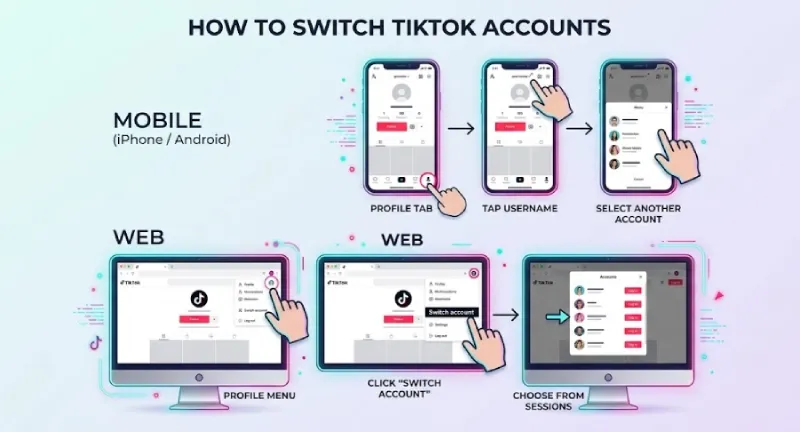
- iPhone / Android: Profile tab → tap username → select another account.
- Web: Profile menu → Switch account → choose from logged-in sessions.
Does switching frequency itself trigger risk?
Switching itself is not the issue. The pattern around it is:
- Rapid back-and-forth across many identities on the same device and IP.
- Engagement loops between your own accounts (likes, comments, follows).
- Identical session timing windows.
Operator-reported thresholds (not TikTok-published) where the risk curve steepens:
- More than 3 account switches within 5 minutes — flagged as suspicious session flow.
- More than 3 active accounts within a 24-hour window on the same device — triggers device-cluster scoring.
- High-engagement actions immediately after a switch (rapid-fire likes, follows, comments) — pattern-matched as scripted behavior.
The practical rule: leave at least 15–20 minutes of natural FYP browsing between switches before performing any engagement actions. Once you are running 4+ accounts and switching multiple times per session, you have outgrown the native switcher and should move high-frequency accounts to dedicated browser profiles.
5. How to Manage Multiple TikTok Accounts
How to manage multiple TikTok accounts safely depends entirely on scale. The same setup that works for 3 accounts is unsafe at 30, and the enterprise stack is overkill for a solo creator.
5.1 Three Management Tiers by Scale
| Account Scale | Recommended Stack | Monthly Cost |
|---|---|---|
| 2–3 | TikTok official app switcher | $0 |
| 4–10 | Antidetect browser + dedicated residential proxies | $30–$80 |
| 10+ | Antidetect browser + mobile proxies + team RBAC + AI batch tools | $150+ |
5.2 The Official Compliant Path: TikTok Business Center
For brands, agencies, and Shop sellers, TikTok Business Center is the official multi-account governance layer.

It provides:
- Asset-level ownership — accounts, pixels, catalogs, and ad accounts under one entity.
- Role-based access (RBAC) — Admin, Standard, and Custom permissions per member.
- Agency-client collaboration — assign or revoke access without password sharing.
- Organic + paid integration — link a creator account to Ads Manager for Spark Ads.
Per TikTok’s official Business Center documentation, a single Business Center can request access to up to 200 TikTok accounts, making it the only TikTok-sanctioned path for agencies and multi-brand portfolios at scale.
If you are running 5+ client accounts, Business Center should be the default. Operating without it forces password sharing, which is itself a trust-graph red flag.
5.3 The 6 Iron Rules of Multi-Account Operations
- One account = one strategic role. Mixing personal + brand + affiliate dilutes the algorithm.
- Don’t cross-post the same raw video file across handles. TikTok’s recommendation system rewards original audio and original content; duplicate uploads dilute distribution on every account they touch. The same product can support multiple distinct accounts — a review angle, a tutorial angle, an FAQ angle, a user-story angle — but each account needs its own re-shot, re-scripted production, not a hash-altered copy of the same file.
- Stagger posting and active times. Two accounts posting at exactly 9:00 PM EST every weekday is a behavioral fingerprint.
- No cross-account inflation. Mutual likes and follows between your own accounts is a textbook coordinated-inauthentic-behavior pattern.
- Track performance per account. A simultaneous reach drop across all accounts usually means a shared-environment leak, not a content issue.
- Maintain a content calendar plus an access SOP. Document who logs in from where, on what device, and on what schedule.
For multi-seat agency setups, audit logging on top of these rules turns a junior operator’s mistake into something recoverable instead of catastrophic.
6. How TikTok Detects & Links Accounts — The 4-Layer Risk Model
TikTok account linkage is multi-signal, not single-signal. Understanding all four layers is what separates operators who scale to 100 accounts from those who lose 5.
6.1 Layer 1 — Device Fingerprint
The hardware-and-software signature of the device:
- Canvas fingerprint — the platform asks the browser to render a hidden image, then hashes the pixel output. Identical GPUs and font sets produce identical hashes. See Canvas Fingerprint for the underlying mechanism.
- WebGL renderer + vendor strings — exposed via
WEBGL_debug_renderer_info, this leaks the actual GPU model. - AudioContext fingerprint — Web Audio API output is OS- and driver-dependent and runs silently.
- Font enumeration — installed fonts (especially Adobe Creative Cloud and Microsoft Office bundles) are surprisingly identifying.
- Mobile-specific signals — IDFA on iOS, GAID on Android, plus battery curves and sensor calibration drift.
The real issue is fingerprint consistency. A browser claiming one country and language while exposing conflicting lower-level signals is what looks untrustworthy.
6.2 Layer 2 — Network Signals
- IP / ASN reputation — TikTok flags any IP whose ASN is registered as datacenter (AWS AS16509, Google AS15169, DigitalOcean AS14061; ASN classification per BGP.tools / PeeringDB, May 2026).
- Subnet overlap — three accounts on adjacent /24 IPs of the same residential ISP within 24 hours often triggers a soft cluster flag (operator-reported pattern, not a TikTok-published threshold).
- DNS leak — DNS resolving through Comcast while the proxy claims Tokyo is a strong mismatch.
- WebRTC real-IP leak — WebRTC’s ICE candidate gathering can bypass HTTP proxies. See MDN on WebRTC API and
RTCPeerConnectionfor the underlying mechanism. This is the most underestimated risk in browser-based multi-account workflows.
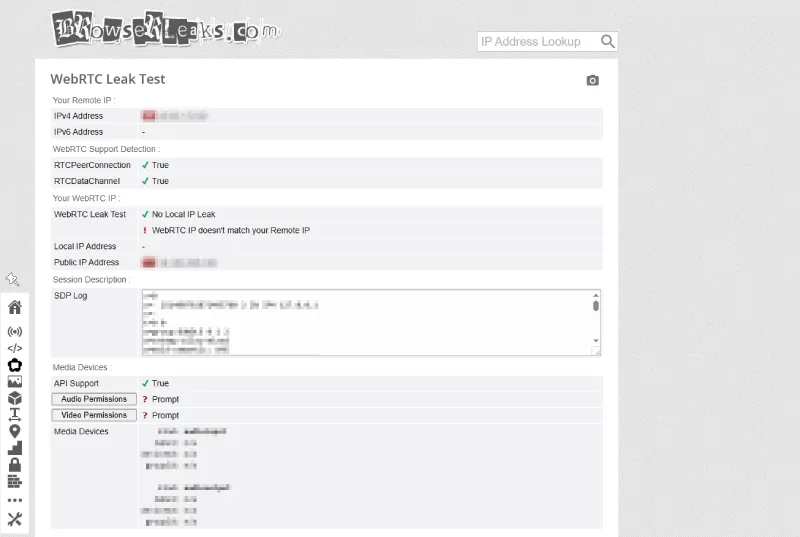
- Self-check (takes under a minute): open
https://browserleaks.com/webrtcinside the browser profile. The Public IP must match your proxy’s exit IP exactly, and the Local IP field should be empty or a placeholder. Any leak in either field means WebRTC isolation has failed and the profile is exposing your real network identity to TikTok.
6.3 Layer 3 — Behavioral Biometrics
- Typing cadence — dwell time and flight time between keys form a near-unique pattern.
- Scroll velocity and dwell time — real users have natural pauses, double-backs, inconsistent swipe speed.
- Posting cycles — humans don’t post at exactly :00 every hour.
- Fast account switching — covered in Section 4.
6.4 Layer 4 — Content & Metadata
- Duplicate captions and identical hashtag stacks.
- EXIF residue — videos shot on the same iPhone for three “different” creator accounts share GPS, lens make, and capture timestamp.
- BGM hash matching — TikTok hashes audio tracks for duplication scoring; this is consistent with the platform’s stated focus on audio originality and is widely reproduced in operator testing.
- Watermark fingerprints — videos exported from CapCut on a single device share a subtle render signature.
6.5 Shadowban vs. Hard Ban
TikTok does not publish “shadowban” as a formal Help Center status — operators use the term informally for sudden visibility loss. Based on operator testing:
- Shadowban (0-view, no notification) — usually triggered by Layer 2 (IP/ASN) or Layer 4 (content duplication). The operator-reported recovery window is 7–14 days once the root cause is fixed; this duration is not TikTok-published.
- Soft ban (login challenge, content removed) — Layer 1 or Layer 3 anomalies.
- Hard ban (account terminated) — Layer 1 or Layer 2 escalation, plus a reported content violation.
6.6 The 6 Most Common Pitfalls
- Reusing email, phone, or recovery info across accounts.
- Posting duplicate or near-duplicate content with identical metadata.
- Datacenter proxies or unstable consumer VPNs.
- Mass account creation (5+ in a single day from one device).
- Cross-account artificial engagement.
- Trying to bypass an existing restriction by registering a replacement account.
7. The 2026 Antidetect Browser + Proxy Stack
Once you cross 4 accounts, a professional antidetect browser plus dedicated proxies is the most stable setup most operators converge on. The goal is not stealth — it is cleaner isolation.
7.1 RoxyBrowser
RoxyBrowser is purpose-built for operators running TikTok and adjacent social-commerce stacks at scale:
- Chromium 148 Core — fingerprint behavior modified at the Core level rather than via JS hooks, so
Function.prototype.toStringchecks return clean[native code]. - 210+ hardware fingerprint parameters — granular control over Canvas, WebGL, AudioContext, fonts, plus mobile-specific Battery, Bluetooth, and sensor traits.
- Built-in residential IP integration — RoxyIP marketplace covers 200+ countries with 30-second proxy binding.
- AI Agent for batch operations — natural-language instructions dispatch across 100+ profiles in parallel; MCP protocol support for existing tooling.
- Team RBAC — Owner, Manager, Editor, Viewer roles for global teams.
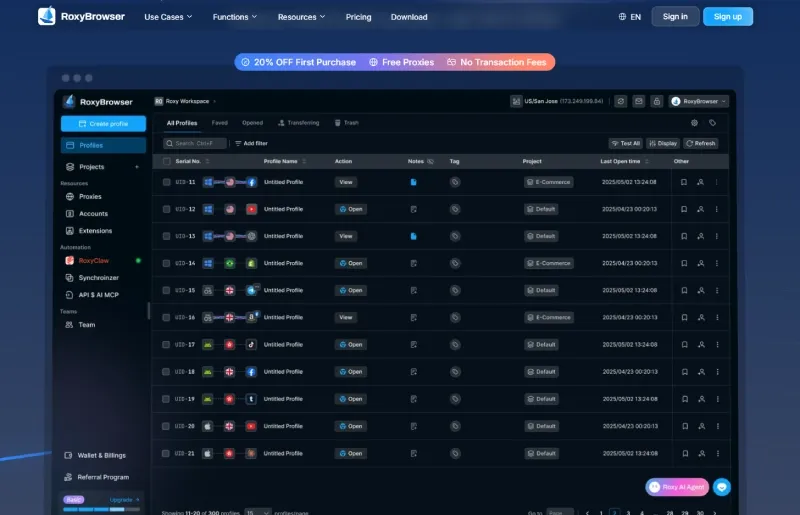
- Free tier — 2 profiles included, no credit card required; supports HTTP, HTTPS, SOCKS5, and SSH proxies.
7.2 Alternatives
- AdsPower — strong RPA, mid-market favorite, heavier RAM footprint.
- GoLogin — fully cloud-based, weaker on local hardware-Core sync.
- Multilogin — most established, premium pricing, slower Core updates.
- GeeLark — cloud-phone style, best for workflows that must present as native mobile.
7.3 Proxy Iron Rules
One dedicated proxy per account. Geo, language, and timezone must match the persona’s country. A US persona running on a Vietnam IP with Vietnam timezone is the kind of mismatch that fails the IP-locale consistency check immediately.
| Proxy Type | TikTok Suitability | Best For |
|---|---|---|
| Mobile (4G/5G) | ★★★★★ | High-value monetization accounts, Shop seller mains |
| Residential (dedicated) | ★★★★ | Most use cases — recommended default |
| Static ISP | ★★★★ | Long-term stable accounts, agency portfolios |
| Datacenter | ★ | Strongly discouraged — datacenter ASN is the single most common 0-view trigger in operator reports |
For browser-based separation work, a stable residential proxy is generally cleaner than a cheap rotating datacenter IP because the reputation profile mirrors normal consumer traffic. Operationally, this also means you should change IP in the browser at the profile level rather than at the system level, so each account binds to its own egress.
7.4 6-Step Setup SOP (RoxyBrowser Example)
- Create a new profile, named after the account persona (e.g.,
tt-us-fitnesscoach-01). - Generate and lock a unique fingerprint — the profile must keep the same Canvas seed forever.
- Bind a dedicated residential or mobile proxy, geo-matched to the persona country.
- Run leak tests on Pixelscan, BrowserLeaks, and CreepJS — verify IP, DNS, WebRTC, and timezone all match.
- Match system language, timezone, and locale to the proxy geo (US persona → en-US, America/New_York, USD).
- Open the profile, register or log in via TikTok’s web flow, save cookies, and never reuse this profile for any other account.
8. A Conservative 30-Day Warm-Up Plan
TikTok does not publish an official warm-up plan. The following is a conservative operating template for legitimate new-account ramp-up, refined from operator practice.
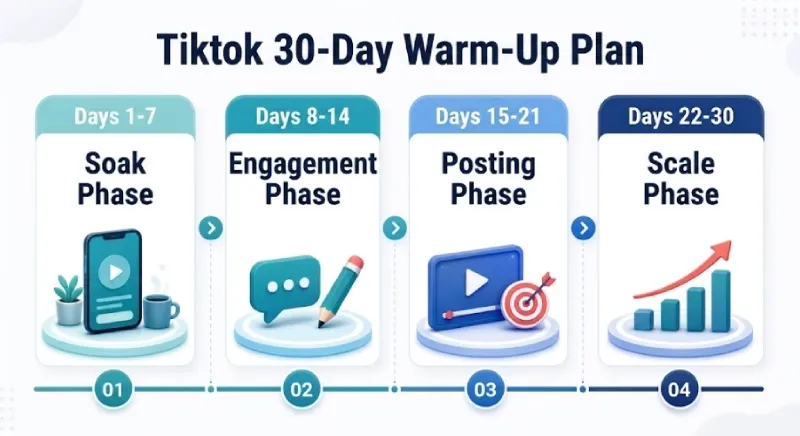
Days 1–7 — Soak Phase
- Browse the For You Page only, 15–30 minutes per day.
- Like 5–10 videos per session; follow 2–3 niche accounts.
- No posting. No profile edits beyond avatar and a one-line bio.
Days 8–14 — Engagement Phase
- Light comments on 1–2 videos per day (3–6 words, on-topic).
- Follow 5–10 niche accounts per day, capped at 10/day.
- Complete the profile fully — bio, location matching proxy geo, optional link.
- First post on day 12–14: native vertical 9:16, 15–30 seconds, no external link, no aggressive CTA.
Days 15–21 — Posting Phase
- 3–4 native videos this week, niche-consistent.
- Build the niche signal: same topic, same lighting, same on-camera persona.
- No external links or DM funnels yet.
Days 22–30 — Scale Phase
- Daily posting at the persona’s local prime time.
- Introduce one CTA per video — bio link, TikTok Shop product tag, or affiliate landing.
- For Shop sellers: connect catalogs and turn on Spark Ads.
5 Red-Line Actions That Reset the Warm-Up Clock
- Switching IP geography mid-warm-up.
- Logging in from a new device or new fingerprint profile.
- Reposting a re-encoded version of a video that already exists on another of your accounts.
- Mass-following burst to import followers from another platform.
- Adding an external bio link before day 15.
9. Troubleshooting + ROI
9.1 Diagnosing a Reach Drop — The 3-Test Method
- Hashtag visibility test — post a benign video with a unique invented hashtag. Wait 30 minutes. Search the hashtag from a logged-out browser. Missing video = visibility suppressed.
- Profile search test — search your exact username from a different account on a different device. Profile not in top results = discovery layer suppressed.
- For You distribution test — post a video and check Analytics → Traffic Source after 24 hours. For You traffic < 5% (vs. typical 60–80% for healthy accounts) = recommendation engine has deprioritized the account.
If any test fails, audit: IP/ASN history, fingerprint changes, session concurrency, last 10 posts for duplication, engagement bursts, and recovery-credential overlap with other accounts.
9.2 Cost & ROI Snapshot — May 2026 (illustrative; substitute your own funnel data)
| Scale | Antidetect Browser | Proxies | Phone Numbers | Labor | Total/mo |
|---|---|---|---|---|---|
| 5 accounts | $0 (free tier) | $40 (residential) | $10 | Self | ~$50 |
| 20 accounts | $40 | $180 (mixed residential + ISP) | $40 | 0.5 FTE | ~$1,500 |
| 100 accounts | $200 (team plan) | $900 (residential + 10 mobile mains) | $200 | 2 FTE | ~$8,000 |
For TikTok Shop sellers, an illustrative 4% conversion rate at $25 AOV with $8 product margin means a 20-account operation would need ~4,700 views per account per day to clear the $1,500 stack. In operator reports, accounts that follow the warm-up plan typically reach that threshold around week 6 — substitute your own funnel data before planning spend.
9.3 When to Pause, Appeal, or Rebuild
- Pause — single shadowban test positive, account < 6 months old, < 5,000 followers. Reduce to 1 post every 3 days, fix root cause, wait 14 days.
- Appeal — hard ban on an account with clear track record and Shop sales history. In operator reports, appeals on monetized accounts (especially with Shop sales history) succeed more often than on cold accounts, though success is never guaranteed.
- Rebuild — account < 30 days old, no monetization tied to it. Cost of recovery exceeds cost of starting clean. Do not reuse the old proxy or phone number.
10. 5 Myths About Multiple TikTok Accounts
- “Multiple TikTok accounts are automatically banned.” False. They are explicitly permitted; the patterns often associated with them are what get flagged.
- “A VPN alone is enough.” False. Consumer VPNs route through datacenter ASNs and shared exits; the IP signal alone is enough to cluster you.
- “You can reuse the same email for multiple accounts.” False. TikTok’s signup flow rejects duplicates at the API level. Aliases like
name+1@gmail.commay pass initial check but get flagged later. - “Posting the same video across accounts is safe if you change the caption.” False. BGM hash, EXIF, and pixel-level hash all match. Caption variance changes nothing under the hood.
- “More accounts always means faster growth.” False. Five well-warmed accounts outperform fifty cold ones. The ceiling is set by content quality, not handle count.
Conclusion
The 3-line takeaway for anyone running multiple TikTok accounts in 2026:
- Isolation, not cleverness, keeps accounts alive — every profile gets its own fingerprint, dedicated proxy, and behavioral cadence.
- Warm up like a human, not a script — 30 days of patient behavior beats any technical hack.
- The platform forgives mistakes; it does not forgive patterns — fix root causes, do not paper over them.
Recommended starting stack by tier:
- Casual creator (2–3 accounts): Native TikTok switcher, no extra tools.
- SMB / TikTok Shop seller (5–15 accounts): RoxyBrowser free tier (3 profiles) for initial validation, then upgrade as the matrix grows; pair with dedicated residential proxies.
- Agency / scale operator (20+ accounts): RoxyBrowser team plan with RBAC, mobile proxies for monetization mains, AI Agent for batch posting, and TikTok Business Center for client governance.
Get started: Try RoxyBrowser free — 2 profiles, no credit card, full Chromium 150 Core fingerprint isolation included.


