
TL;DR
- Yes, you can have multiple Telegram accounts. Per Telegram’s official FAQ, one app holds up to 3 accounts; Telegram Premium raises that to 4.
- No, one phone number cannot hold several accounts. Telegram uses the number as the account’s identity — one number, one account.
- Beyond the native cap, you move along a spectrum of four methods: native multi-account → virtual numbers → desktop workspace apps → antidetect browsers. Only the last gives each account a physically isolated environment.
- Most stability problems come from shared numbers, shared IPs, shared browser sessions, or weak labeling — not from Telegram itself.
Can You Have Multiple Telegram Accounts?
Yes. Telegram allows multiple accounts, and there is no policy that ties one person to a single profile. According to the official Telegram FAQ, the practical question is never “is it allowed” — it’s “how many can I run, and how do I keep them from interfering with each other.”
The official app sets a soft native cap. On the free tier you can add up to 3 accounts inside one installation; Telegram Premium raises that to 4. Switching between them takes two taps — no logout, no re-verification. This native slot system is the simplest answer to can you have multiple Telegram accounts for anyone juggling a personal and a work profile.
Support differs by platform, and the gap matters once you scale:
- Mobile (Android / iOS): full native multi-account switching, up to the 3–4 cap.
- Desktop (Windows / macOS): Telegram Desktop and the macOS app both support adding several accounts in one window.
- Web (web.telegram.org): each browser session generally holds one account — exactly the property that makes the browser-based methods later in this guide work.
So how many can one person realistically operate? Natively, three or four. Once you add the professional methods below — dedicated numbers, isolated environments — the ceiling becomes practically unlimited; the constraint shifts from “what Telegram allows” to “how cleanly you can isolate each account.” That isolation question is the real subject of this guide.
Can I Have Multiple Telegram Accounts With the Same Phone Number?
No. Each Telegram account binds to one unique phone number, and that number is the account’s identity. It receives the login code, restores access on a new device, and acts as the platform’s primary anchor for the account. One number maps to exactly one account — there is no native setting, premium upgrade, or hidden trick that lets a single number carry two.
This is where most confusion lives, so it’s worth separating two ideas that sound similar but are completely different:
- Adding several accounts inside one app — fully supported. Account A uses number A, account B uses number B, and the app lets you flip between them. This is the native multi-account feature.
- One number unlocking several accounts — impossible. The number-to-account relationship is strictly one-to-one.
So the honest answer to can I have multiple Telegram accounts with the same number is that the premise doesn’t hold: you can hold many accounts in one app, but every one of them needs its own number.
Where the numbers come from
If you want more accounts, you need more numbers. The common sources, from most to least robust:
- A second physical SIM or eSIM — the most stable option, because the number is genuinely yours and recovery never depends on a third party.
- A business / VoIP line (Google Voice, a carrier second-line, a business PBX number) — reliable as long as it can receive SMS and you control it long-term.
- A reputable virtual number provider — workable for scale, but the source you choose determines whether the account survives.

The real risks of virtual numbers
Virtual numbers are how most people scale past their personal SIM, but they carry specific failure modes you should plan around:
- Recycled numbers. Many cheap providers re-issue numbers a previous user already registered to Telegram. You buy a “new” number, send the code, and the slot is already taken — or worse, you inherit someone else’s flagged history.
- SMS that never arrives. Free and low-tier virtual numbers frequently can’t receive Telegram’s verification SMS at all, because Telegram filters known bulk-SMS ranges. You pay, you wait, the code never lands.
- Losing the number breaks recovery. A disposable number you rent for a week disappears when the rental ends. If that account ever logs out or asks to re-verify, you’ve permanently lost it.
Callout — number reusability after deletion: If you fully delete a Telegram account, its number is released and can register a new account after Telegram’s cooldown (the self-destruct/deletion process, not an instant reset). The new account starts empty — chats, contacts, and history do not come back. Reusing a number is possible; recovering the old account through it is not.
The takeaway: treat the phone number as the foundation of each account. A dedicated, controllable number per account is the first stability rule, and every method below assumes it.
Why Use Multiple Telegram Accounts?
Before the how, the why — because the reason you’re scaling determines which method actually fits. People don’t create multiple Telegram accounts to collect logins; they do it to separate identity, workload, and risk.
Personal use is the simplest case. You keep a private account for family and friends and a separate one for work contacts, a side project, or a community you moderate. The goal is a clean boundary: your boss doesn’t see your weekend group chats, and your professional contacts reach a profile that looks professional.
Business use is where Telegram multiple accounts become operational infrastructure:
- Multi-brand / multi-market / multi-language. A cross-border seller runs one account per brand and per region — an English support account for the US store, a separate Spanish account for the LATAM audience — so each speaks to its market in the right voice.
- Customer support and community operations. Support agents work a shared queue of accounts; community managers run announcement channels and moderation accounts that should never tie back to a personal profile.
- Risk isolation. This is the one professionals care about most. When each account lives in its own environment, one account hitting a limit or a verification check doesn’t drag the others down. A single flagged account stays a single problem instead of cascading across the whole matrix.
That last point — risk isolation — is the thread connecting the rest of this guide. Casual users can ignore it. At ten, fifty, or a hundred accounts, it’s the difference between a stable operation and a fragile one.
How to Create & Manage Multiple Telegram Accounts: 4 Methods
There isn’t one “right” way to run multiple Telegram accounts — there’s a spectrum, and where you land depends on how many accounts you need and how much isolation they require. Below are the four methods in order of increasing capability.
Method 1 | Native Multi-Account (built into the app)
The fastest path, and the answer to can I create multiple Telegram accounts for most personal users: Telegram’s own app already supports it.
- Android: open Settings, tap the down-arrow next to your name, choose Add Account, and register the new number. Switch by tapping your name and selecting the account.
- iPhone: go to Settings, tap your profile name at the top, choose Add Account, and verify the new number. The same name-tap switches profiles.
- Windows / macOS (Telegram Desktop): click the hamburger menu (☰) → Add Account, then log in with the new number via code or QR. All accounts appear in the menu for one-click switching.
- Web: each session in web.telegram.org holds one account; you switch by using separate browser sessions rather than an in-app toggle.
Best for: 2–3 personal accounts on a single device.
Hard limits: the 3-account free / 4-account Premium cap, and — critically — every account shares the same phone, IP, and device fingerprint. For personal use that’s fine. For business accounts that must stay independent, that shared environment is exactly the problem the later methods solve.
Method 2 | Virtual / Second Phone Number
This method isn’t really an alternative to the others — it’s the prerequisite for them. Native multi-account, desktop apps, and antidetect browsers all need one number per account, and the virtual-number step is how you supply them.
- How to get one: the durable options are a second eSIM, a Google Voice / business VoIP line, or a paid virtual-number service that explicitly supports Telegram and long-term rental. Look for a number you keep, not a one-time disposable code.
- Which to avoid: free “receive SMS online” sites and ultra-cheap disposable codes — recycled, often already registered, frequently can’t receive Telegram’s SMS, and vanish when you need to re-verify. The cost of a lost account far outweighs the few dollars saved.
Best for: anyone blocked purely by the phone-number requirement — you have the device and app sorted, you just need clean numbers to register more accounts onto.
Method 3 | Multi-Device / Desktop Workspace Apps
Once you outgrow the native cap, third-party desktop “workspace” apps let you run several accounts side by side in separate panes at once — useful for support agents watching multiple queues or a manager monitoring several channels. Productivity goes up because you stop switching and start seeing everything together.
But there’s a boundary you have to understand:
These apps do not isolate the environment. Every account in the workspace still shares one operating system, one IP address, and one hardware fingerprint. They give you convenience (parallel viewing), not isolation. If the platform decides several accounts on the same fingerprint and IP look like one operator, running them in a tidy multi-pane app does nothing to prevent that linking — it may even concentrate the signal.
Best for: a handful of accounts you don’t mind being associated with — your own personal/work set, or low-risk monitoring. Not suitable for accounts that must stay unconnected.
Method 4 | Antidetect / Anti-Association Browser
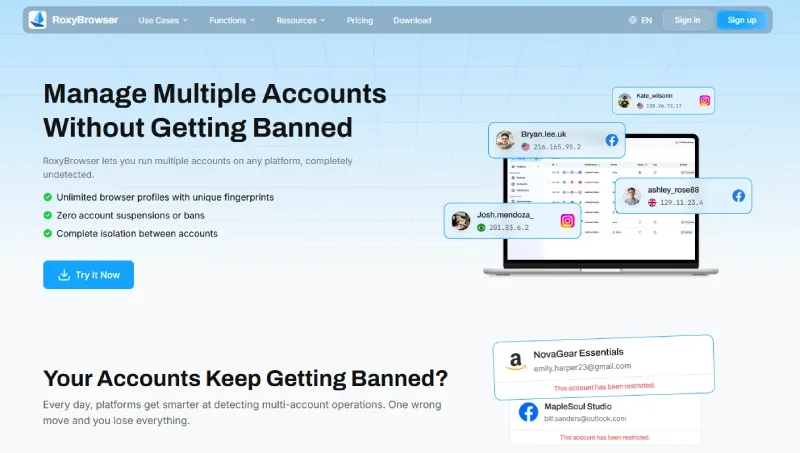
This is the professional-scale method, and the only one that gives each account a genuinely separate runtime environment. An antidetect browser creates isolated profiles, where each profile runs with its own browser fingerprint and its own dedicated proxy IP. To Telegram, each profile looks like a different device on a different network — because at the signal level, it is.
The model is simple and strict: one account = one profile = one fingerprint = one proxy IP. You log each account into Telegram Web inside its own profile, and nothing leaks between them — no shared cookies, no shared Canvas fingerprint, no shared exit IP.
Best for: scale — multi-brand operations, support matrices, cross-border teams, and studios running anywhere from 10 to 100+ accounts. Why it’s different: Methods 1–3 all share one underlying environment; this is the only approach that isolates each account at the hardware-fingerprint and network level, which is precisely what stops a matrix of accounts from being recognized as one operator.
If you need to manage multiple accounts across different platforms safely, this browser-level isolation is essential.
Which Method Should You Choose? (Decision Table)
Match the method to your actual situation. The right choice is the cheapest, simplest option that still delivers the isolation your accounts need.
| Method | Manageable accounts | Environment isolation & stability | Cost | Learning curve | Best-for audience | Proxy support | Recommendation |
|---|---|---|---|---|---|---|---|
| 1. Native multi-account | 3 (free) / 4 (Premium) | None — shared phone, IP, fingerprint | Free / Premium | Very low | Casual users, 2–3 personal accounts | No | First choice for personal use |
| 2. Virtual / second number | +1 account per number | None on its own (a prerequisite) | Low–medium per number | Low | Anyone blocked by the number requirement | No | Pair with another method |
| 3. Desktop workspace apps | ~5–10 in parallel view | Low — convenience, not isolation | Free–low | Low–medium | Support agents, channel monitoring | Limited | Good for low-risk, owned accounts |
| 4. Antidetect browser | 10 to 100+ | High — isolated fingerprint + dedicated proxy per account | Medium (subscription) | Medium | Multi-brand, cross-border, teams | Native, per-profile | Required for scale & risk isolation |
The pattern is clear: convenience methods (1–3) share one environment; only the antidetect-browser method (4) isolates each account. If your accounts can safely be associated, stay low on the table. If they can’t, isolation isn’t optional.
Why Do Multiple Accounts Get Linked or Limited — and How to Run Them Reliably?
The goal here is to avoid being mistakenly flagged and keep a legitimate set of accounts stable — not to evade enforcement for abuse. Platforms link accounts because their anti-fraud systems look for one operator pretending to be many, and a poorly isolated setup looks exactly like that even when your use is entirely legitimate.
How the platform decides two accounts are “the same person”
Linking is a correlation problem. The system scores how similar two sessions are across several signals, and high overlap on any one is enough to associate them:
- Shared IP address. Ten accounts logging in from one residential IP is the single loudest signal. Real, unrelated people almost never share an exit IP at that density.
- Shared device fingerprint. Even with different logins, the same browser on the same machine produces a near-identical fingerprint — User-Agent, screen metrics, fonts, and low-level graphics signatures.
- Cross-session bleed. Cookies, local storage, and cache that leak between profiles tie sessions together even when IP and fingerprint look different.
- Near-identical behavior. Same login times, same message cadence, same device model — behavioral sameness reinforces the technical correlation.
Why incognito windows and multiple tabs aren’t enough
The most common mistake is assuming a fresh incognito window or a second tab creates a separate identity. It doesn’t. Incognito clears cookies and history, but it does not change the hardware-level fingerprint underneath.
The reason is in how those fingerprints are generated. A Canvas fingerprint is built by asking the browser to render a hidden graphic, then hashing the exact pixel output — and that output depends on your GPU, drivers, and font rendering, which incognito doesn’t touch. A WebGL fingerprint reads your graphics hardware’s rendering characteristics the same way, and APIs like RTCPeerConnection can expose network-level signals. Add AudioContext, installed fonts, and screen geometry, and you have a hardware signature that stays identical across incognito windows, tabs, and even separate browsers on the same machine. Clearing cookies hides nothing at this layer.
Real environment isolation has to happen below the cookie level. It requires modifying the underlying Chromium Core to inject tiny, natural-looking randomization into each signal per profile — not a surface-level User-Agent override, which detection systems see through immediately. That low-level work is the entire technical reason antidetect browsers exist.
For more on how browser fingerprint protection works at the technical level, understanding Canvas and WebGL fingerprinting is crucial.
What is browser fingerprint consistency?
Browser fingerprint consistency means the visible traits of a session make sense together and stay stable over time. If one account says it’s in Germany, but the proxy exits from Brazil, the browser language stays English-US, and the timezone stays Shanghai, the profile looks inconsistent. Consistency doesn’t guarantee safety, but inconsistency creates unnecessary review signals.
Stability checklist
To run multiple Telegram accounts reliably, every account should have:
- A dedicated phone number — one controllable number per account, never shared.
- A dedicated proxy — the core rule: 1 IP = 1 environment = 1 account. A clean residential IP per profile.
- An isolated fingerprint environment — independent Canvas, WebGL, AudioContext, and hardware signals per account.
- Sensible naming and grouping — a labeling system so you always know which environment maps to which account.
- Compliant, human-paced usage — warm new accounts gradually; don’t blast identical messages from twenty fresh accounts on day one.
A concrete example of why the IP rule matters: a cross-border team once bought cheap “residential” proxies to save money, but the underlying ASN (Autonomous System Number) still resolved to a datacenter range. The IPs looked residential in the dashboard but flagged as datacenter at the network layer, and the freshly registered accounts started hitting verification walls almost immediately. The fingerprint isolation was fine; the IP was the weak link. Isolation only works when every layer is clean.
Common pitfalls (watch for these):
- Verification code never arrives — usually a recycled or filtered virtual number.
- Cross-session bleed — cookies or cache shared between profiles silently relink accounts.
- Sending from the wrong account — the classic manual-switching error; consistent labeling prevents it.
- A dead number breaking recovery — a disposable number lapses, the account asks to re-verify, and access is gone for good.
Get the foundation right — dedicated number, dedicated proxy, isolated fingerprint — and a multi-account setup stays stable.
Best Antidetect Browsers for Multiple Telegram Accounts
Antidetect browsers are not interchangeable. Judge them on five criteria that directly affect Telegram account stability:
- Fingerprint isolation — how deep the spoofing goes (surface UA tricks vs. true Chromium Core-level customization).
- Proxy integration — how cleanly you can bind one dedicated IP per profile, and whether proxies are built in.
- Team collaboration — permissions, account sharing, and audit trails for studios.
- Core freshness — how current the Chromium Core is, which affects compatibility and how natural the fingerprint looks.
- Value — total cost including proxies and seats, not just the headline subscription.
RoxyBrowser
RoxyBrowser is purpose-built for the cross-border account matrix this guide describes, and it scores well on every criterion above.
- Deep fingerprint isolation. RoxyBrowser works at the browser-Core level, customizing 210+ hardware and software parameters — Canvas, AudioContext, WebGL, fonts, and even mobile-specific traits like battery and Bluetooth characteristics. Each profile behaves as an independent, self-consistent device rather than a UA-string disguise, built to stand up to fingerprint checkers like Pixelscan.
- Built-in dedicated proxies. Instead of sourcing proxies separately, RoxyBrowser ships a self-operated residential IP store with 90M+ clean nodes across 200+ countries and regions, including lines tuned for social media and cross-border e-commerce. You can go from picking an IP to binding it to a browser environment in roughly 30 seconds, making the “1 IP = 1 account” rule trivial to enforce at scale.
- Latest Chromium Core. Profiles run on a current Chromium Core, so Telegram Web and other sites render normally and the fingerprints look like real, up-to-date devices.
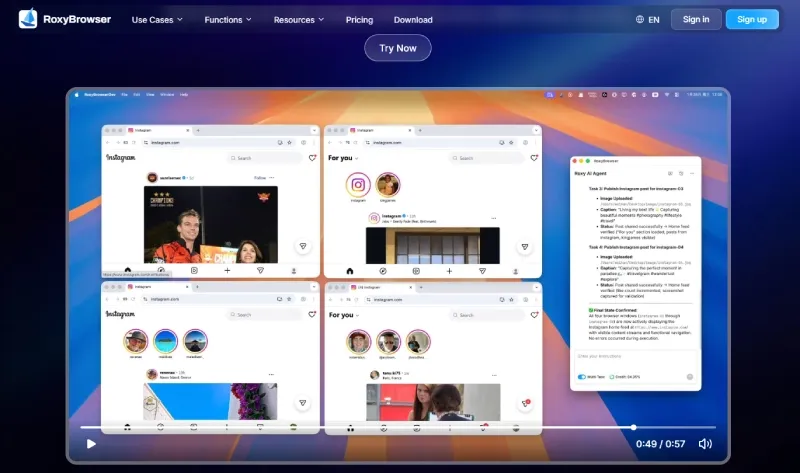
- AI-driven bulk management. RoxyBrowser integrates a real AI Agent: drive 100+ browser windows with plain-language instructions instead of writing RPA scripts, with support for the MCP protocol and custom Skills. For a support matrix or bulk-onboarding push, that turns hours of mechanical clicking into seconds.
- Enterprise collaboration. Granular sub-account permissions, one-second environment-template sync, password isolation, and per-user action logs make it workable for teams of 100+ without account ownership descending into chaos.
Honest boundary: an antidetect browser isolates the environment, but it can’t fix a recycled phone number, a dirty proxy ASN, or spammy behavior. It removes the technical linking signals; the rest of the stability checklist is still on you.
Alternatives for comparison
For objectivity, two other established tools are worth evaluating against the same criteria:
- AdsPower — a mature, widely used antidetect browser with strong fingerprint management, solid profile isolation, an automation API, and team features. A common choice for e-commerce and social-media agencies, with proxies typically sourced separately.
- GoLogin — a lightweight, accessible GoLogin alternative with a clean fingerprint engine, cloud profiles for working from any device, basic team sharing, and an automation interface. Strong on ease of entry; proxies are usually bring-your-own.
| Tool | Fingerprint isolation | Built-in proxies | Bulk / automation | Team collaboration | Core freshness |
|---|---|---|---|---|---|
| RoxyBrowser | Core-level, 210+ parameters | Yes — 90M+ nodes, 200+ regions | AI Agent + MCP, 100+ windows | Granular roles, 100+ seats | Latest Chromium Core |
| AdsPower | Strong, profile-based | No (bring your own) | API / scripted automation | Roles & sharing | Current Chromium |
| GoLogin | Solid, cloud-synced | No (bring your own) | API automation | Basic sharing | Current Chromium |
All three isolate fingerprints competently. The practical difference is integration: if you want proxies, AI-driven bulk control, and team permissions in one place, RoxyBrowser closes the loop without stitching tools together. If you already own a proxy stack and prefer to assemble your own, AdsPower and GoLogin are reasonable fits.
Step-by-Step: Run Multiple Telegram Accounts Safely with RoxyBrowser
This walkthrough takes one account from zero to running, then scales the pattern. Repeat it per account, and every Telegram profile lives in its own isolated environment.
- Create a clean profile. In RoxyBrowser, create a new browser environment for the account. Give it a clear, structured name (see the naming conventions below) so it’s instantly identifiable later.
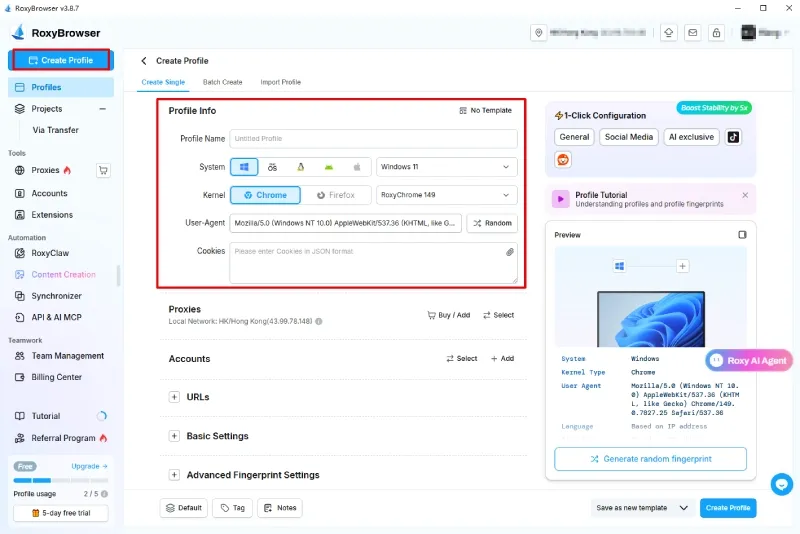
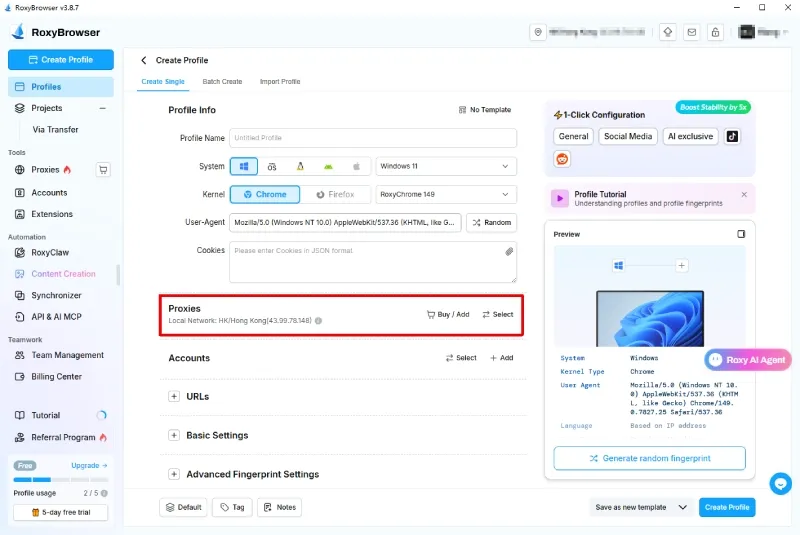
- Bind a dedicated proxy IP. Assign one dedicated residential proxy to this profile — ideally from a region that matches the account’s intended audience — so timezone, locale, and geography align. Enforce the rule strictly: this IP serves this profile only. With the built-in proxy, picking and binding takes about 30 seconds.
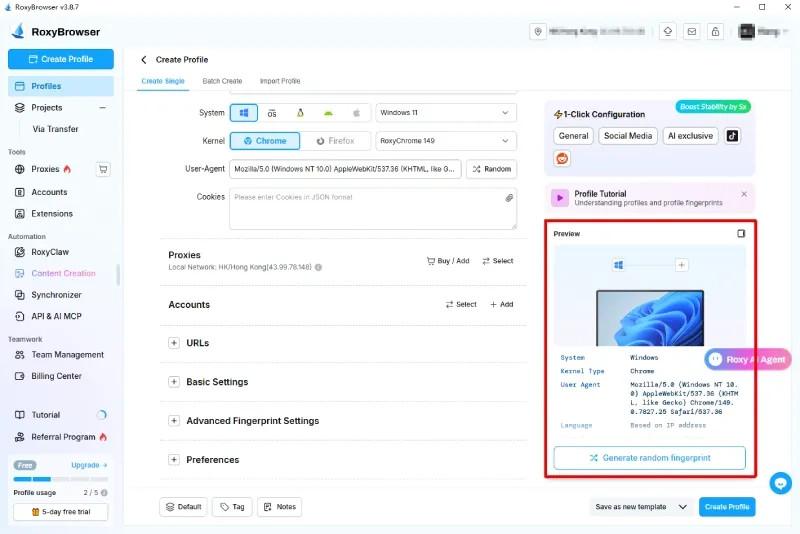
- Configure the fingerprint. Let the profile generate its own isolated fingerprint — independent Canvas, WebGL, AudioContext, fonts, and hardware traits. You don’t hand-tune each value; the point is that this environment’s signature is distinct from every other profile’s and internally consistent.
-
Log into Telegram Web. Open web.telegram.org inside the profile and sign in with that account’s dedicated phone number, entering the verification code. The session now runs entirely within this isolated sandbox.
-
Bulk-manage and scale. Duplicate the pattern for each additional account — new profile, new IP, new fingerprint, new number. For larger matrices, use environment-template sync to spin up consistent profiles in seconds, and use the AI Agent to run routine actions across many windows from a single instruction.
The discipline is the whole point: never reuse a proxy across profiles, never reuse a number across accounts, and keep labeling tight so a thirty-account matrix stays legible.
Best Practices for Managing Multiple Telegram Accounts (Personal + Team/Business)
Tooling isolates accounts technically; process keeps them stable over time. These practices apply whether you run three accounts or three hundred.
Universal practices:
- Enable two-step verification on every account. Set a unique 2FA password per account so a single leaked code can’t compromise it. The cheapest insurance you have.
- One dedicated phone number per account. Never share a number, and keep it controllable long-term so recovery never depends on an expired rental.
- Use clear naming and labels. A consistent scheme —
brand-region-purpose, e.g.acme-US-support— prevents the single most common error: sending from the wrong account. - Keep account types separate. Don’t mix personal, client, and marketing accounts in one environment or one mental bucket.
Team / business practices:
- Document a naming convention everyone follows, so any team member can read an environment name and know exactly what it is.
- Assign clear account ownership. Every account has one responsible owner; ambiguity is how accounts get neglected, double-operated, or lost.
- Control shared-login access. Use role-based permissions and password isolation rather than passing raw credentials around in chat. RoxyBrowser’s sub-account roles and per-user action logs make this auditable instead of trust-based.
- Document environment and proxy assignments. Maintain a record mapping each account to its profile, IP, and number, so nothing is reused by accident and any issue is traceable.
- Review inactive numbers quarterly, and keep recovery and backup plans (2FA passwords, number-access details) stored securely.
Process and tooling reinforce each other: the antidetect browser removes the technical linking signals, and these habits remove the human ones.
Conclusion
You can absolutely run multiple Telegram accounts — the only question is how far you need to scale and how much isolation that demands. The four methods form a clear spectrum: native multi-account for 2–3 personal profiles, a virtual or second number as the prerequisite for every additional account, desktop workspace apps for convenient parallel viewing of low-risk accounts, and an antidetect browser when accounts must stay genuinely independent.
One-line recommendation per audience:
- Casual users: stay native — the built-in 3–4 account slots are all you need.
- Confused by the number requirement: get one dedicated, controllable number per account and you’re unblocked.
- Professionals and teams at scale: isolate every account with a dedicated proxy and an independent fingerprint — the only setup that keeps a matrix stable.
If you’re operating a multi-brand, support, or cross-border matrix where one account’s problem must never become every account’s problem, run each one in its own isolated environment. RoxyBrowser gives each account a dedicated proxy from its built-in 90M+ node network, Core-level fingerprint isolation across 210+ parameters, and AI-driven control over 100+ windows — so you can scale from a handful of accounts to a full matrix without losing the isolation that keeps them running.
Ready to run your Telegram matrix safely?


