
Referral Program
The Referral Program lets you invite new users to register and use RoxyBrowser. The updated program uses one unified referral link and invitation code. When a user registers through your referral link or enters your invitation code, eligible future purchases from that user will be counted toward your referral rewards.
Referral Entry
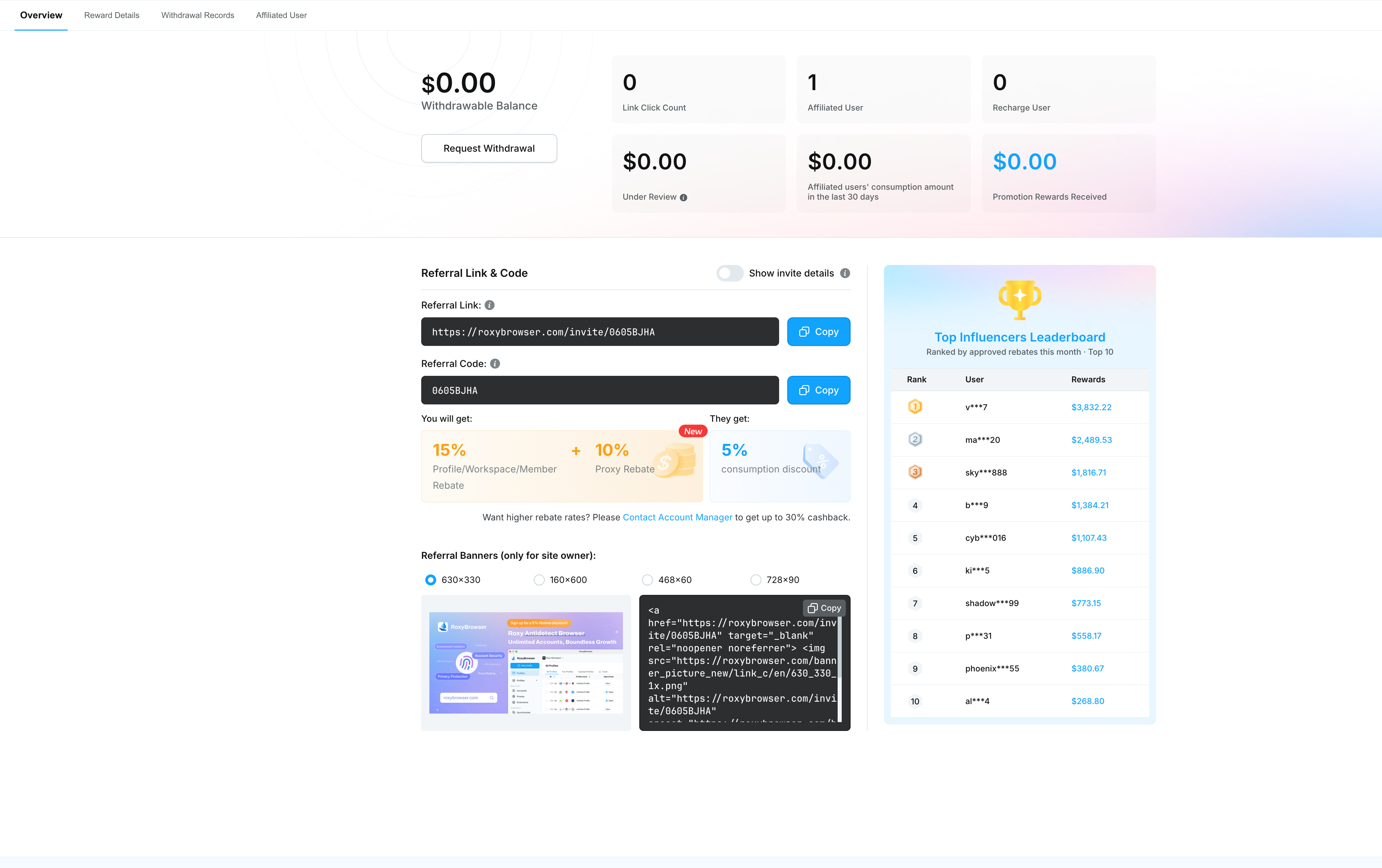
On the Referral Program page, the Overview tab shows your withdrawable balance, link clicks, referred users, paying users, rewards under review, referred user spending in the last 30 days, and total earned referral rewards.
You can share either of the following with new users:
- Referral link: Users who register through this link will be automatically linked to your account as referred users.
- Invitation code: Users who enter this code during registration will be linked to your account as referred users.
Referral Reward Rules
After a referred user completes payment, the system calculates your referral reward based on the purchase type. The updated Referral Program mainly includes the following reward categories:
| Purchase type | Reward for referrer |
|---|---|
| Browser profile, team member, and related purchases | Reward based on the rate shown on the page, 15% at present |
| Proxy IP spending | Reward based on the rate shown on the page, 10% at present |
Referred users can receive a spending discount, shown as 5% on the page at present. The actual reward and discount rates are subject to the values displayed on the Referral Program page.
Calculation examples:
- If a referred user pays $100 for browser profiles or team members, and the reward rate at present is 15%, you will earn a $15 referral reward.
- If a referred user pays $100 for proxy IPs, and the reward rate at present is 10%, you will earn a $10 referral reward.
For a higher reward rate, you can add a business manager from the Referral Program page. The final rate is subject to confirmation by the business manager.
Data and Details
The Referral Program page provides the following sections:
- Overview: View referral data, referral link, invitation code, referral rewards, and rankings.
- Reward details: View the source, amount, status, and time of each referral reward.
- Withdrawal records: View previous withdrawal requests and their processing status.
- Referred users: View users linked through your referral link or invitation code.
After a referred user's order is paid, the reward first enters a review period. The review period lasts 7 days. After approval, the reward is automatically added to your withdrawable balance.
Withdrawal Instructions
At present, we support three withdrawal methods: Roxy Wallet, USDT address, and PayPal.
Withdraw to Roxy Wallet
- No limits: You can withdraw your full balance to your Roxy Wallet at once.
Withdraw to USDT address
- Minimum withdrawal amount: $50.
- Amount requirement: The withdrawal amount must be a multiple of $50, such as $50, $100, or $150.
- Processing time: Funds will arrive within 5 business days after your request is approved.
Withdraw to PayPal
- Enter your PayPal receiving email to submit a withdrawal request.
- Make sure the PayPal account associated with the email can receive funds. After approval, the funds will be sent to that account.
- Processing time: Funds will arrive within 5 business days after your request is approved.