
Team Members
TIP
You can view various information about members belonging to the current team in Team Members.
Invite Team Member
Click Invite, enter the invitee's email address, select permissions and a project, then click Invite to invite the member to join the project. After sending the invitation, the invitation box remains open so you can invite the next user. Assigned permissions can only be lower than the current inviter's permissions. Invitees will receive a team invitation in the system notifications in the upper right corner of the app and in their email inbox. They can click View Details to join the team.


After successfully joining the team, you can view or modify the profiles and other configurations in the project within the corresponding permissions.
Permission Description
| Identity | Core Privileges | Special Permissions / Limitations | Applicable Scenarios |
|---|---|---|---|
| Owner | Has the highest level of permissions and can perform all operations. | Exclusive permission: delete the team | Team owner |
| Manager | Has all permissions except deleting the team. | Same as Owner: 1. Create, edit, and delete projects within the team. 2. Manage all other team members, excluding those at the same permission level. | Team project lead or senior administrator |
| Editor | Can edit profiles, accounts, and proxies within assigned projects. | Key limitations: 1. Cannot create or delete projects. 2. Cannot view projects associated with team members. | Project content editor |
| Viewer | Can view and use profiles within assigned projects. | Main functions: 1. Open and close profiles within assigned projects. 2. Add notes to and favorite profiles. | Team member or external consultant |
TIP
· Owner has absolute control over the entire team, including the ability to delete it.
· Manager can perform all daily management tasks, but does not have permission to delete the team.
· Editor focuses on modifying project content and cannot create or delete projects.
· Viewer is limited to browsing and opening profiles, but can add notes and favorites without affecting profile settings.
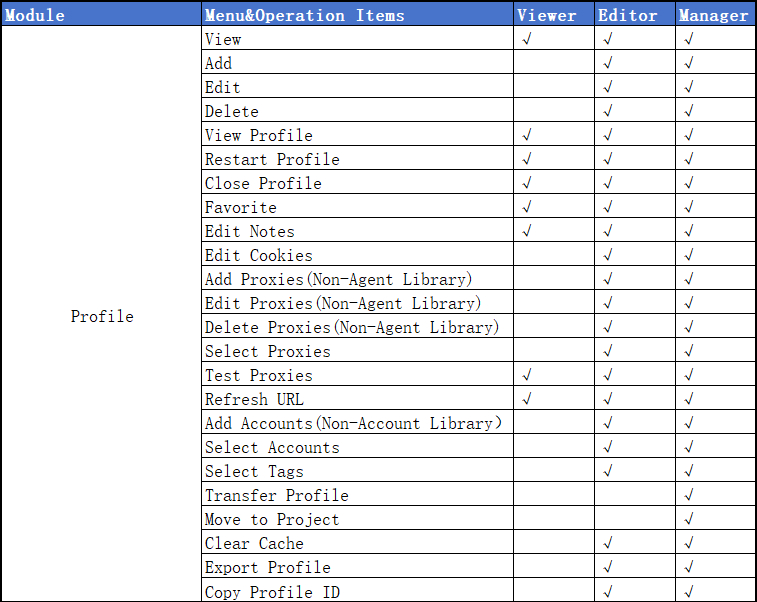
Appendix: Detailed Permission Table
Profile
Tags
Projects
Account
Proxy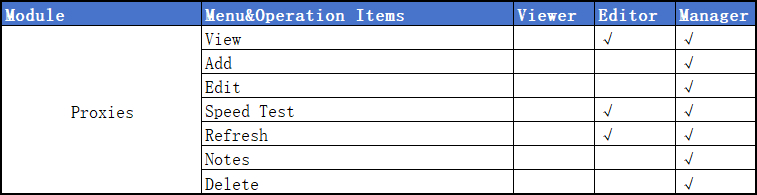
Extensions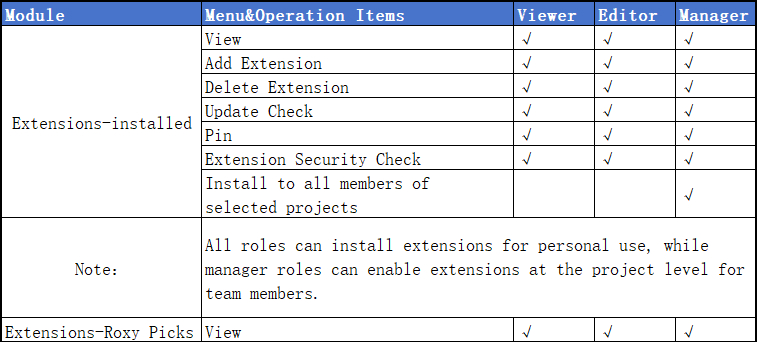
Team-Team Member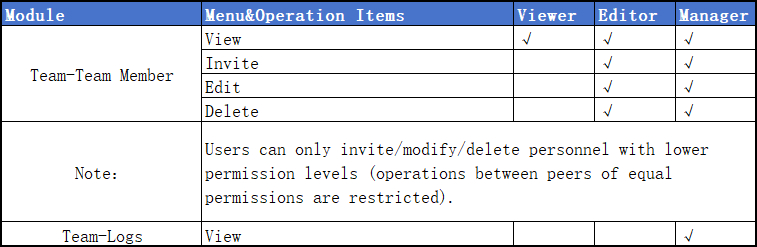
API