
Competition is incredibly fierce in the world of cross-border e-commerce and global digital marketing today, and efficiency has almost become the most important factor determining the success or failure of a cross-border business. Roxybrowser, as the world’s first anti-detect browser with a deep AI Agent integration, has initiated a true productivity revolution by helping cross-border entrepreneurs to automate the management of multiple accounts and making old-fashioned manual repetitive tasks a thing of the past.
So, how can you use this revolutionary tool to boost your business efficiently? After reading this comprehensive guide, any multi-account operator aiming to thrive in the AI automation trend can quickly master the usage of Roxy AI Agent. Whether you’re a TikTok creator, Amazon seller, or seasoned marketing pro, a single command can let Roxy AI Agent safely automate your accounts, even if you have zero coding experience.
Start Your AI Automation Journey
Entering Roxy AI Agent is easy. Just click on the “Roxy AI Agent” button in the bottom-right corner of the RoxyBrowser client to enter the main operation interface.
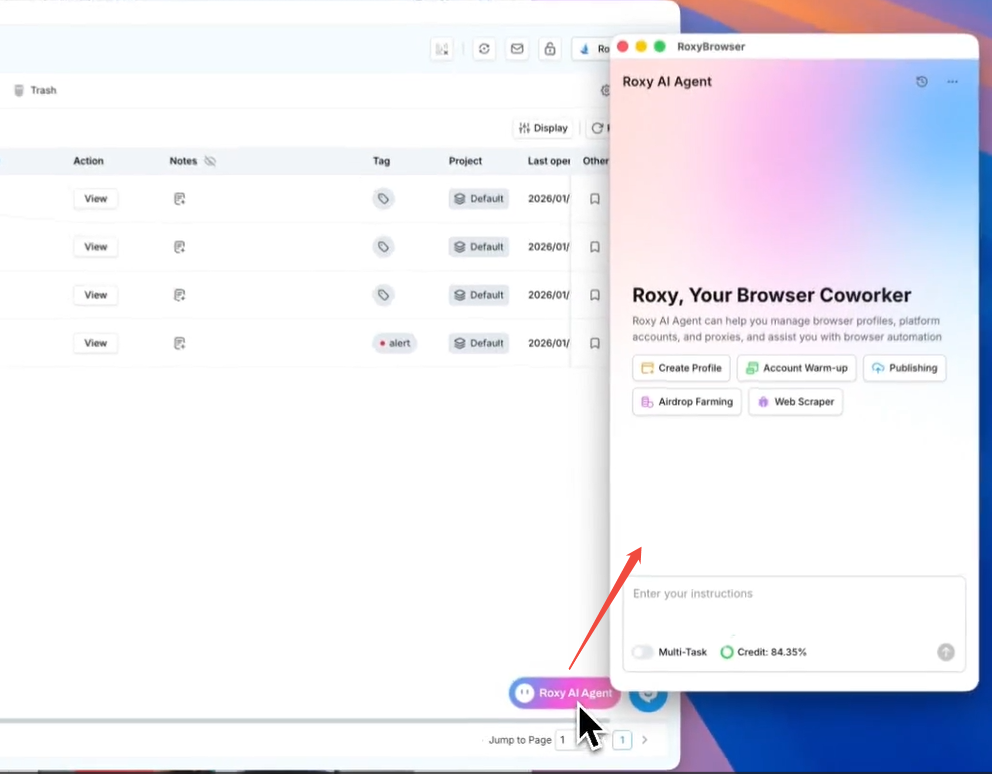
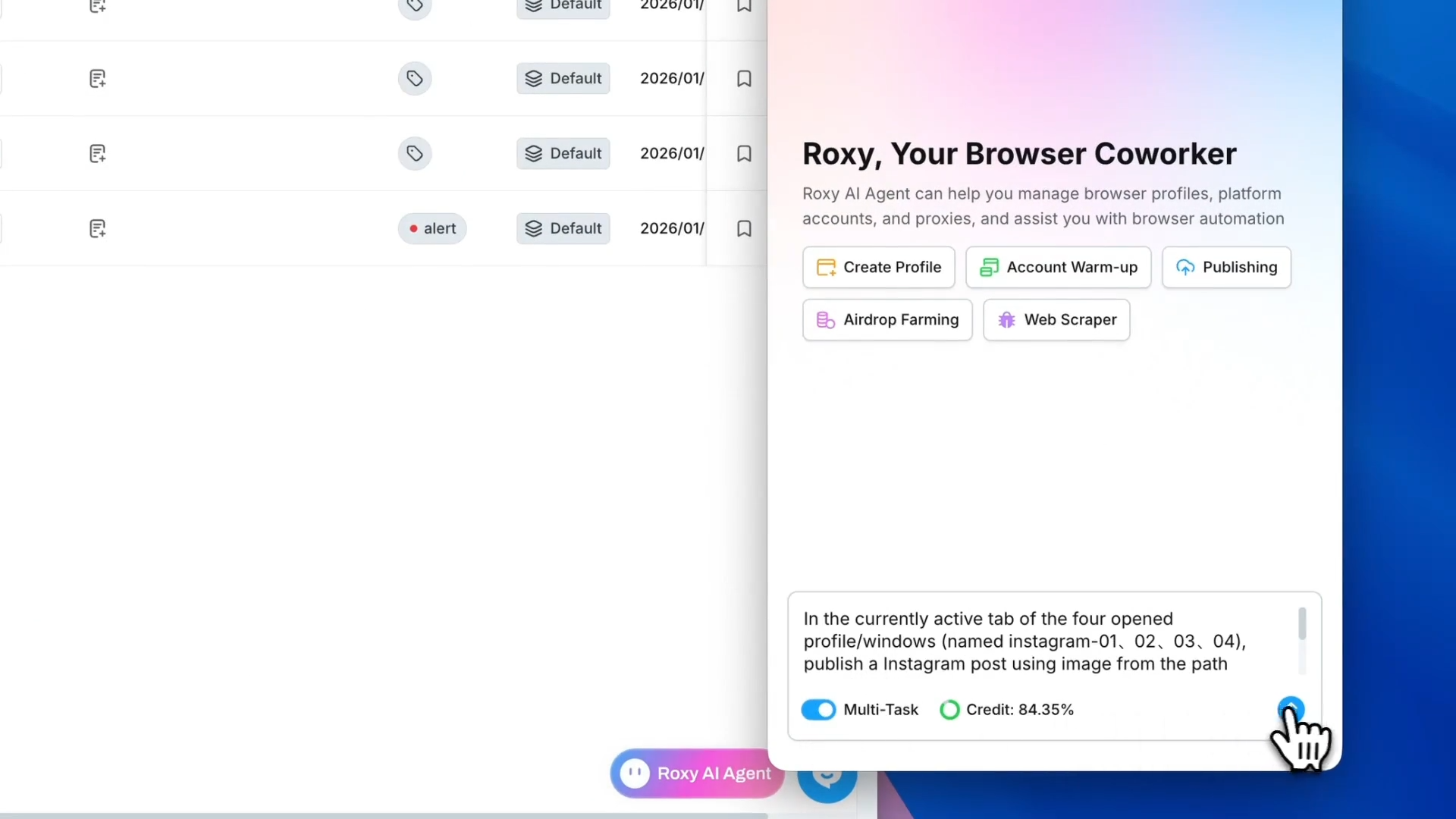
A window with a pink-and-blue gradient background will appear—this is where you command your Roxy AI Agent. The window consists of three main functional areas: the Command Input Box, the Task Template Area, and the Status Display Area. All main operations of the AI are done here.
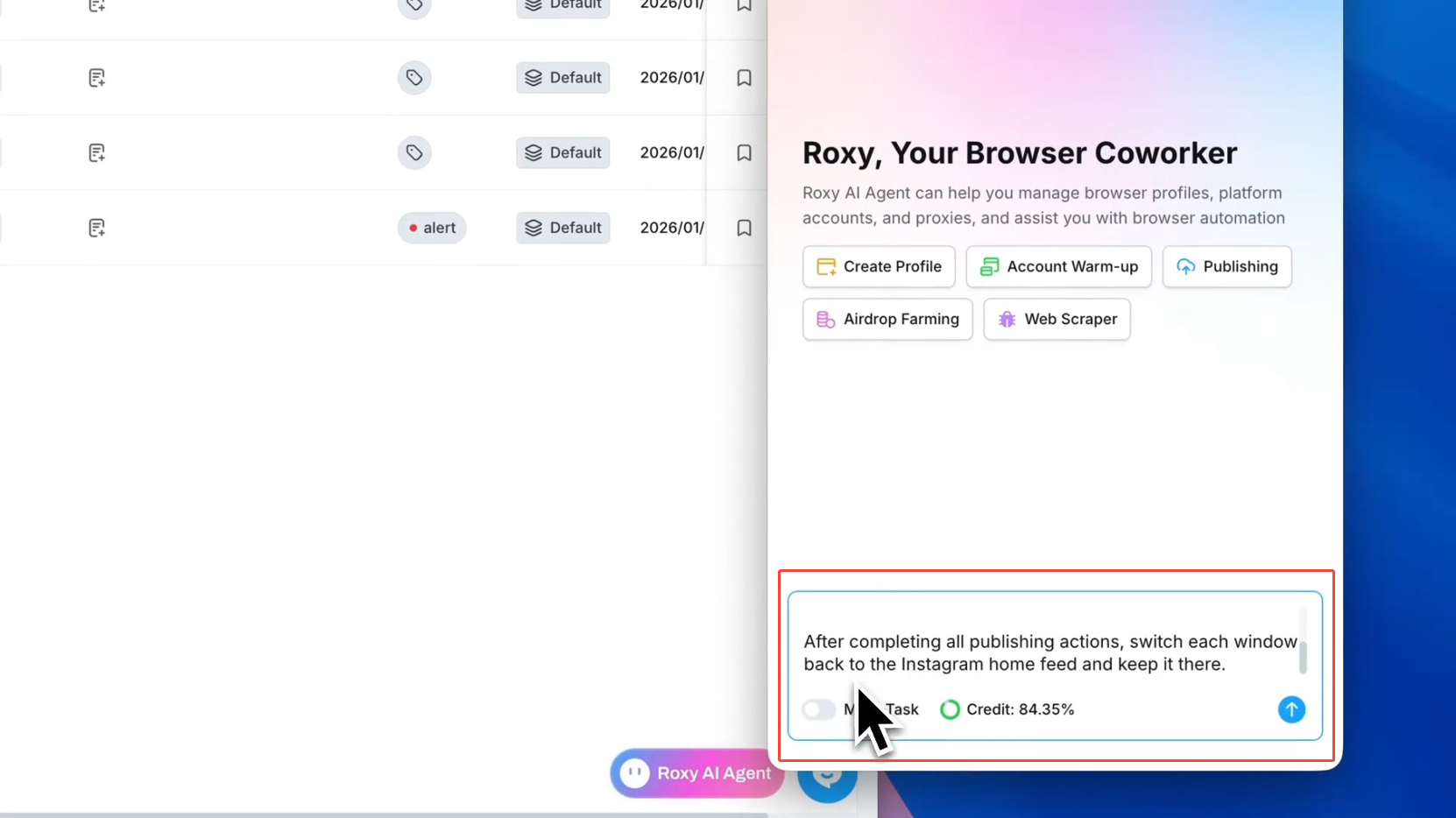
- Command Input Box: Located at the bottom, this is where you enter instructions to the AI Agent. On the left side below the input box, you can find the “Multi-Task” toggle. If you need to execute multiple tasks simultaneously or assign separate browser profiles to different tasks, be sure to turn this on, which will allow the AI to open and control multiple windows synchronously.
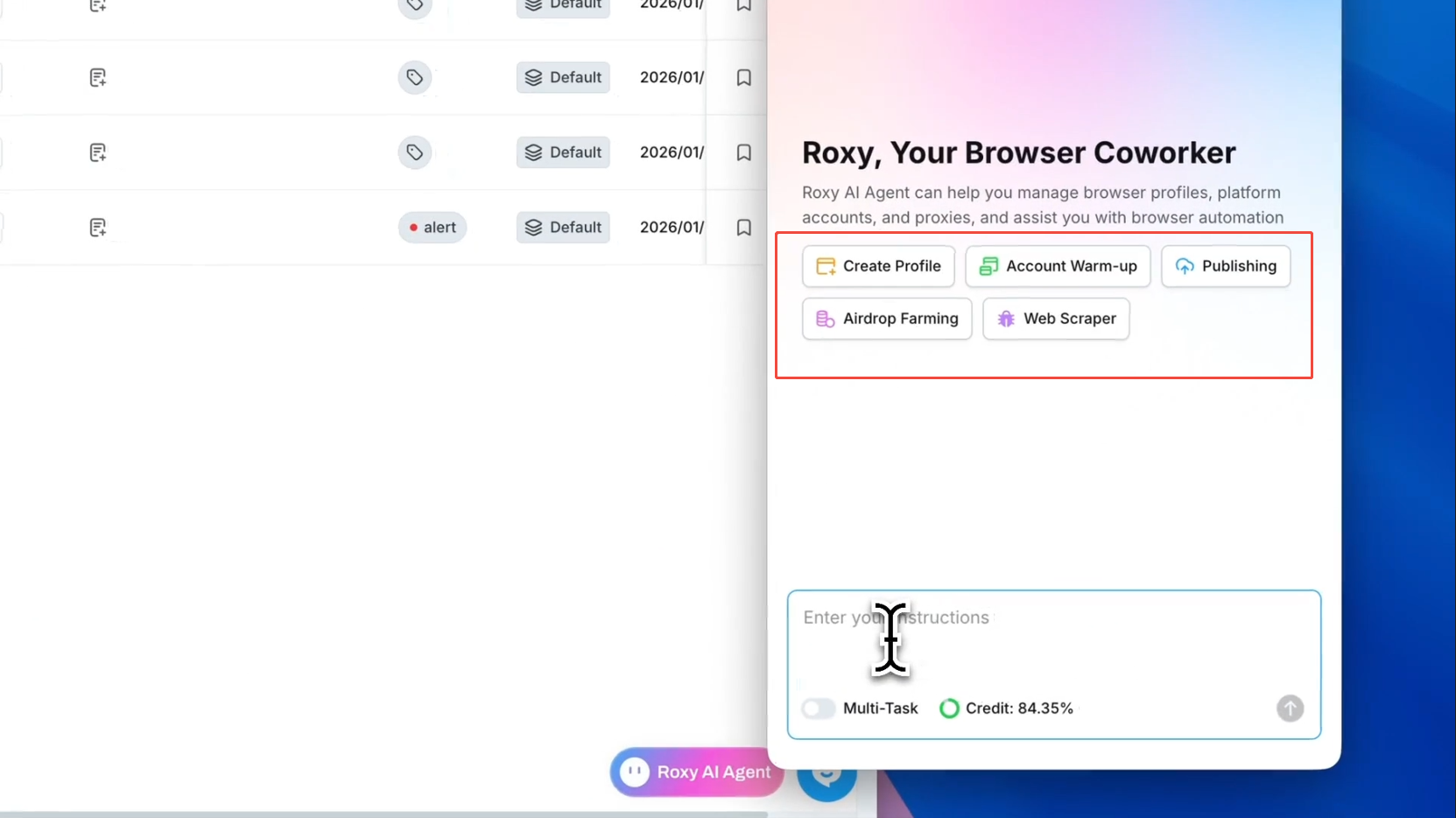
- Task Template Area: This functional area appears in the center by default when you start a new session, and it is preset for the operations used most frequently in multi-account management. Simply click a template option to generate a corresponding command in the input box, which you can then modify to fit your needs.
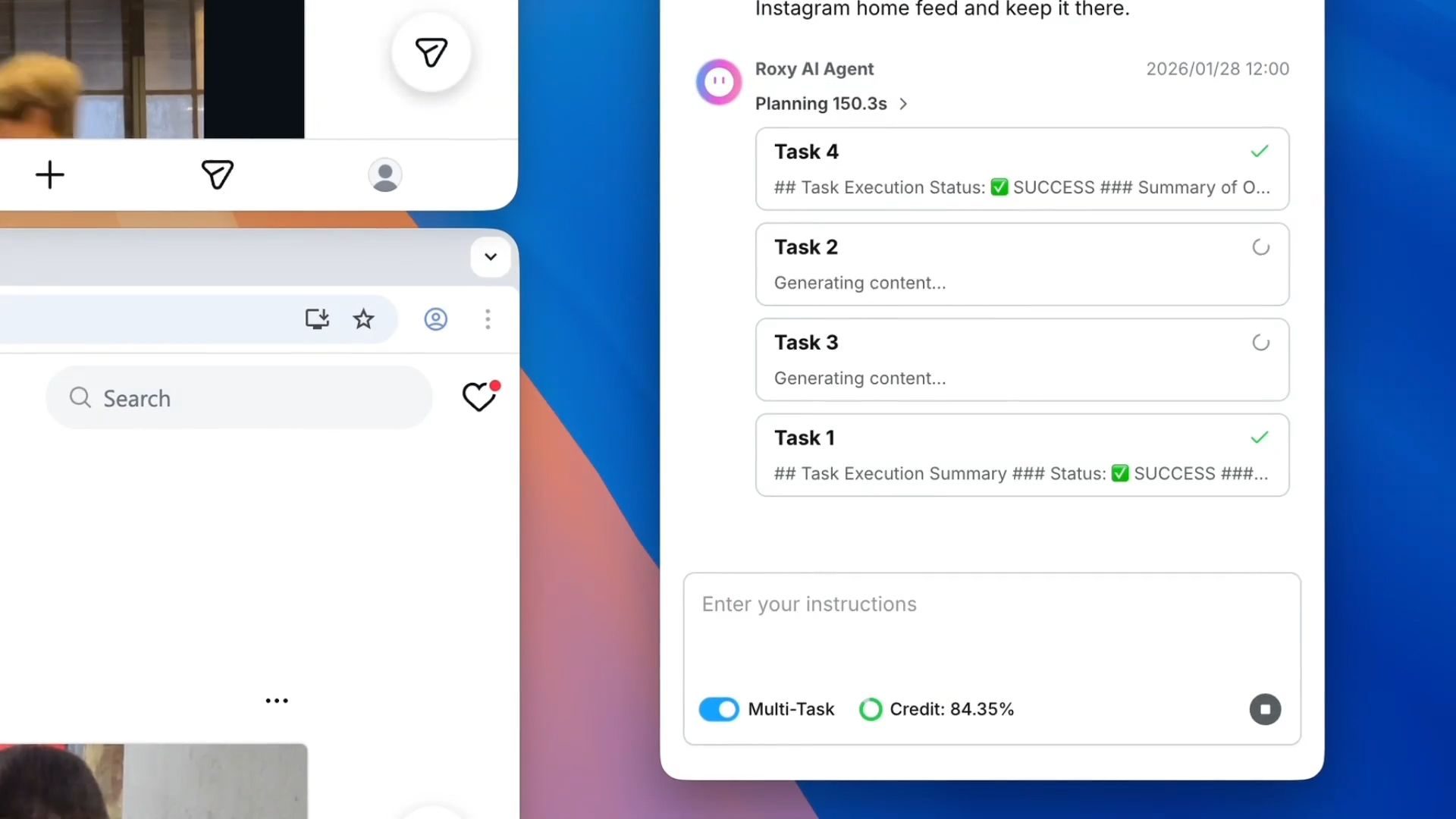
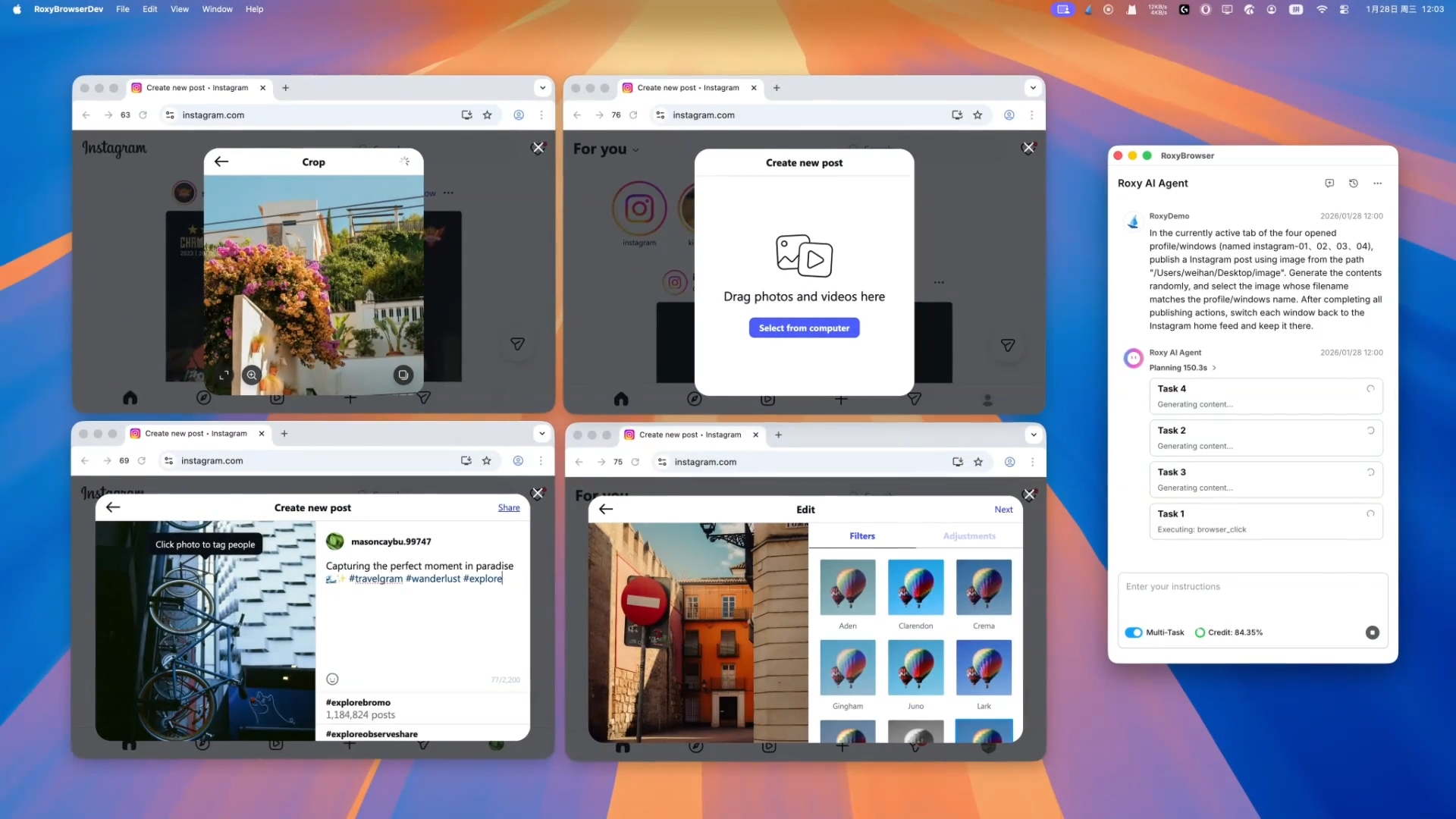
- Status Display Area: Once you send a command in the input box, the Task Template Area is replaced by the Status Display Area, which shows the commands you’ve entered and returns the AI’s execution results. It can show the execution results in real-time, displaying each logical step the AI takes along with the time spent on each step.
Natural Language Understanding and AI Automation
Roxy AI Agent’s biggest breakthrough lies in its realization of “Natural Language as Code.” You don’t need to learn complex Python scripts or debug Selenium frameworks. Just by inputting natural language as commands, you can automate various operations across multiple accounts. For example, let’s explore how to use Roxy AI Agent to post content to multiple Instagram accounts simultaneously.
- Enter Your Command
Type your task instruction in the Command Input Box, which can be either a natural language description manually typed by you or a templated command generated using task templates. Then just click the Upward Arrow button in the lower-right corner of the input box. The AI Agent will immediately parse the semantic meaning of your input. (Tip: Don’t forget to turn on the “Multi-Task” toggle when doing multi-account operations!)
- Task Execution
Once your command is submitted, you’ll witness firsthand how smoothly AI operates in place of humans. During task execution, the Status Display area shows real-time AI execution logic and progress, allowing you to see exactly what actions and steps the AI is performing—such as “Thinking…” or “Generating content…”
- Viewing Results
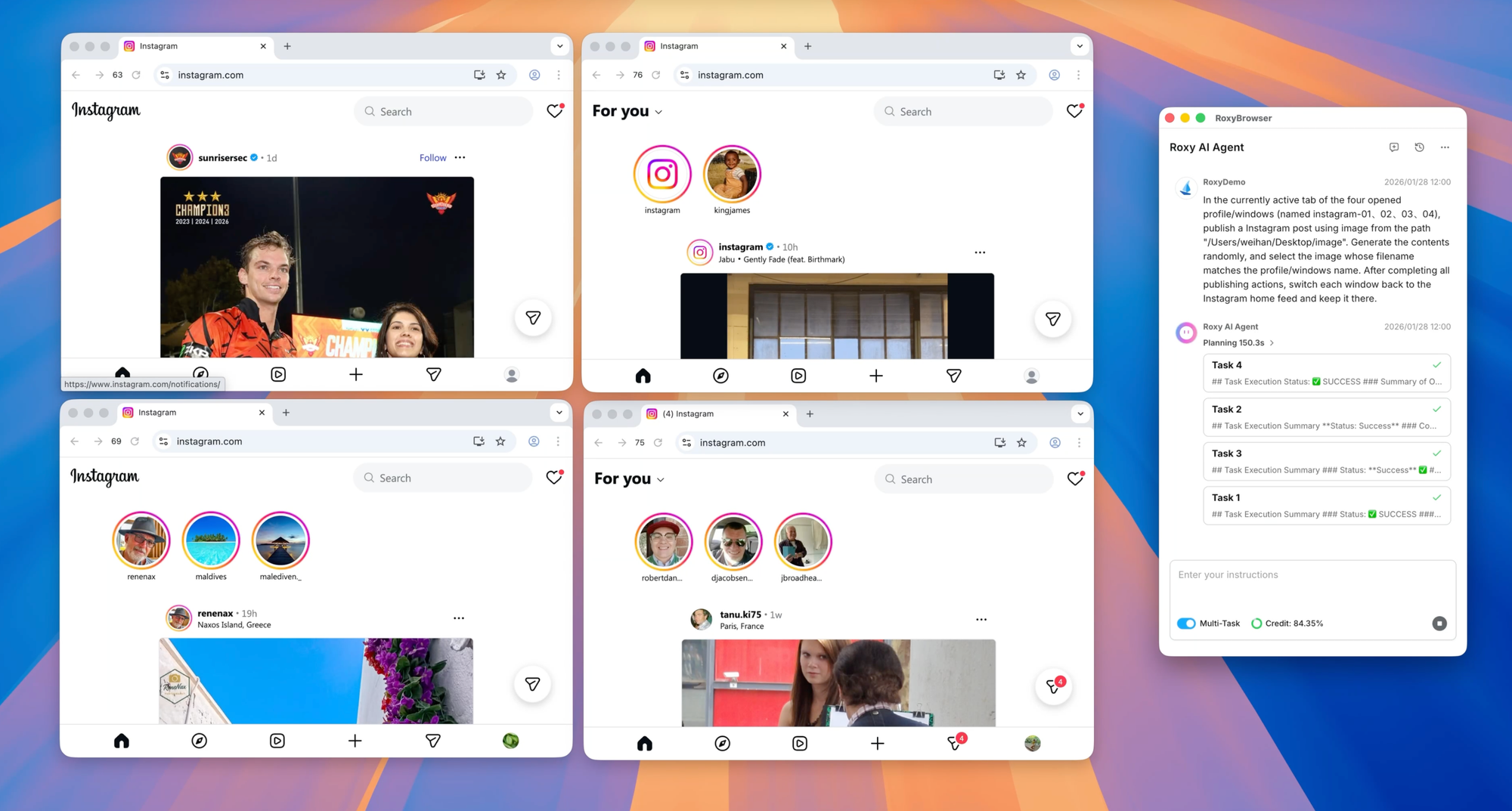
Soon, all Instagram accounts across the windows have successfully posted the content described in the command. There’s no need to manually post on each account one by one at all—efficiency at its peak!
Deep Dive into Task Templates
You already know that the Task Template Area comes pre-loaded with four important Task Templates. Now, let’s explore how these templates can make your business operations much more efficient. The four task templates cover over 80% of high-frequency scenarios in cross-border operations, making them completely ready for new users to use right out of the box:
-
Create Profile
This template helps you with the tedious task of manually configuring fingerprints for each profile. It allows you to set the number of profiles to create, specify proxy IP types (e.g., static residential or dynamic traffic), and choose browser fingerprint versions in seconds. -
TikTok Account Warm-up
As a powerful tool for matrix operators, it automatically executes standardized TikTok account warm-up. The AI can simulate real user behavior like watch time, follows, and interactions, which helps boost account authority while evading bot detection of the platform. -
Publishing
Want to batch-posts videos or images on major social media platforms like TikTok and Instagram? Use this template to set the posting time, captions, and hashtags for your content, and the AI will handle the rest. This is fully automated global content distribution. -
Web Scraper
This template reduces data collection costs drastically. After clicking it, just input the URL of your target website, and Roxy AI Agent will crawl and output website data automatically using its powerful web structure recognition.
Managing AI Conversations
Efficient organization is key to handling multi-account operations of high-intensity. Roxy AI Agent provides a minimalist yet powerful system for you to manage your conversations with AI, allowing you to manage every automated workflow effortlessly.
Deleting Conversations
- Scenario: As your business grows, certain sessions may become obsolete. Regularly clearing your old conversations keeps your interface efficient and protect your privacy in certain tasks.
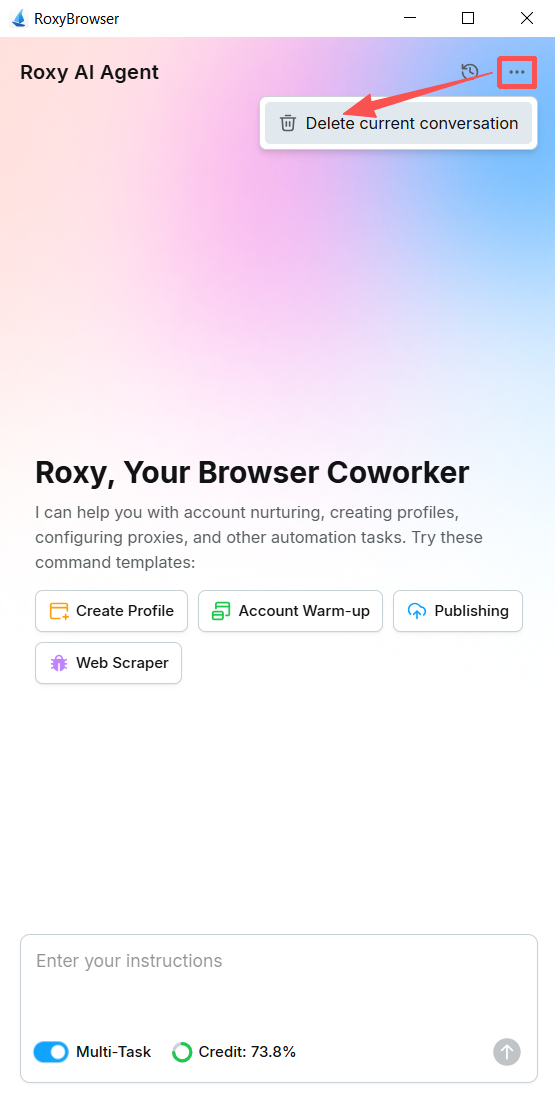
- How-to: Click the “…” icon in the top-right corner and select “Delete current conversation” to permanently remove your current conversation.
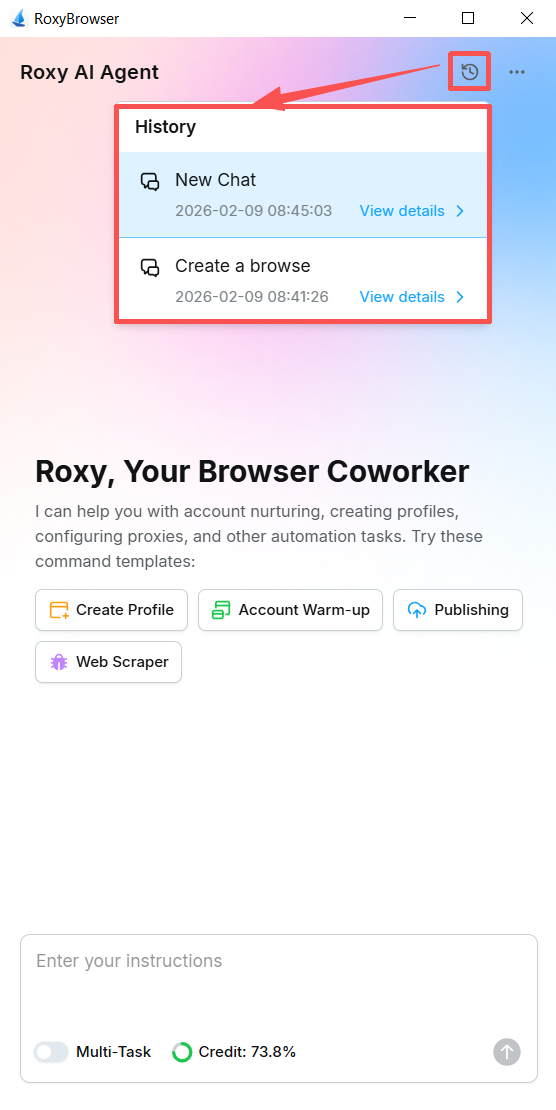
History
- Scenario: This is your archive for all the conversations you’ve created, allowing you to view all their content easily. It’s very valuable for replicating successful workflows and troubleshooting past issues.
- How-to: Click the History icon at the top of the page to view all previous conversations along with their creation times. Click a specific conversation, and you will switch to its interface.
Adding a New Conversation
- Scenario: You often need to create a new conversation when handling a new business logic (e.g., switching from “TikTok account warm-ip” to “Amazon data crawling”), which helps isolate different workflows and ensure AI precision.
- How-to: Click the Dialog Box icon (to the left of the History icon) in the top right to generate a new and clean conversation.

FAQ
-
Do I really not need to code when using Roxy AI Agent?
Absolutely not. Roxy AI Agent is an intelligent execution AI assistant and its core advantage is that no coding is needed. Simply stating your requirements in everyday language can enable the AI to control multiple browser windows for synchronized automation tasks. -
How is Roxy AI Agent different from regular AI tools?
Most regular AI tools generate content or perform dialogues; the actual operations still need a human. Roxy AI Agent, however, handles the entire workflow—from analyzing requirements to devising solutions—without human input. It also supports headless automation mode to meet diverse control needs. These abilities are beyond the reach of regular AI models. -
Who is Roxy AI Agent for?
It’s designed for multi-account managers, such as cross-border e-commerce and social media operators, to automate tasks like synchronous account operations and data scraping. It ensures account security when used with RoxyBrowser’s advanced anti-detect technology. Whether for individual use or enterprise-scale applications, Roxy AI Agent delivers. -
Will unclear instructions affect task execution?
Not significantly. Roxy AI Agent can identify core needs from ambiguous instructions and asks for your confirmation. The AI will request key details if the instructions are too vague. The system also learns user habits to better match your needs over time. Even beginners can avoid AI hallucinations and command misunderstandings by using simple instructions. -
Can the AI handle multiple tasks at once without conflict?
Yes. Roxy AI Agent automatically allocates execution resources based on task priority and resource consumption, preventing interference between tasks. It has iteration limits and stop rules to ensure stability and prevent potential loops in multi-tasking. You can also monitor task progress and terminate tasks at any time.
Experience the Next Generation of Multi-Account Browsing
Roxy AI Agent is a revolutionary productivity tool that transforms you from a frantic operator at your computer into a strategist commanding a massive matrix of intelligent accounts with a single command. In this era where efficiency is everything, starting using RoxyBrowser—the world’s first automated multi-account browser—can help you achieve higher efficiency,outmaneuver competitors, and dominate the fiercely competitive cross-border operations arena.
Join the RoxyBrowser family today and send your first automated command to Roxy AI Agent!


