
TL;DR
Based on MuLogin’s public product pages, MuLogin still looks like a workable option for teams that already run stable Windows-based workflows and do not mind a more manual setup process. Its clearest strengths are profile isolation, API compatibility, and basic team collaboration. Its main tradeoffs appear to be a Windows-first client experience, manual trial activation, and a proxy workflow that still depends heavily on user setup. If you are comparing alternatives, RoxyBrowser is one relevant option to review side by side using the same criteria.
Why a MuLogin review has to start with risk control
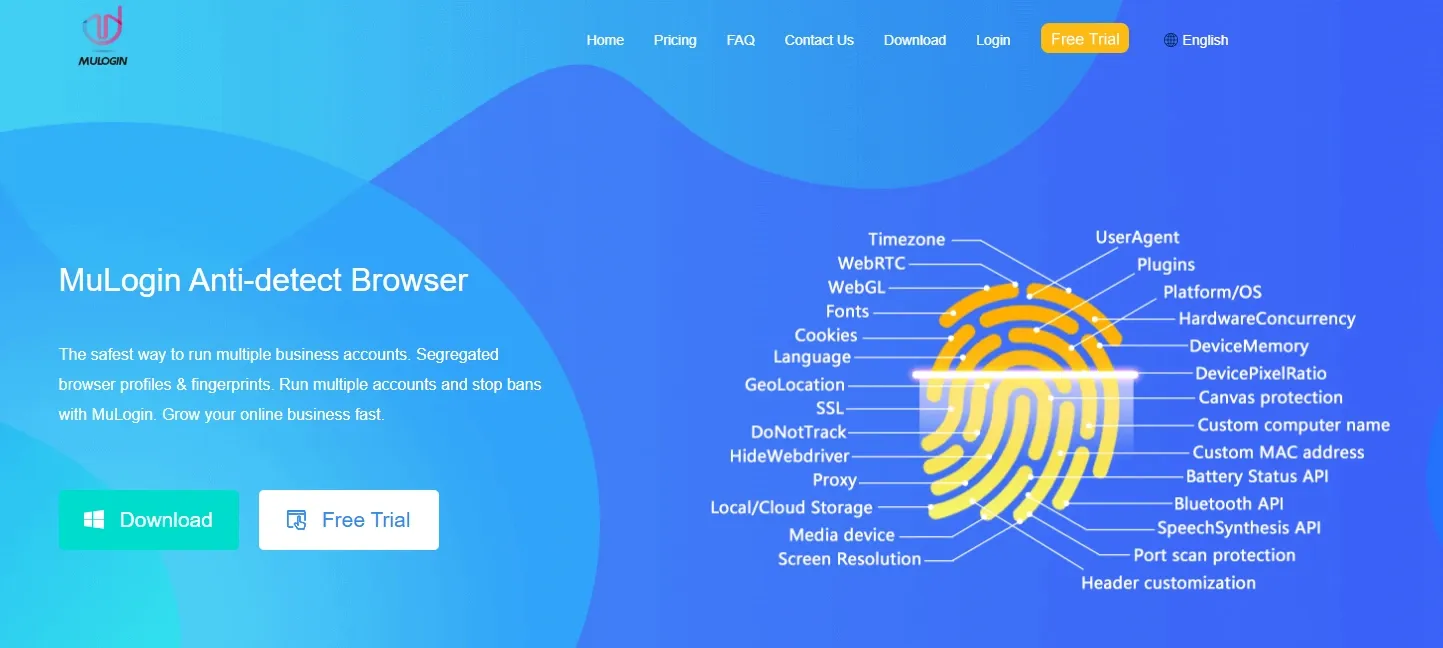
Platform risk controls have moved well beyond “just change the IP.”
Facebook, Amazon, Google, TikTok, and many crypto-related platforms increasingly score accounts across multiple layers at once. That usually includes browser fingerprint signals, network traits, behavior patterns, and account history. In practice, that means multi-account operations are judged as full environments, not as isolated settings.
The most relevant checks typically include:
- User-Agent and User-Agent Client Hints
- Canvas rendering and WebGL metadata
- AudioContext and font enumeration
- WebRTC candidate leakage
- Timezone, language, and geolocation alignment
- In some cases, TLS and HTTP/2 client-side traits
That is why reviewing MuLogin cannot stop at “Can it change the UA?” The more useful question is whether it can maintain a coherent browser profile that stays aligned with its proxy region over time.
If you want a technical baseline, MDN remains a useful reference for the Canvas API and RTCPeerConnection.
This review focuses on four questions:
- Does MuLogin present profile isolation as a core capability?
- Do the public settings pages cover the fingerprint controls that matter most?
- Does the proxy workflow look efficient enough for daily use?
- Do the team and automation features fit how multi-account teams work today?
| Risk-control layer | Is changing the IP alone enough? | Does MuLogin publicly cover it? | What matters most |
|---|---|---|---|
| User-Agent and UA-CH consistency | No | Yes | Whether the settings stay coherent over time |
| Canvas and WebGL fingerprinting | No | Yes, through related environment controls | Whether one profile stays stable across repeated launches |
| WebRTC and local IP exposure | No | Yes | Whether the exposed network view matches the proxy exit |
| Timezone, language, geolocation | No | Yes | Whether manual mismatch is reduced |
| Cookie and local storage isolation | No | Yes | Whether profiles are truly separate |
| Team collaboration and bulk workflows | Not applicable | Partially | Whether the workflow is efficient enough day to day |
MuLogin is not the only product in this space, and it is not unusable. The issue is that the difference between “possible” and “efficient” matters a lot more than it used to.
How we reviewed MuLogin
This review uses a two-layer method.
The first layer is factual verification. We reviewed MuLogin’s homepage, pricing page, help center, trial explanation, system requirements, profile settings guidance, proxy documentation, download page, and version page to confirm what the product publicly states about features, pricing, trial rules, system support, and maintenance activity.
The second layer is workflow evaluation. We compared MuLogin’s public flows for profile creation, proxy setup, WebRTC handling, sub-account sharing, and API use against what modern multi-account teams typically need today.
This is a conservative method by design. For example, the public help materials state that installing and running the client is supported on Windows systems, while profiles can simulate Windows, macOS, Linux, Android, and iOS environments. Based on that, the defensible claim is not “MuLogin has a native Mac client.” It is “MuLogin can simulate macOS environments while remaining Windows-first at the client level.”
The review checks six workflow areas:
- Profile creation and template readiness
- MuLogin browser proxy setup and reuse logic
- Browser-environment parameter coverage
- Profile sharing, transfer, and team management
- LocalAPI, RESTAPI, and automation compatibility
- Update cadence and public maintenance signals
| Review area | Evidence used | What it can tell us | What it cannot tell us |
|---|---|---|---|
| Pricing and trial | Public pricing page and help materials | Plan structure, trial path, entry threshold | Hidden discounts or off-page sales quotes |
| System support | Public system requirements | Native client support scope | Hardware-specific performance differences |
| Fingerprint controls | Public settings documentation | Parameter coverage and whether consistency is emphasized | Every low-level implementation detail or live pass rate |
| Proxy support | Public proxy documentation | Protocol compatibility, setup path, workflow complexity | The quality of any third-party proxy provider |
| Automation | Public API docs and examples | Whether script integration is supported | Final productivity inside a private internal stack |
| Product updates | Download page and version page | Whether the product is still being maintained | Internal roadmap priorities |
What MuLogin is, and who it is for
MuLogin is an antidetect browser, not just a private browsing tool or a simple multi-profile launcher.
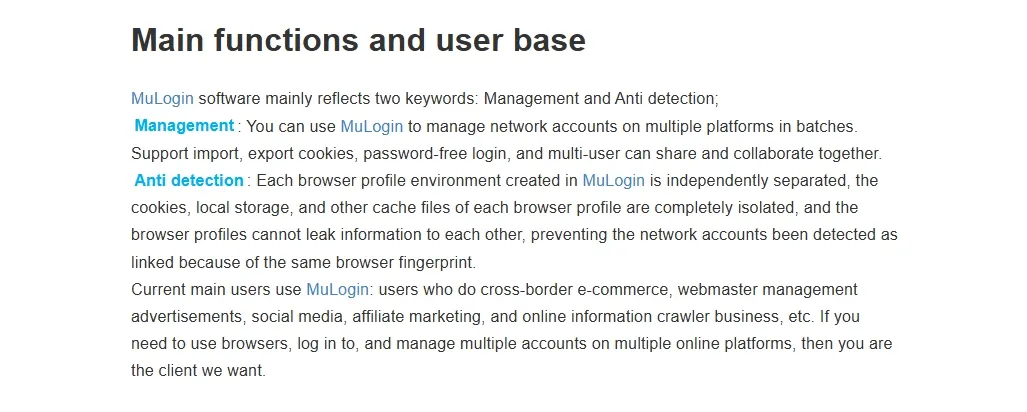
Its core purpose is to create a separate browser profile for each account. According to MuLogin’s public documentation, those profiles can isolate cookies, local storage, IndexedDB, cache, timezone, language, screen settings, User-Agent, and other environment parameters tied to browser fingerprinting.
That is very different from incognito mode. Incognito mainly limits local history and some session persistence. It does not create a reusable, isolated environment for long-term multi-account work.
Based on MuLogin’s public positioning, the product is aimed at:
- Cross-border e-commerce sellers
- Advertising teams
- Affiliate marketers
- Social media operators managing account clusters
- Teams doing market monitoring or research workflows
That positioning is plausible. More precisely, MuLogin is aimed at users who need to operate multiple long-lived digital identities, not at casual everyday browsing.
Based on the public workflow, MuLogin looks like a better fit for:
- Teams already running mature Windows-based workflows
- Users who want to keep using LocalAPI, RESTAPI, Selenium, or Puppeteer
- Teams that need sub-accounts, profile sharing, and profile transfer
- Operators who are comfortable handling timezone, language, proxies, and WebRTC settings manually
It looks like a weaker fit for:
- Beginners
- Buyers who want a native Mac-first experience
- Teams with heavy daily proxy operations
- Teams trying to reduce long-term script maintenance
MuLogin review: the core feature set
If you read only the public materials, MuLogin does not look thin on features. The product pages reviewed for this article present support for Chrome, Safari, and Firefox profile types; simulation of Windows, macOS, Linux, Android, and iOS environments; controls for User-Agent, sec-ch-ua, WebRTC, Language, Accept-Language, Platform, and resolution; plus profile sharing, profile transfer, bulk creation, and RESTAPI access.
That puts MuLogin in the category of a traditional full-featured antidetect browser rather than a simple browser wrapper.
The more important question is not whether the feature list exists. It is whether the workflow around those features looks efficient and dependable in real use.
Fingerprint controls
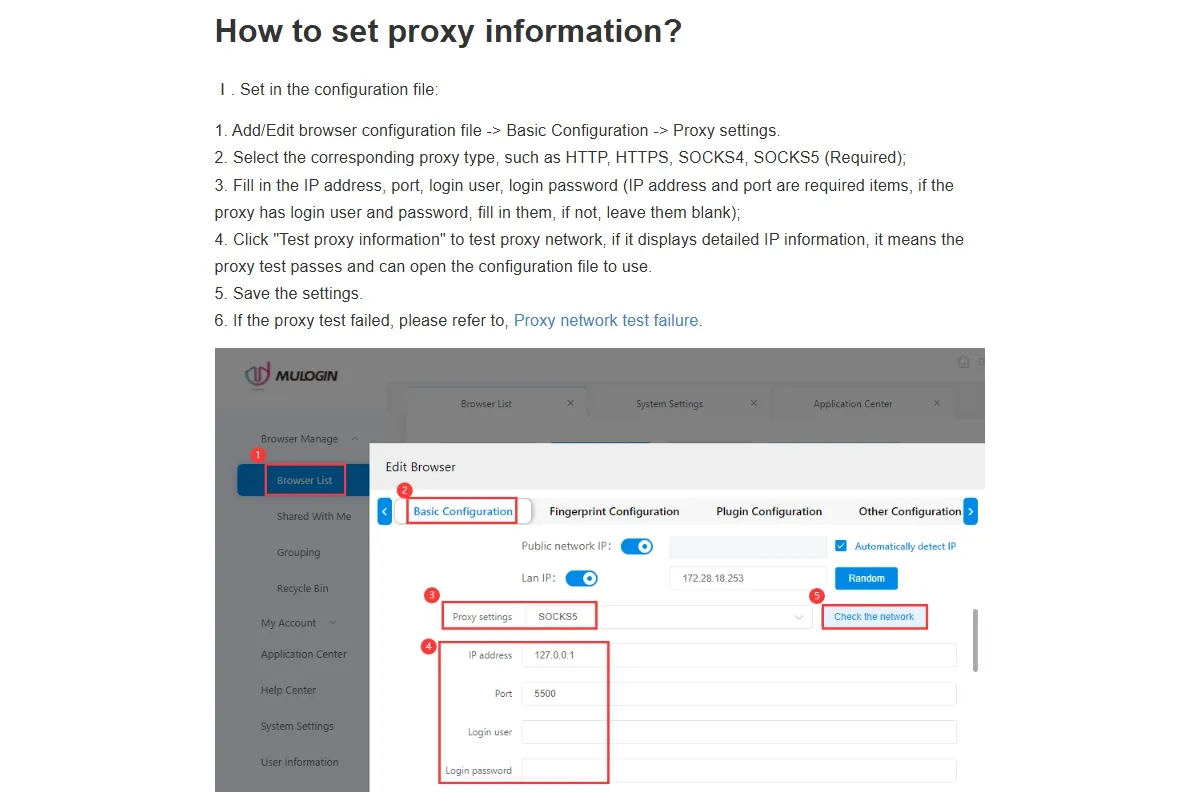
MuLogin’s public configuration guidance is fairly detailed. It references controls for User-Agent, sec-ch-ua, WebRTC, Language, Accept-Language, Platform, and Resolution, and it explicitly warns that sites may check whether those values are consistent with each other.
That matters because the real issue in fingerprint management is not parameter count. It is coherence.
A common bad setup looks like this:
- User-Agent says macOS Chrome
- Timezone remains in Asia
- Accept-Language stays Chinese
- Proxy exit appears in the United States
A stronger setup aligns the UA, UA-CH, timezone, language, region, and proxy exit from the start, then keeps that combination stable over time.
This is both a strength and a tradeoff for MuLogin. Experienced operators get a fairly open control surface. Less experienced users also get more ways to misconfigure the environment.
Browser environment isolation
MuLogin’s public materials present each profile as storing cookies, local storage, and cache separately. That is one of the most credible and important parts of the product’s positioning.
For storefronts, ad accounts, social accounts, or multi-wallet workflows, profile isolation is not a bonus feature. It is the baseline requirement.
The easiest way to break that model is also one of the most common: using one profile for multiple same-site accounts or repeatedly logging out and back into different accounts inside the same profile. A safer long-term model is one account per profile, one profile per storage context, and one profile per stable network path whenever possible.
The public guidance reviewed for this article also stresses one unique IP per browser profile and only one account per site in that profile. That is a useful signal because it shows that MuLogin frames the real risk correctly: cross-environment contamination, not just window count.
Team collaboration
MuLogin does offer team features in its public documentation. The materials reviewed for this article describe a main account, multiple sub-accounts, and the ability to share or transfer profiles.
For small teams, especially in e-commerce or ads, that may be enough.
The limitation is that this model still reads more like the older “share and transfer” approach than the finer-grained permission system many growing teams now expect. Once a team is running multiple business lines, rotating operators, and centralizing proxy resources, the demand usually shifts toward:
- Granular permissions
- Stronger workspace separation
- Better audit trails
- Cleaner resource governance
From the public materials alone, MuLogin appears to cover the basics without looking especially modern at that layer.
Automation support
MuLogin publicly supports LocalAPI, RESTAPI, Selenium, and Puppeteer, and the public examples reviewed for this article show profile launch, script execution, and proxy-testing interfaces.
For teams that already have scripts in production, that is a real strength.
The tradeoff is that this still points to a fairly traditional automation path. You are still responsible for scripts, retries, scheduling, and the boundary between operator permissions and automation tasks. For engineering-heavy teams, that may be fine. For teams trying to reduce RPA maintenance, it is an ongoing cost.
What browser fingerprint consistency actually means
Browser fingerprint consistency means that the signals inside one profile should not only look plausible on their own. They should also make sense together, and they should stay stable over time for the same account.
That matters more than randomizing lots of settings because real devices do not become a different machine every time a browser session starts.
Platforms compare signals across layers. If the User-Agent says Windows 11 Chrome, the platform may also expect a matching platform value, a believable language set, a timezone that fits the proxy region, synced UA-CH values, and browser behavior that does not expose a conflicting local IP.
If one or two settings fluctuate once, a platform may not react immediately. If the environment keeps contradicting itself over time, the account becomes easier to classify as abnormal.
MuLogin’s public documentation deserves credit for presenting consistency as a first-order issue. That is a better framing than treating anti-detection as a game of changing as many values as possible.
In real operations, one common mistake is refreshing the resolution, browser version, timezone, and language every time a profile launches because it “feels safer.” In practice, that can make one account look like it has changed devices several times in a week.
In most legitimate multi-account workflows, a better pattern is:
- Choose the OS, browser family, region, proxy strategy, and language policy when the profile is created.
- Keep the profile stable over time.
- Change the environment only when there is a real reason to migrate it.
MuLogin does not necessarily lose on this point. The issue is that much of the consistency discipline still seems to depend on the operator.
Third-party test pages: useful, but not a guarantee
Anyone researching MuLogin will eventually ask about Pixelscan, BrowserLeaks, or CreepJS-style checks. Those tools can be useful, but they need to be interpreted carefully.
They are good at surfacing obvious contradictions. They are not proof that a real platform will never trigger risk review. Real platforms use multi-signal scoring, not a single public test page.
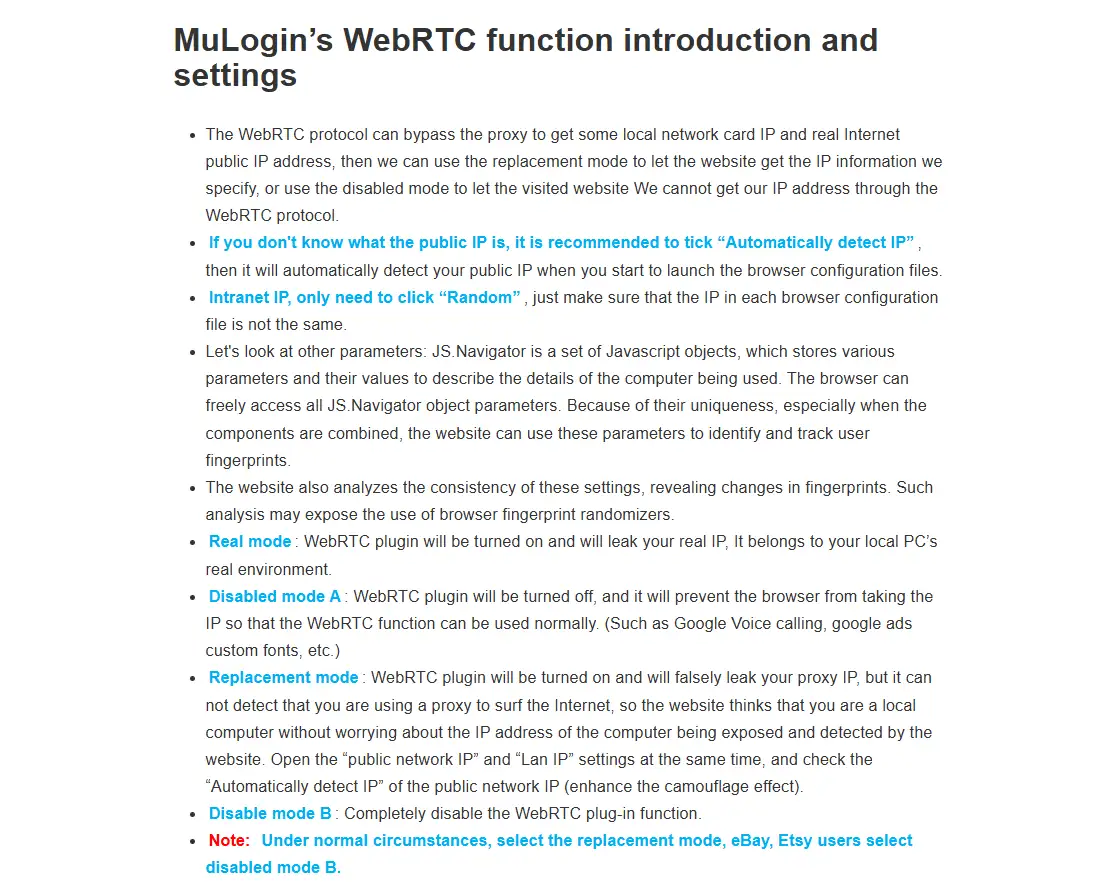
From MuLogin’s public settings material, the product appears to cover major checkpoints such as User-Agent, sec-ch-ua, WebRTC, language, Accept-Language, platform, resolution, and logic related to proxy-linked public IP exposure. The WebRTC Replacement mode mentioned in the documentation is relevant because it suggests an attempt to expose the proxy IP instead of the device’s local IP.
The public update notes, however, stay fairly high level. Based on the version information reviewed for this article, the visible releases include:
v1.1.0.8, described as adding a Chromium 144 kernel plus fingerprint optimizationv1.1.0.7, described as adding a Chromium 142 kernelv1.1.0.6, described as adding a Chromium 140 kernel
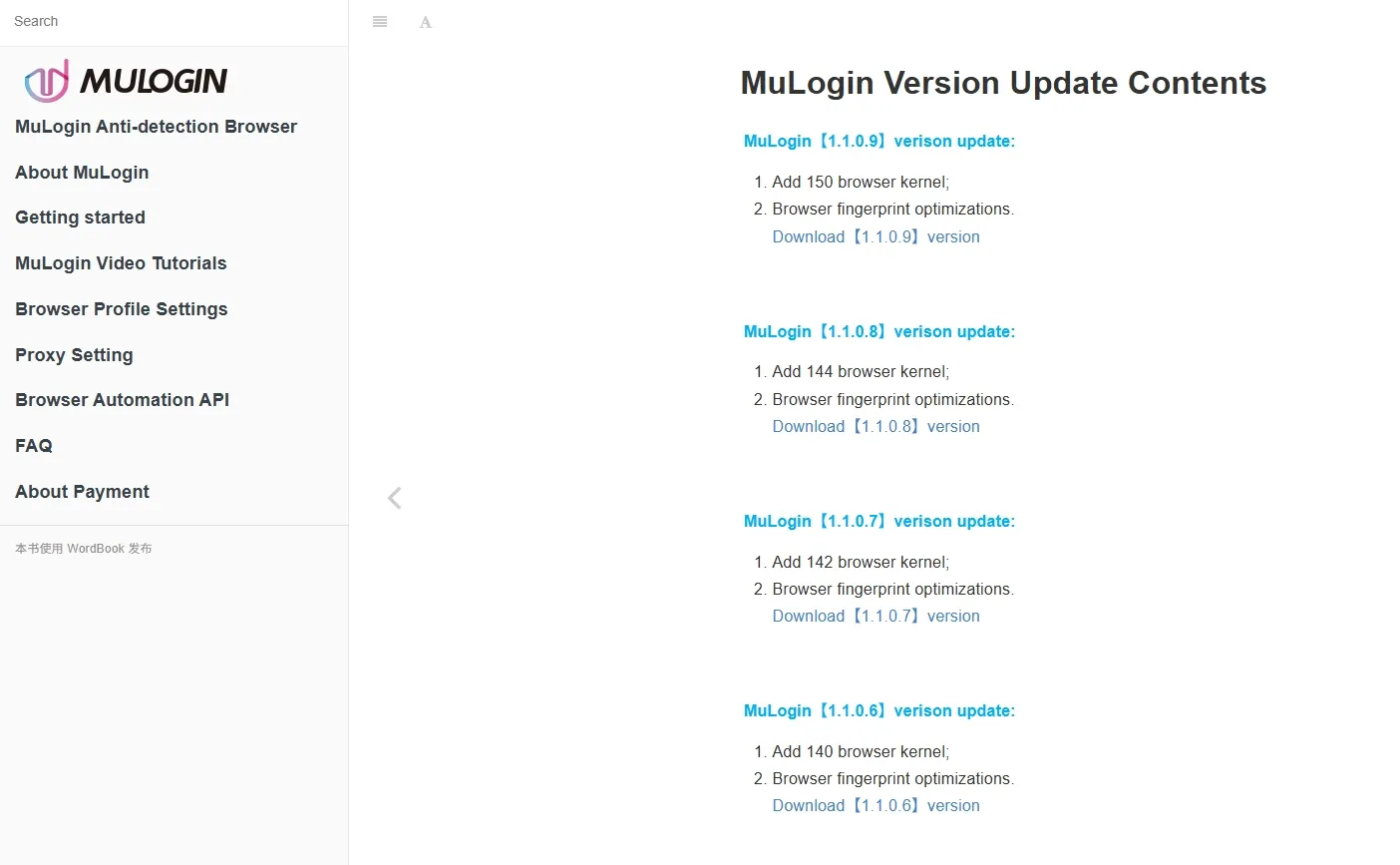
That is enough to show that MuLogin is still being maintained. It is not enough to prove how deep the protocol-layer work goes or how the product performs across advanced detection scenarios.
The most defensible takeaway is that MuLogin still looks like an active traditional antidetect browser, not an abandoned product.
| Lens | MuLogin’s public signal | Practical meaning |
|---|---|---|
| Parameter coverage | Covers UA, UA-CH, WebRTC, language, platform, resolution, and related settings | The baseline fingerprint toolkit is intact |
| Consistency awareness | Public docs emphasize environment consistency | The product frames the problem correctly |
| Third-party detection pages | Useful for spotting obvious contradictions | Not a guarantee of account safety |
| Update-note granularity | Mostly “new kernel plus optimization” language | Active maintenance is visible, deeper roadmap signals are not |
| Usability threshold | Relies on operator understanding | More forgiving for experienced users than for beginners |
How manual is MuLogin’s proxy workflow in daily use?
The MuLogin proxy workflow is one of the most important parts of this review because the product does not appear to bundle proxy supply as a core layer. In practice, results depend heavily on proxy quality, how cleanly proxies are bound to profiles, and how much effort it takes to manage them over time.
Based on the public materials reviewed for this article, MuLogin supports HTTP, HTTPS, SOCKS4, SOCKS5, and IPv6, and it allows a separate proxy per browser profile. On protocol compatibility alone, that is enough for most teams.
Compatibility and baseline support
For most buyers, protocol support is not the bottleneck. HTTP, HTTPS, and SOCKS5 cover the majority of mainstream proxy vendors. The help materials also provide standard input formats, which suggests that MuLogin expects users to manage raw proxy credentials themselves.
There is nothing inherently wrong with that approach. It is a practical, older-school design. It assumes the operator already understands:
- The difference between static residential and rotating proxies
- Why one profile should usually stay tied to one relatively stable IP
- Why frequent IP switching can undermine account stability
Is the setup flow efficient?
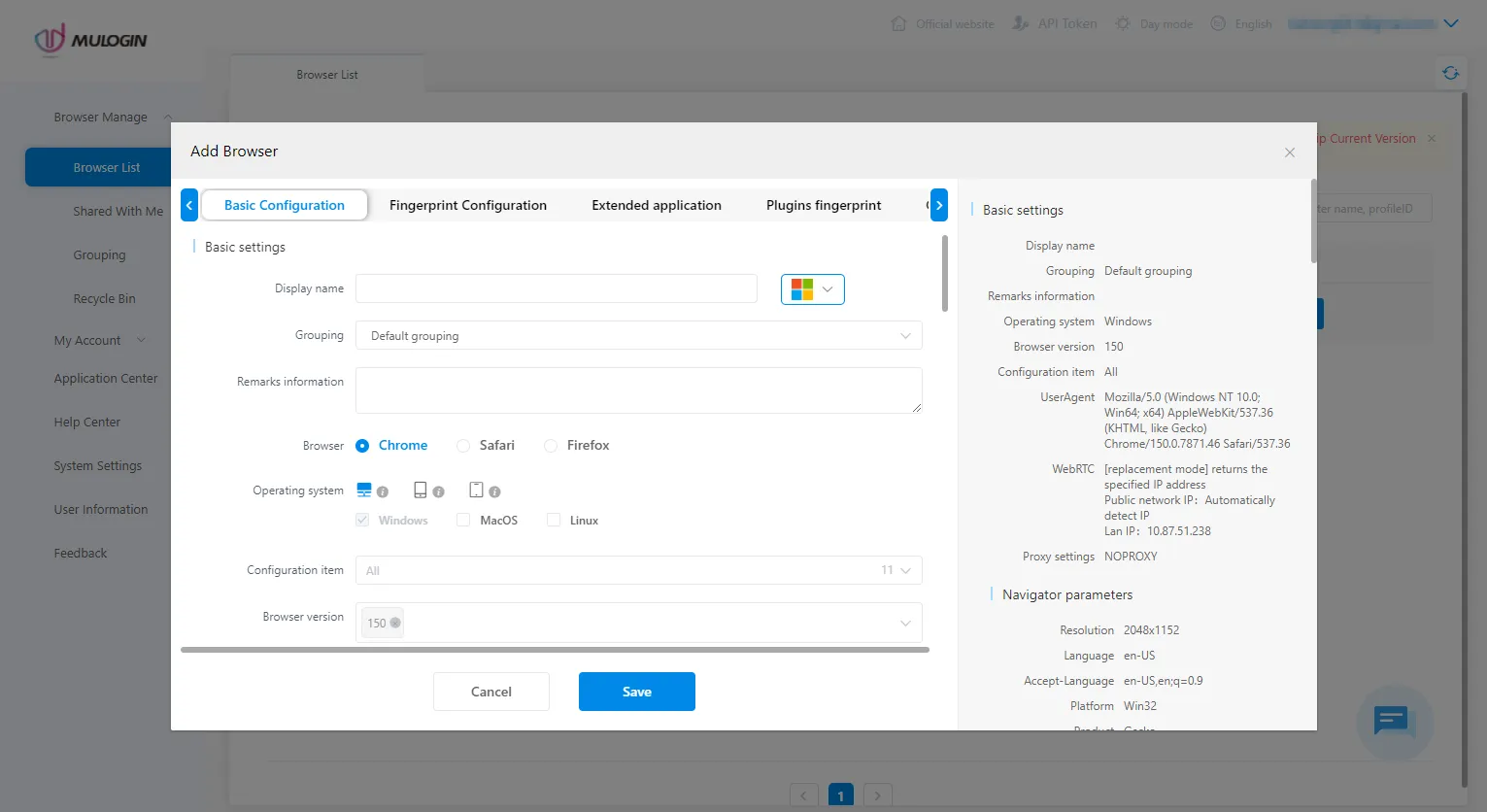
The public workflow looks roughly like this:
- Create a new profile
- Open proxy settings
- Enter host, port, username, and password
- Choose the protocol
- Test the connection
- Save
That works. By current standards, it does not look especially efficient.
The bigger difference appears after the first setup. The real questions are:
- Can you bulk-parse proxy strings?
- Can you bulk-test them?
- Can you batch-fix failures?
- Can you reassign them cleanly across multiple profiles and operators?
An inefficient pattern is importing dozens of proxies, testing them one by one, troubleshooting them one by one, and mapping them to profiles through notes or spreadsheets. A stronger workflow is to import a full proxy pool, validate it in bulk, segment it by region and use case, and then assign it into profile templates with timezone and language already aligned.
MuLogin does support bulk profile creation and public third-party proxy integration tutorials. From the public materials alone, though, the product still reads as “bring your own proxies, then configure them manually inside MuLogin.”
Where the daily friction shows up
The main time cost is rarely the first connection. It is the ongoing maintenance.
The public documentation reviewed for this article advises one unique IP per browser profile and only one account per site within that profile. That is sound guidance. But once you manage dozens of profiles, recurring issues start to matter:
- Expired proxies
- Wrong-region exits
- Unstable IP quality
- Overused static IPs
- Weak visibility into which profile is tied to which resource
MuLogin appears to offer a test-network step, but the public materials do not point to a richer proxy-pool management layer or a more unified resource view. In workflow terms, it looks more like “possible to complete” than “designed to reduce repetition.”
| Proxy management area | MuLogin’s public workflow | A more efficient modern workflow |
|---|---|---|
| Proxy source | Buy externally, then connect manually | Tighter integration between environment and proxy resources |
| First-time setup | Manual parameter input and one-by-one testing | Bulk import with automatic format recognition |
| Ongoing troubleshooting | Primarily single-proxy testing | Bulk health checks and faster bad-node removal |
| Region alignment | Mostly operator-driven | Stronger templates and linked settings |
| Team reuse | Often depends on notes and handoff discipline | Cleaner pool visibility and smoother reassignment |
This is one reason many buyers who start with a “MuLogin browser proxies” query eventually broaden the comparison to other tools.
What does MuLogin publicly confirm about pricing and free trial terms?
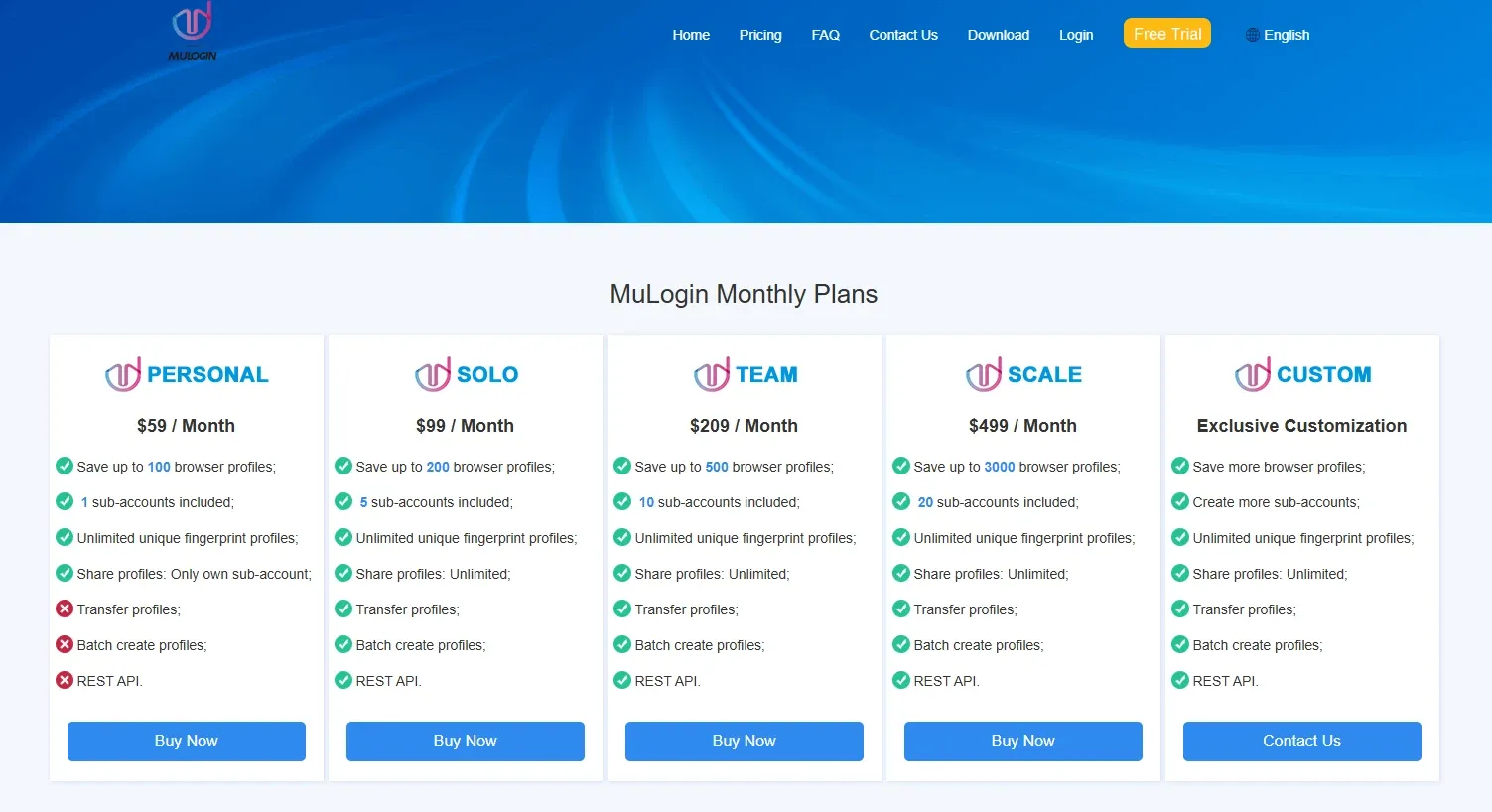
Based on the public pricing and help materials reviewed for this article, MuLogin’s published plans were listed as:
- Personal:
$59/month, including 100 browser profiles and 1 free sub-account - Professional:
$99/month, including 200 profiles and 5 sub-accounts - Team:
$209/month, including 500 profiles and 10 sub-accounts - Enterprise:
$499/month, including 3000 profiles and 20 sub-accounts - Custom plans were also presented
The same public materials state that new users can register and then contact online support to activate a three-day free trial. The trial terms described in those materials say that users can save up to 5 profiles and use bulk creation and RESTAPI, but do not get sub-accounts, profile sharing, or profile transfer.
On paper, those prices are not extreme for established teams. The bigger question is the entry structure.
If you already know you need 100-plus profiles, sub-accounts, API access, and a long-term Windows workflow, the starting cost may be acceptable. If you are a solo operator or a small team trying to validate a 10-to-20-account workflow first, the entry threshold is harder to justify because the published plans start at 100 profiles rather than a lighter starter tier.
Search demand around “MuLogin coupons” is real, but the public materials reviewed for this article do not suggest that coupon-based discounts are the center of the pricing model. The more realistic cost-reduction paths appear to be:
- Choosing a longer billing cycle
- Contacting sales or support about a custom plan
- Looking at total operating ROI rather than subscription price alone
That third point matters. In real operations, you also have to account for:
- Proxy spend
- Time spent resolving setup mistakes
- Team handoff cost
- Expansion flexibility
That is why a fair pricing judgment should not stop at “cheap” or “expensive.” The better question is whether the cost structure fits your current stage and maintenance overhead.
What can public version notes and support pages actually prove?
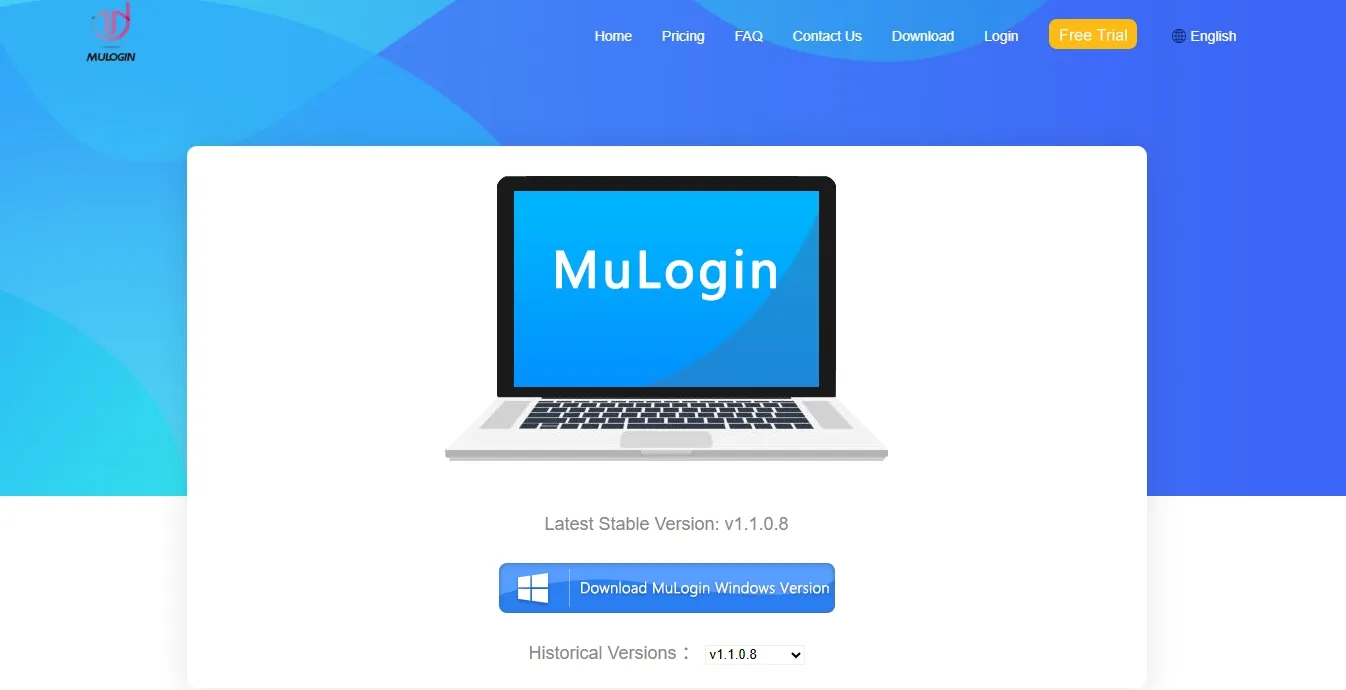
MuLogin does not look abandoned.
Based on the public pages reviewed for this article, the latest stable version shown on the download page was v1.1.0.8, and the version page listed consecutive releases such as v1.1.0.8, v1.1.0.7, and v1.1.0.6. The visible release notes are mostly framed as new browser kernels plus fingerprint optimization.
That is enough to confirm ongoing maintenance at a basic level.
What is harder to see from the outside is whether MuLogin is also making deeper product-evolution moves, such as:
- Major UI or UX restructuring
- Stronger permissions architecture
- Better proxy-resource management
- More modern team workflow design
The public materials make those changes less obvious.
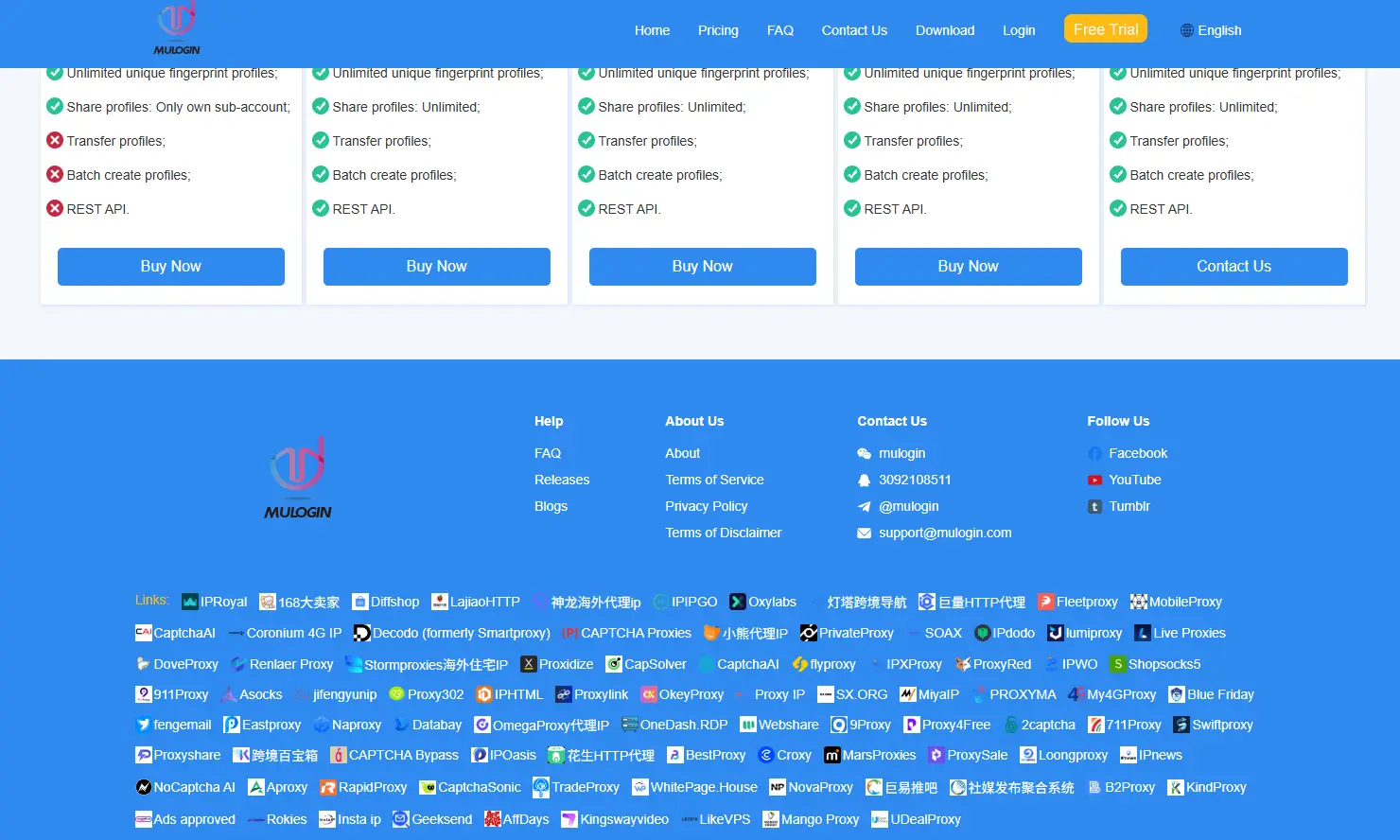
The public support channels reviewed for this article include WeChat, QQ, Telegram, and email, and the homepage text referenced 7x12-hour 1v1 customer service with remote assistance. That suggests a support style that is more human-led and chat-oriented than ticket-driven and documentation-led.
For some teams, that will feel helpful. For teams that prefer self-serve documentation, standardized ticketing, and lower dependence on direct messaging, it may feel less efficient.
That distinction matters because support quality has two layers:
- Can you reach a human when something goes wrong?
- Does the product reduce how often you need help in the first place?
From the public materials alone, MuLogin appears stronger on the first question than on the second.
MuLogin pros, cons, and where it starts to feel dated
Pros
- The public materials present profile isolation as a core capability.
- Automation support is meaningful, with LocalAPI, RESTAPI, Selenium, and Puppeteer all publicly documented.
- Sub-accounts, profile sharing, and profile transfer cover the basic needs of smaller teams.
- The Windows-first approach may reduce switching pain for older teams already invested in traditional workflows.
- The documentation explicitly warns about frequent failure points such as WebRTC, language, timezone, and proxy binding.
Cons
- Public system requirements still point to a Windows-first installation model, so native macOS support does not look like a core strength.
- The proxy workflow appears more manual than what many newer tools offer.
- Trial access requires manual activation through support rather than instant self-serve onboarding.
- The published plans start at a 100-profile level, which is heavy for solo users and small teams.
- Public update notes mostly highlight kernels and optimization, while deeper product-direction signals remain limited.
Where MuLogin starts to feel dated
| Dimension | MuLogin’s public positioning | What many teams care about more |
|---|---|---|
| Onboarding model | More parameters, more freedom, more dependence on operator knowledge | Stronger defaults, fewer mismatches, less manual troubleshooting |
| Proxy workflow | Manual input and one-time testing | Bulk parsing, bulk validation, proxy-pool management |
| Client experience | Clearly more Windows-centered | Native comfort on both Windows and macOS |
| Collaboration model | Sub-accounts, sharing, transfers | Granular permissions, workspaces, audit trails, resource isolation |
| Automation path | API and script friendly | Lower-maintenance orchestration on top of APIs |
| Entry cost | Starts at a 100-profile threshold | More flexible starter tiers and trials |
MuLogin has not necessarily become worse. Market expectations have changed. Time cost is part of product cost.
MuLogin vs RoxyBrowser
The clearest way to evaluate a MuLogin alternative is to compare workflow design, not just feature checklists.
MuLogin’s main strengths are a mature, traditional antidetect model and lower switching friction for established Windows teams. Based on the public RoxyBrowser materials reviewed for this article, RoxyBrowser is presented as a workflow that brings profiles, proxies, collaboration, and automation together more tightly.
If your main goal is to manage multiple accounts with less day-to-day overhead, that workflow difference is worth checking directly against your own process.
| Feature | MuLogin | RoxyBrowser |
|---|---|---|
| Entry path | Public materials describe a 3-day trial that requires manual activation; paid plans start at 100 profiles | The public materials reviewed for this article describe a free edition with 5 profiles, a public trial path, and paid tiers that scale by profile count |
| System support | Publicly Windows-only at the client-install level, while profiles can simulate macOS, Linux, and mobile environments | The reviewed public materials describe support for Windows and macOS, including Apple Silicon and Intel builds |
| Proxy integration | Supports HTTP, HTTPS, SOCKS4, and SOCKS5, mainly through manual input and one-by-one testing | The reviewed public materials describe smart recognition, bulk import, bulk testing, batch assignment, and a dedicated proxy resource entry point |
| Profile creation | Detailed controls, but more dependent on user setup | Public materials emphasize quicker creation, templates, and bulk workflows |
| Team collaboration | Sub-accounts, sharing, and transfers | Public materials describe sub-accounts, granular permissions, template sync, workspace collaboration, and clearer operation history |
| Automation | LocalAPI, RESTAPI, Selenium, and Puppeteer | The reviewed public materials describe Selenium, Puppeteer, Playwright, AI Agent, MCP, and natural-language orchestration |
| Anti-association framing | Traditional and mature, with broad parameter coverage | Public materials emphasize environment consistency, fine-grained controls, and profile isolation |
| Better fit | Legacy Windows teams with mature SOPs | Teams that prioritize workflow efficiency, Mac support, proxy operations, and lower long-term maintenance overhead |
MuLogin still appears capable of handling the core job. The reason to compare it with RoxyBrowser is not that MuLogin has stopped working. It is that the surrounding workflow may require more manual effort over time.
Why RoxyBrowser is a relevant alternative to compare
If you are actively looking for a MuLogin alternative, the real question is not “Which product can edit more settings?” It is “Which product fits a modern operating workflow more cleanly?”
Based on the public RoxyBrowser materials reviewed for this article, it offers a useful contrast in workflow design:
Public materials point to a more streamlined daily workflow
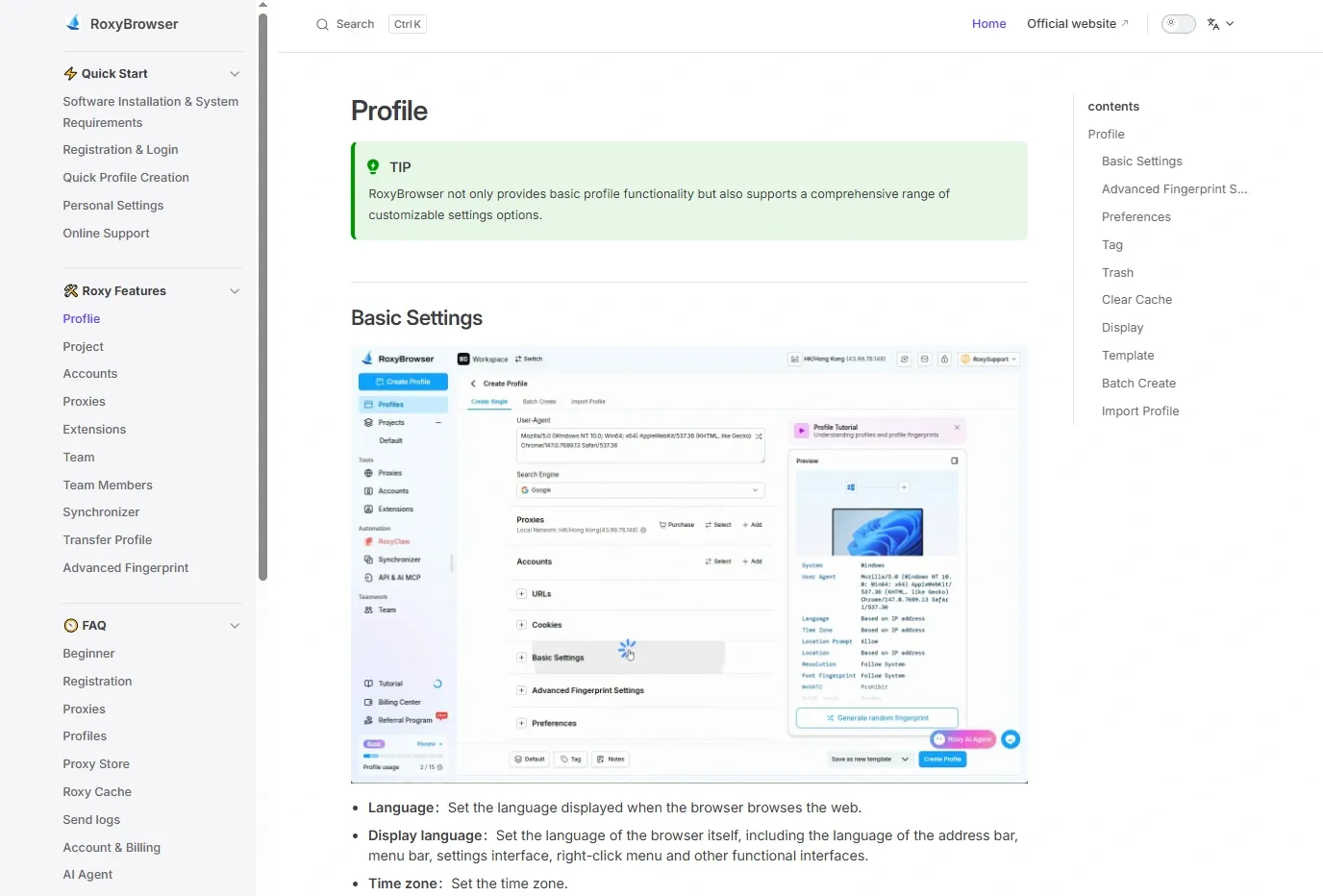
The public documentation presents quick creation, templates, bulk creation, bulk import, proxy pools, team tools, and update entry points more clearly. That suggests a product designed to pull high-frequency actions into one workflow instead of leaving users to stitch them together manually.
Public materials suggest a lighter scripting burden
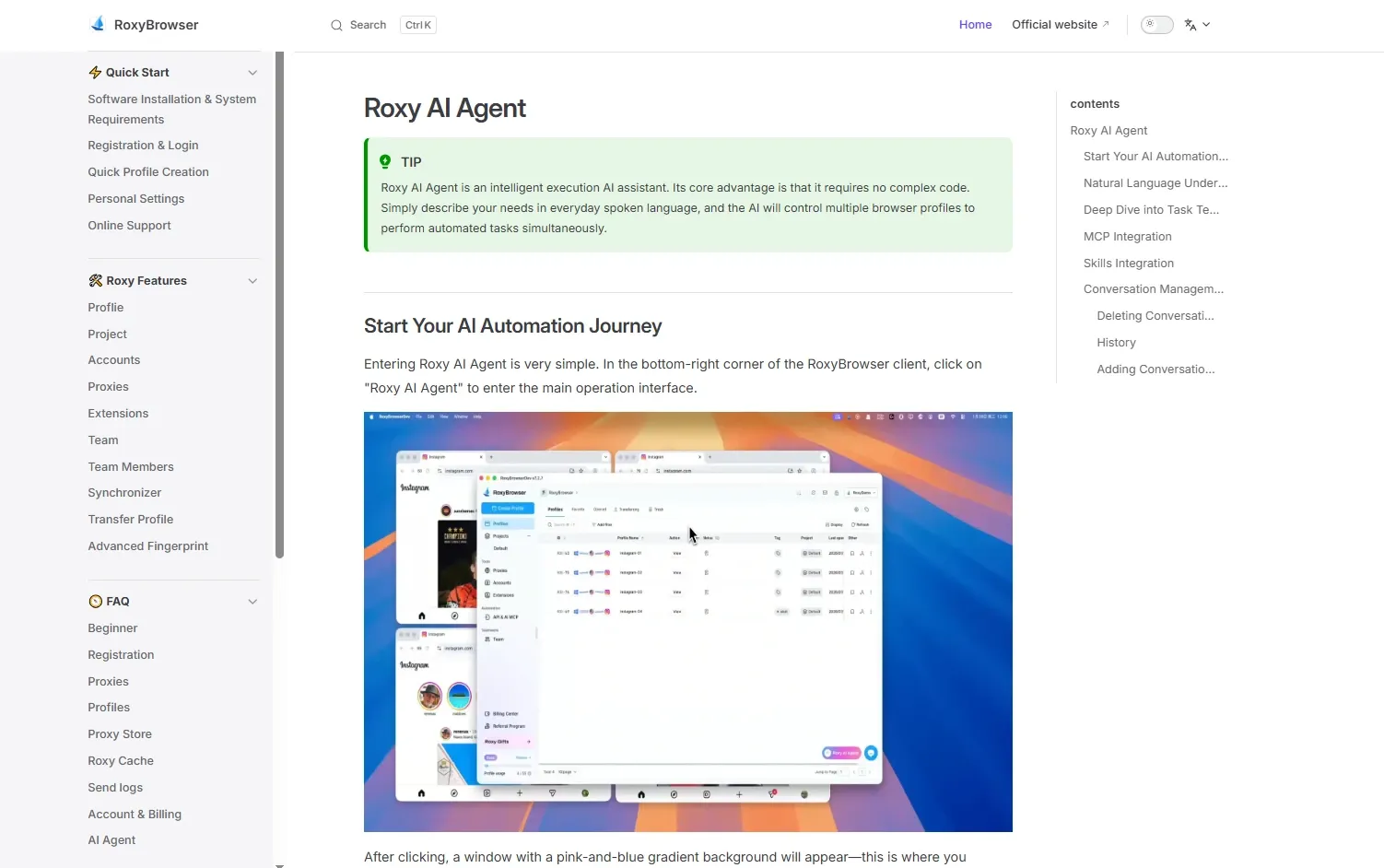
One of the clearer public directions is natural-language orchestration. The public materials reviewed for this article emphasize AI Agent support, MCP support, custom Skills, and concurrent multi-profile execution. The value here is not the “zero-code” slogan by itself. It is the lower operational overhead that comes from moving work out of brittle scripts and repetitive manual tasks.
Public materials describe broader mixed-device support
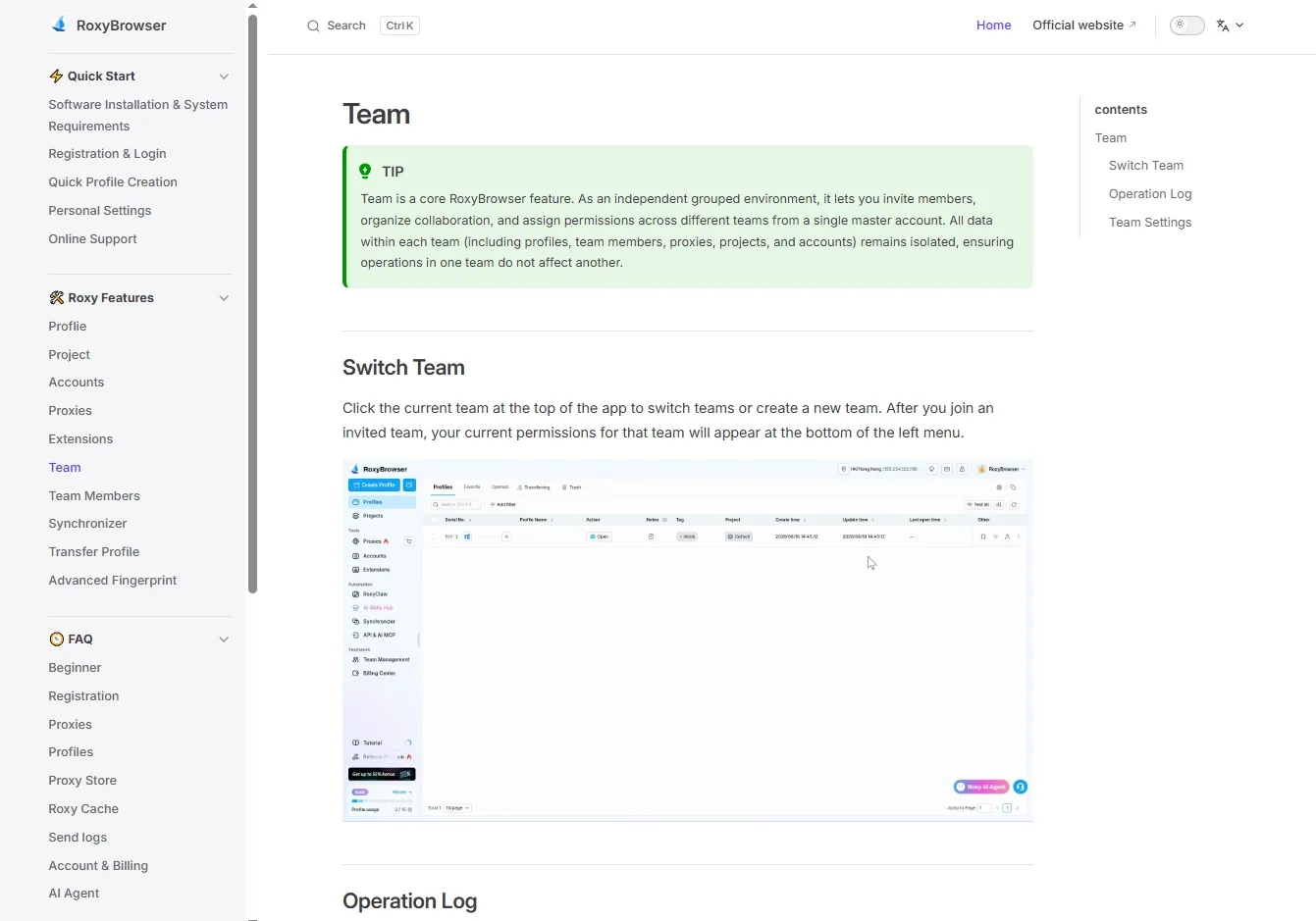
The public system materials reviewed for this article describe macOS support, including Apple Silicon and Intel builds. That matters for teams that work across Windows and Mac or for managers who oversee operations from macOS.
Public materials describe easier proxy and profile management
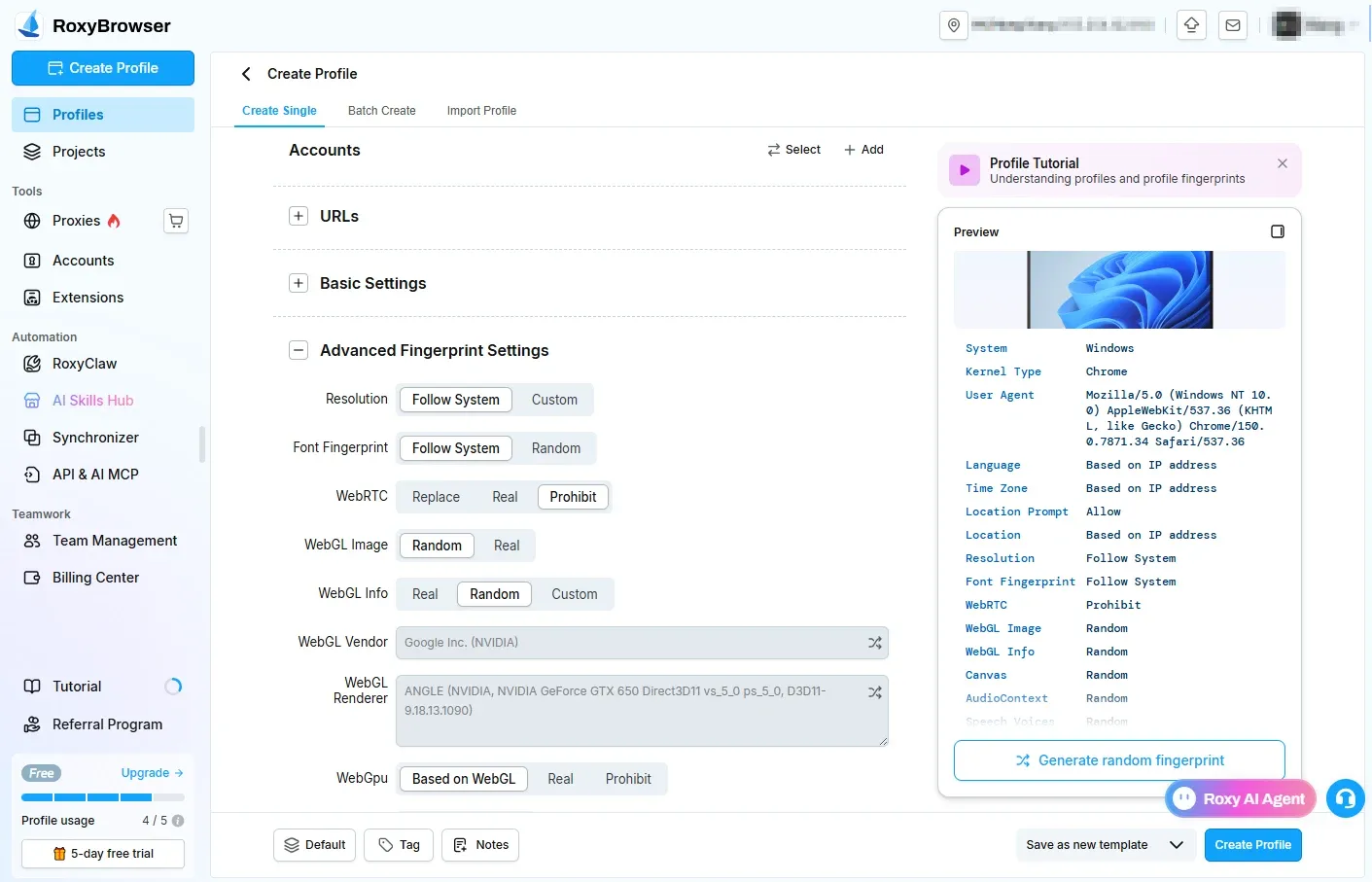
The public materials reviewed for this article describe bulk proxy import, bulk testing, batch assignment, and a built-in proxy resource entry point. For teams creating profiles at scale, that kind of design can remove a meaningful amount of repetitive work.
Public materials describe more flexible entry pricing
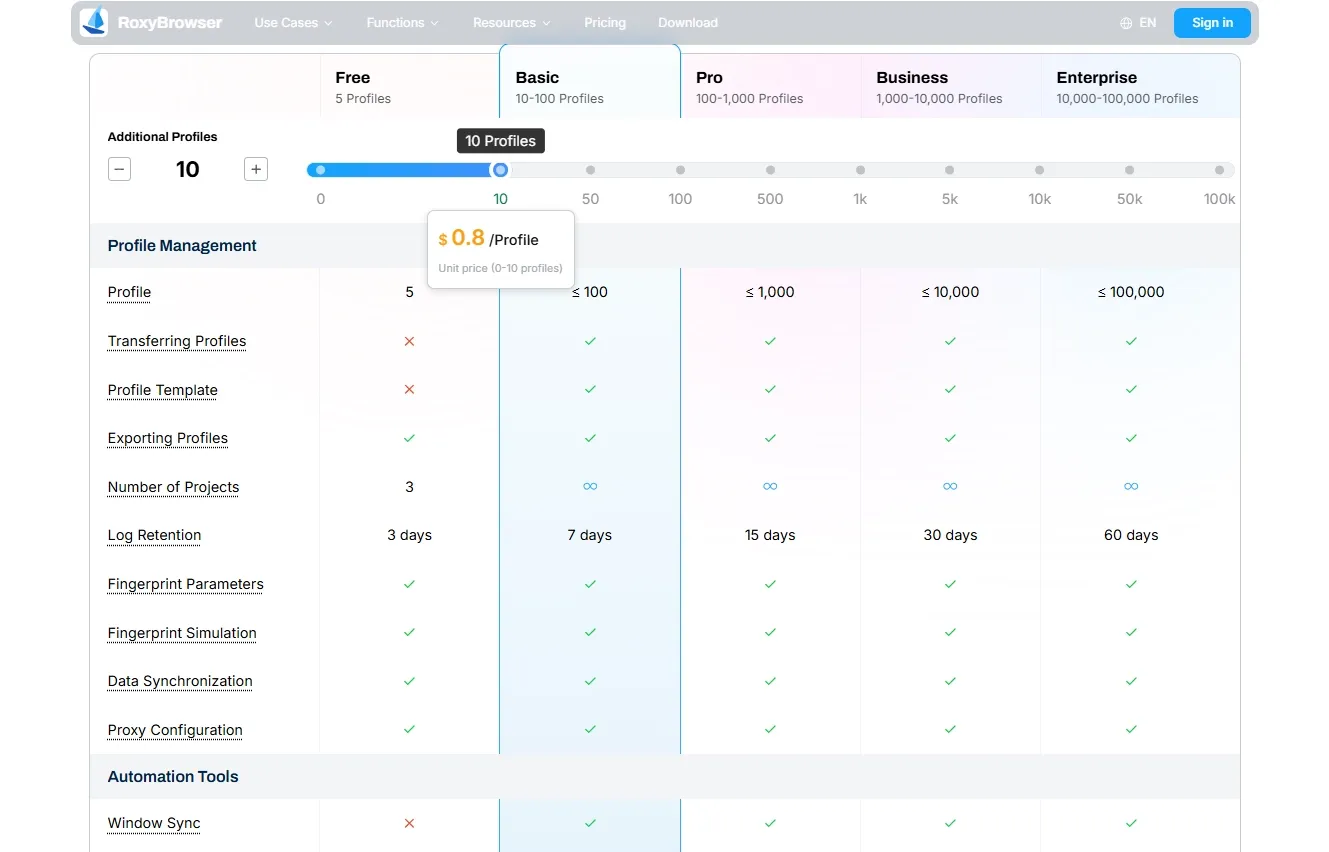
The source material reviewed for this article describes a more granular profile-based pricing model for RoxyBrowser, including a free tier and smaller starting steps for teams that do not want to commit to a 100-profile bundle on day one.
Public materials describe team features built for longer-term operations
The public materials reviewed for this article also describe RoxyBrowser in terms of permission layers, template sync, collaboration, and operation history. For multi-person teams managing environments and proxy resources together, that structure may be easier to scale.
Who can still keep using MuLogin
MuLogin is not the right default choice for every new buyer, but it can still make sense for some existing users:
- Teams already running stable Windows-based workflows
- Teams with existing Selenium or Puppeteer scripts they do not want to replace soon
- Operations where migration risk is higher than the cost of staying put
- Users who value familiarity and SOP continuity more than interface modernization
- Small teams whose needs are already covered by sub-accounts, profile sharing, and transfers
If that sounds like your operation, staying on MuLogin may be more rational than migrating immediately.
Who should compare alternatives more seriously
If your workflow is still taking shape, or if your current workflow is already slowing you down, it makes sense to compare MuLogin with RoxyBrowser directly.
That is especially true for:
- Beginners and newly formed teams
- Mac users, especially Apple Silicon users
- Solo operators who want to start small before paying for 100 profiles
- Teams that need bulk proxy import, testing, and profile creation
- Teams that need stronger workspace management and cleaner cross-operator handoff
- Teams that want to move beyond script-only automation
Final verdict: is MuLogin still worth it?
Yes, MuLogin still appears to be a legitimate and usable antidetect browser.
Based on the public materials reviewed for this article, it appears to offer the core building blocks many teams need: profile isolation, environment controls, proxy compatibility, sub-account collaboration, and API-based automation.
That is not the same as saying it is the obvious first choice for every buyer.
MuLogin still looks reasonable for established Windows teams, teams with mature scripts, and teams with low appetite for migration. It looks less compelling for beginners, Mac-first teams, solo operators, or growth-stage teams trying to reduce proxy-management and automation-maintenance overhead at the same time.
The most practical decision framework is simple:
- Are you comfortable with a more manual profile and proxy workflow?
- Is your operation still mainly Windows-based?
- Do you already have working scripts and SOPs that you do not want to replace?
If all three answers are yes, MuLogin may still be worth keeping.
If at least two answers are no, it is reasonable to put RoxyBrowser on the shortlist and compare its browser fingerprint protection, proxy workflow, team features, and automation model in detail.
If your priority is a more modern workflow, Mac support, bulk proxy operations, and lower day-to-day maintenance overhead, a reasonable next step is to try RoxyBrowser free and test it against your real workflow before making a migration decision.


