
TL;DR
- Use free web proxies for quick public-page checks.
- Use residential proxies for scraping and location-based sessions.
- Use a proxy browser for multi-profile or account workflows.
- Always verify provider claims on official product pages.
What does a web proxy actually solve?
A web proxy is a relay layer between your device and the target website. In practical terms, it changes the network exit the site sees, rather than your local public IP. MDN’s proxy documentation describes the proxy server as the system that receives a request, forwards it, and returns the response.
That solves four common problems:
- Exit IP switching: the site sees the proxy IP, not your original network exit.
- Geo-targeted access: traffic can appear from a specific country, region, or city.
- Request distribution: repeated requests can be spread across different exits instead of one origin.
- Session routing: a specific account or workflow can stay tied to one stable proxy session.
The limit is just as important. A web proxy does not fix browser-side identity leaks by itself. Cookie residue, WebRTC candidates, Canvas and WebGL fingerprint signals, timezone mismatch, font exposure, and UA-CH conflicts can still reveal that the environment does not match the IP location. That is why teams that need manage multiple accounts usually pair proxies with isolated browser profiles instead of switching IPs inside one standard browser.
What makes a web proxy “best” for a specific task?
The best web proxy is not the one with the biggest advertised pool. It is the one that matches the job. For public-page access, low friction may matter most. For scraping, session control and exit quality matter more. For logged-in workflows, network routing alone is not enough because browser identity, storage isolation, and location consistency also affect stability.
This guide discusses legitimate uses such as public-page testing, localized QA, price monitoring, team workflows, and multi-profile environment management. It does not recommend violating platform terms, misrepresenting identity, or using proxy tools for fraud, spam, or account abuse.
Web proxy vs VPN vs proxy browser
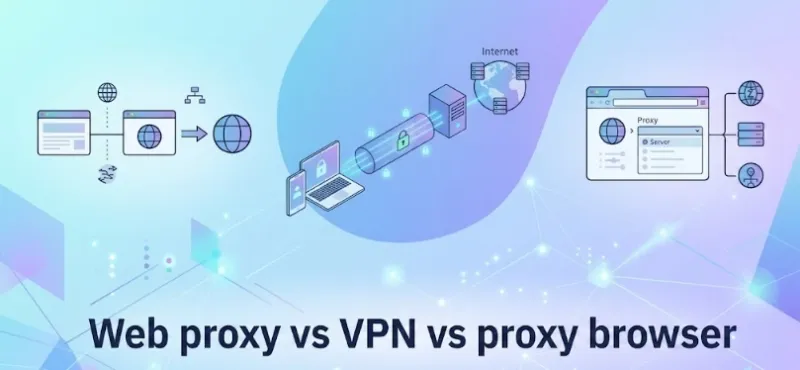
These tools affect traffic in different layers.
If you are comparing Proxy vs VPN options, the main question is not which tool is universally better. It is which layer of control your workflow actually needs.
A VPN is closer to a system-wide tunnel. It usually encrypts traffic for the whole device and gives you one unified exit.
A web proxy is lighter. It is better suited to individual requests, browser sessions, or quick route changes.
A proxy browser goes one layer deeper. It combines proxy routing with profile isolation, local storage separation, timezone and language alignment, and fingerprint controls. In multi-profile workflows, that extra layer is often what separates a usable setup from a fragile one. In other words, the best proxy web browser is usually the option that keeps network routing and browser identity management in the same system.
Capability comparison
| Category | Web Proxy | VPN | Proxy Browser |
|---|---|---|---|
| Main purpose | Quick IP change for web traffic | Device-wide encrypted tunnel | IP routing plus profile isolation |
| Scope | Single page or browser session | Entire device | Separate browser profiles |
| Fingerprint control | Low | Low | High |
| Long-session stability | Limited | Moderate | Stronger when configured correctly |
| Multi-account suitability | Weak | Limited | Strong |
| Typical use cases | Public page preview, light testing | Public Wi-Fi protection, remote work | Scraping, account operations, team workflows |
For a single user doing short public-page checks, a VPN or a basic web proxy may be enough. For a team running multiple accounts on Snapchat, TikTok, ad platforms, stores, or social dashboards, the question changes from “Can I switch IPs?” to “Can I keep each browser identity separate and consistent over time?”
What makes the best web proxy in practice?
The best web proxy is the one that matches the risk profile of the task. When teams compare the best web proxies, the useful comparison is not just speed or pool size. In most real workflows, we evaluate six factors.
1. Exit quality and proxy types
Exit quality affects how believable your traffic looks to the target site. Modern businesses require different exits for diverse use cases:
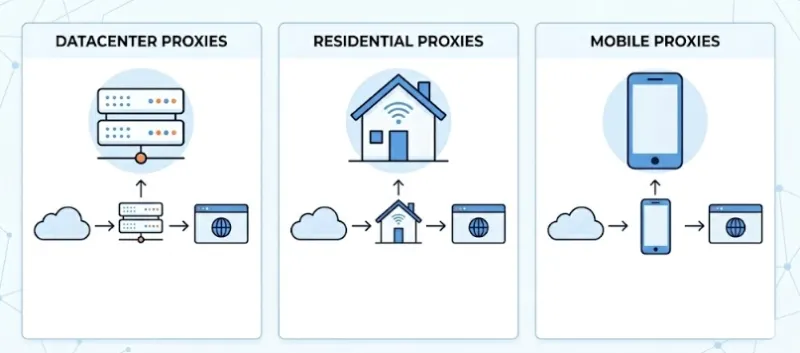
Datacenter Proxies: Fast and cost-effective. Best for basic security monitoring or accessing non-restrictive public data where high speed matters more than anonymity.
Residential Proxies: Network traits look closer to ordinary consumer traffic. They are usually better aligned with platforms that score ASN history, ISP type, and request behavior. This makes them essential for ad verification, brand protection, and localized market research.
Mobile Proxies: Offers the highest level of IP trust through 4G/5G networks, ideal for app-based testing and highly restricted social platforms.
Even with high-quality IPs, residential proxies are not automatically “safe”. For example, a price-monitoring task that hits the same marketplace every hour may work with datacenter exits at a small scale, then degrade once request volume rises and the target starts clustering those exits as automation traffic.
2. Session strategy
Finding the best web proxy is also a session strategy problem. Some tasks benefit from rotation, while others break because of it.
Rotating sessions: Fit broad jobs like competitive price monitoring and SEO tracking where bypassing strict rate limits is necessary.
Sticky sessions (Static/ISP): Fit logged-in work like global e-commerce management where a profile should keep the exact same exit over time.
A common failure pattern is using aggressive IP rotation for a stable account. That can create repeated geo-jumps, unusual login trails, and session distrust even if the raw proxy pool is strong.
3. Protocol fit
HTTP and HTTPS proxies cover most ordinary browsing and many collection tasks. SOCKS5 becomes more useful when you need broader transport support, deeper traffic handling, or tighter binding inside a proxy browser.
If your workflow is simple page retrieval, HTTP may be enough. If you are tying long-lived profiles to different proxies, SOCKS5 is often easier to work with in browser environments that expect stable session routing.
4. Fingerprint consistency
Fingerprint consistency means the environment tells one believable story. If the proxy says New York but the browser timezone says Shanghai, the UI language says French, and WebRTC exposes a local Asian network candidate, the setup can still look suspicious.
This is where the best web proxy stops being just a proxy purchase decision. It becomes an environment design decision. You need the IP region, browser language, timezone, profile storage, and user-agent hints to line up.
5. Leak surface control
Even a strong proxy can fail if the browser leaks too much.
DNS leaks can expose local resolver behavior.
WebRTC leaks can reveal local or public IP candidates.
Canvas and WebGL fingerprints can expose rendering signatures.
UA-CH can provide additional device and browser details. MDN’s UA-CH reference and its WebRTC API documentation explain why those surfaces matter.
Example: a team can change to a clean residential exit and still trigger checks because WebRTC or storage artifacts link several profiles back to one unmanaged browser environment.
6. Operational cost and scalable deployment
Manual proxy switching works for one person doing occasional tests. It scales badly once you need templates, permission control, repeatable setups, and audit trails. Purchasing high-quality IPs is only the first step; the deployment process must be scalable.
At that point, the best web proxy solution is usually not a single IP vendor. It is a system that integrates proxy assignment with tools that support profile setup, reusable templates, and consistent deployment. This reduces manual configuration drift and lowers the operational cost of team workflows.
Scenario-Based Selection: Free Proxies, Residential Proxies, and Web Scraping Proxies
Temporary Access to Public Web Pages
If you only need to temporarily open public web pages, online web proxies serve as a low-barrier solution. Their main advantages are that they require no installation and are ready to use immediately, making them suitable for short-term, read-only, and low-sensitivity access.
However, they come with clear limitations: shared exit nodes, weak concurrency, limited stability, high login risks, and poor control.
Therefore, while some of the best web proxies in this free tier are “usable tools,” they should not be treated as “business infrastructure.” Below are several best free web proxy tools to help you understand different product formats. This is not a real-time ranking; please refer to their respective official websites for specific features, node availability, quotas, and current uptime.
Best Free Web Proxy Tools
| Proxy Name | Core Product Format | Common Advantages | Common Use Cases | Common Limitations |
|---|---|---|---|---|
| Webshare | Proxy IP Service | Good for developer integration and lightweight testing | Lightweight scraping, script debugging | Free quotas and node strategies may fluctuate |
| Hide.me | Online Web Proxy | Low barrier, direct web access | Temporarily opening public pages | Features and node ranges are usually limited |
| CroxyProxy | Online Web Proxy | Friendly for dynamic web page access | Temporarily viewing front-end rendered pages | Shared exit stability is affected by real-time load |
| ProxyScrape | Open Proxy List | Good for testing different proxy types | Learning proxy pools and basic scraping | Free proxy uptime fluctuates heavily |
| Proxyium | Online Web Proxy | Simple to use, good for quick access | Temporary cross-region page previews | Not suitable for long sessions and login-based tasks |
- Webshare: Often used for lightweight proxy testing and basic integration. If your goal is API debugging, script connectivity verification, or low-frequency web access, services like this are easier to start with. However, always check their official page for exact free quotas, supported protocols, and node availability.
- Hide.me: The value of this type of online web proxy lies in its “no installation, ready-to-use” nature. It is ideal for temporarily opening public web pages or performing simple access verification. Whether it is suitable for login-based scenarios depends entirely on exit stability and session control capabilities.
- CroxyProxy: Commonly used when you need to access dynamic content directly at the web layer. It is better suited for checking “if a page can load” rather than supporting a stable business access pipeline.
- ProxyScrape: This acts more like an open proxy source aggregator. It is highly suitable for learning, testing, and building experimental proxy pools, but it is not recommended for production environments requiring high stability.
- Proxyium: Focused on lightweight convenience, it is perfect for quickly verifying how a web page renders through different geographic exits. If you need long-term logins, stable sessions, or strict environment isolation, you will usually need to upgrade to a more comprehensive solution.
Web Scraping and Price Monitoring
When the goal is to find the best proxy for web scraping, the evaluation criteria must be far stricter. A reliable scraping proxy must meet at least four core requirements:
- Stable concurrency without high-frequency disconnections.
- Support for switching between Sticky Sessions and Rotating Sessions.
- Granular geographic targeting, ideally down to the country or city level.
- A highly clean IP pool that won’t trigger CAPTCHAs or access blocks rapidly.
In practice, a common misdiagnosis is treating a “script error” as a logic issue in the scraper. The true root cause is often poor IP reputation, incorrect protocol selection, or a mismatch between the browser environment and the proxy’s physical location. When evaluating the best proxies for web scraping, it is useful to compare several provider models and check the current product pages for exact limits, coverage, and purchasing terms.
Recommended Proxy Providers
| Provider | Common Positioning | Sticky/Rotating Control | Key Purchasing Checks | Common Use Cases |
|---|---|---|---|---|
| RoxyIP | Residential proxy solution deeply integrated with browser environments | Subject to official page and dashboard capabilities | IP pool size, geo-coverage, profile binding, management UI | Cross-border e-commerce price comparison, long-term data scraping, multi-account management |
| Rola IP | Hybrid residential and mobile proxy solution | Subject to official page and API docs | Mobile proxy coverage, API capabilities, session strategies | Mobile-centric scraping, scenarios requiring evaluation of multiple exit types |
| Bright Data | Enterprise-grade global proxy brand | Subject to product plans and terms | Geo-coverage, compliance processes, budget thresholds | Enterprise-scale proxy procurement, complex geographic coverage needs |
1. RoxyIP
Core Resources: 90+ million premium residential IPs covering 200+ countries/regions, supporting precise city-level targeting.
Key Advantages: Resources are natively embedded within RoxyBrowser, reducing the friction of third-party integration. It supports fast proxy-to-profile setup and is designed for teams that want proxy management and browser environment control in one workflow.
Use Cases: Suitable for cross-border e-commerce, social media operations, localized testing, and long-term multi-profile workflows that need stable proxy binding and centralized management.
2. Rola IP
Core Resources: A comprehensive proxy matrix featuring not only dynamic/static residential and datacenter IPs but also real mobile IPs and static IPv6.
Key Advantages: Rola IP is commonly positioned around flexible billing and a mix of residential and mobile proxy options. Its API-based setup may fit teams that need broader proxy-type coverage.
Use Cases: Can fit technical teams that want to evaluate a hybrid proxy strategy across residential, mobile, and other traffic types.
3. Bright Data
Core Resources: Highly vetted, premium residential IP networks.
Key Advantages: Bright Data is widely known as an enterprise proxy provider with a large commercial product stack and advanced data collection tooling. Exact capabilities vary by plan and compliance requirements.
Use Cases: Often evaluated by larger teams that need broad geographic coverage, procurement controls, and enterprise-oriented proxy workflows.
Multi-Account Operations and Cross-Border Business
When workflows involve account logins, merchant backends, advertising accounts, regional storefronts, or other legitimate cross-border business operations, simply having a “working IP” is no longer enough.
At this stage, the critical factor is: whether the proxy can be permanently bound to an isolated fingerprint environment, and whether a team can replicate that exact environment configuration seamlessly.
If a team requires proxy binding, environment templates, layered permissions, and audit logs simultaneously, an all-in-one approach is essential. Finding the best proxy web browser (or anti-detect browser) to pair with your IPs becomes a strategic infrastructure decision. Below are the mainstream fingerprint browsers:
Selection Tip: Please refer to the official pages of each product for real-time updates on feature boundaries, pricing plans, and integration methods. For sensitive workflows, teams should also confirm that their operating model complies with platform rules, internal policies, and local regulations.
| Browser Name | IP Integration Model | Fingerprint Isolation Focus | Team Collaboration Focus | Core Advantages & Target Audience |
|---|---|---|---|---|
| RoxyBrowser | Used seamlessly with RoxyIP. Designed for teams managing proxies and environments in one workspace. |
Linked configuration of environment and proxy. Useful when network and browser settings need to stay aligned. |
Supports environment templates, multi-team workspaces, and granular permissions. | Teams that want unified proxy, profile, and collaboration workflows. |
| AdsPower | Usually configured with third-party proxies. | Commonly associated with multi-profile management and automation-oriented workflows. | Includes team and workspace management features in its product positioning. | Teams comparing proxy-browser options with an existing external proxy supply chain. |
| Multilogin | Supports external proxies and plan-dependent integrations. | Often evaluated for baseline environment isolation and enterprise controls. | Typically positioned toward auditability and structured team use. | Larger teams that prioritize administrative control and process consistency. |
| GoLogin | Uses built-in or external proxies. | Commonly presented as easier to onboard and lighter to configure. | Covers smaller-team collaboration needs. | Smaller teams, solo operators, or early-stage validation workflows. |
How to evaluate a proxy browser
Many searches for best web proxy are really searches for a better account environment. If that is your situation, evaluate the browser layer with the same rigor as the proxy layer. Some users search for best web proxies when they really need the best proxy web browser for multi-profile work. If you are comparing categories rather than single vendors, a best proxy browsers roundup can be more useful than another generic proxy list.
What is browser fingerprint consistency?
Browser fingerprint consistency means the browser environment should match the story your network settings tell. If a profile uses a US proxy but reports a mismatched timezone, language, WebRTC path, or storage pattern, the setup can still look abnormal.
For multi-profile work, consistency usually matters more than aggressive IP rotation. A stable setup should keep proxy region, timezone, language, browser profile data, and leak controls aligned over time.
Isolation depth
Ask whether each profile has separate cookies, local storage, IndexedDB, and cache. Tab-level separation is not the same as profile-level separation.
Proxy binding
Ask whether each profile can keep its own long-term proxy, whether SOCKS5 is supported, and whether you can test or bulk-import proxy assignments without manual rework.
Template control
Ask whether you can reuse standardized templates for timezone, language, screen parameters, and startup settings. That reduces configuration drift across teams.
Team permissions
Ask whether there are workspace roles, logs, and shared project structures. RoxyBrowser’s public homepage, for example, shows Team Space and role-based collaboration features. That is relevant when you need reproducibility and accountability rather than one-off testing.
A practical setup checklist
Even the best web proxy can fail because of setup order. A safer workflow usually looks like this:
- Create the browser profile first.
- Assign the proxy to that profile.
- Align timezone, language, and region before login activity starts.
- Test for DNS, WebRTC, and fingerprint inconsistencies.
- Use sticky sessions for stable account work.
- Reserve rotation for public scraping or broad request distribution.
Example: if one team member logs into five accounts through five proxies inside one unmanaged browser, the IP layer may look different while the local environment still looks linked. That is exactly the kind of mismatch a proxy browser is designed to reduce.
Closing view
The best web proxy is not a universal product category winner. It is a fit-for-purpose stack. The same applies to best web proxies as a category: the right answer changes with the task.
- For short public-page checks, a free web proxy may be enough.
- For scraping and price monitoring, residential exit quality and session design matter most.
- For logged-in workflows and multi-account operations, a proxy browser often matters more than raw proxy volume.
If you are trying to choose a best web proxy, start by defining the job: public preview, scraping, or account work. If your shortlist includes best web proxies for scraping, compare session controls and exit quality first. If your shortlist is really about the best proxy web browser, compare profile isolation and workflow controls first. Once that is clear, the right setup is usually much easier to identify, and much harder to overpay for.
If your evaluation points toward isolated browser workflows rather than raw IP rotation alone, review the profile, proxy binding, and team-control criteria above before moving from a proxy list to a product shortlist.


