
Amazon account suspended? Start with the reason in Amazon’s notice. Confirm whether it affects a seller account, a buyer account, or a single listing, or whether you are facing a sign-in error. Then correct the documented problem, complete any requested verification, and submit the response through the designated channel. This guide covers both seller appeals and buyer recovery; reinstatement and timing depend on the issue and review outcome.
TL;DR: Save the notice and case reference, identify the account type, and answer the stated request with matching evidence. Sellers may need a Plan of Action (POA); buyers use a separate verification or recovery route. Track orders, payments, inventory, and access while Amazon reviews the case.
1. Confirm Your Account Status First
Check Amazon’s Notice
Open Amazon by typing the known website address or using the official application. Do not rely on a link in an unexpected email. Save the affected marketplace, exact restriction wording, cited policy or order, requested action, deadline, case reference, screenshots, and attachments.
For sellers, sign in to Amazon Seller Central and select the affected marketplace. Open Account Health and Performance Notifications using the navigation or search options available to the account.
Menu placement and response options vary by marketplace, permissions, and account state. A US marketplace notice should be investigated in that marketplace even if another store remains accessible. For buyers, follow the official sign-in or account message; Seller Central appeal forms do not replace a buyer recovery process.
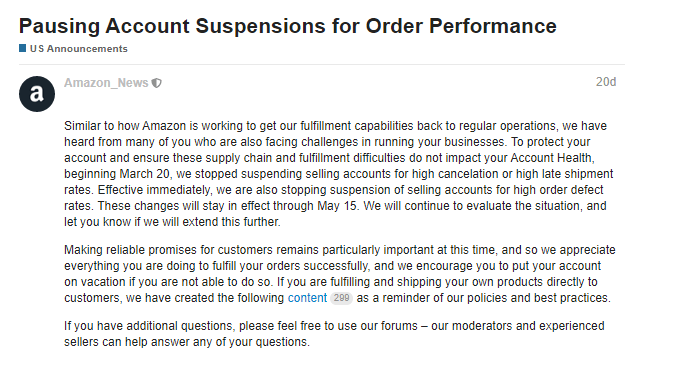
Public Seller Central example reproduced by SellerEngine. Source: SellerEngine.
Suspension, Hold, or Login Error?
| What you see | Likely category | First check |
|---|---|---|
| Selling privileges are disabled or listings are deactivated | Seller account deactivation | Account Health and the cited performance or policy notice |
| One ASIN or category is restricted | Listing, product, or category restriction | The affected listing and required documents |
| Payment, identity, or unusual-activity verification appears | Buyer or account security hold | The official verification flow |
| Sign-in fails without a restriction notice | Authentication or technical problem | Password recovery, two-step verification, cookies, and browser status |
If your problem is “my Amazon account isn’t working” but no suspension notice appears, check password recovery, the two-step verification method, and whether cookies or extensions are interfering. If an authentication code never arrives, verify the recovery method before resetting the password repeatedly. Preserve screenshots before changing local browser data. A sign-in error does not establish that you have a suspended Amazon account.
Preserve records and follow instructions for outstanding orders. Do not open a replacement account, submit altered documents, or send rushed duplicate appeals.
If you contact support, replace “my Amazon account isn’t working” with the exact error, affected marketplace, and time it appeared. That distinguishes an authentication problem from an account review.
2. Why Is My Amazon Account Suspended?
The answer to “why is my Amazon account suspended?” should come from the notice and underlying records. Shared Wi-Fi, a recent login, or one performance metric may be relevant context, but they do not establish the cause by themselves.
| Possible cause | Where to look | Response may require |
|---|---|---|
| Seller performance problems | Account Health and affected orders | Operational corrections and supporting records |
| Authenticity or condition complaints | Cited ASINs, supplier records, complaint details | Sourcing evidence and inventory corrections |
| Intellectual property, safety, or restricted products | Cited policy and affected listings | Authorization or compliance evidence |
| Identity, business, or payment verification | Verification requests and registered details | Genuine documents matching account information |
| Review manipulation or conduct violations | Activity named in the notice | Investigation and corrective controls |
| Related seller accounts | Named account, ownership history, marketplaces | Source-account resolution or evidence about the relationship |
| Buyer payment or security concerns | Payment checks and unusual-activity messages | The designated buyer verification process |
An Amazon related account suspension requires an investigation into the account relationship described in the notice. Relevant records can include ownership, business details, user access, payment information, and historical activity. A browser profile or IP address cannot prove or disprove ownership on its own. For example, an old company registration may explain a named account even when the current operator has never used it.
If Amazon deactivated selling privileges over product documents, the recovery route below starts with the requested sourcing or compliance evidence. A buyer payment hold belongs in Section 4. Lower sales alone do not establish an account suspension or a “shadowban.”
3. Recover Your Amazon Seller Account
Step 1: Identify the Required Response
Determine whether Amazon requests identity, business, or payment verification; supplier or compliance documents; a Plan of Action; evidence disputing a decision; or information about another seller account. A generic POA is unsuitable for every deactivation. Copy the exact issue into a checklist and mark which statements are verified and which documents support them.
For example, a video identity appointment cannot be replaced by an operational improvement letter. A sourcing request needs the specified invoices or other evidence, even if fulfillment metrics are healthy. Identify the response type before drafting an explanation.
Step 2: Find and Fix the Cause
Review the orders, listings, suppliers, inventory, and fulfillment process named in the notice. For access concerns, audit employees, virtual assistants, agencies, shared primary credentials, devices, and access logs. Record what happened, the verified root cause, the correction completed, the control owner, and the review schedule.
For example, if an invoice cannot be matched to the cited inventory, pause the affected stock, verify the supplier and product identifiers, and document the reconciliation. Do not claim that a supplier issue is fixed until the records support that statement.
If Amazon Cites a Related Account
Treat an Amazon related account suspension as part of the investigation:
- You own or control the named account: identify its source marketplace and follow the instructions for resolving that account before seeking reinstatement of the affected store.
- A relationship ended: explain its dates and scope, with ownership-transfer, employment, agency, or access-termination records.
- You do not recognize the account: investigate old registrations, former partners, employees, and service providers before submitting documented findings about ownership or control.
If the notice names another selling account, address the ownership or control relationship it describes. Explain any legitimate business relationship and provide records that support the explanation. For example, an agency engagement letter and a dated access-termination record can document when authorized access began and ended.
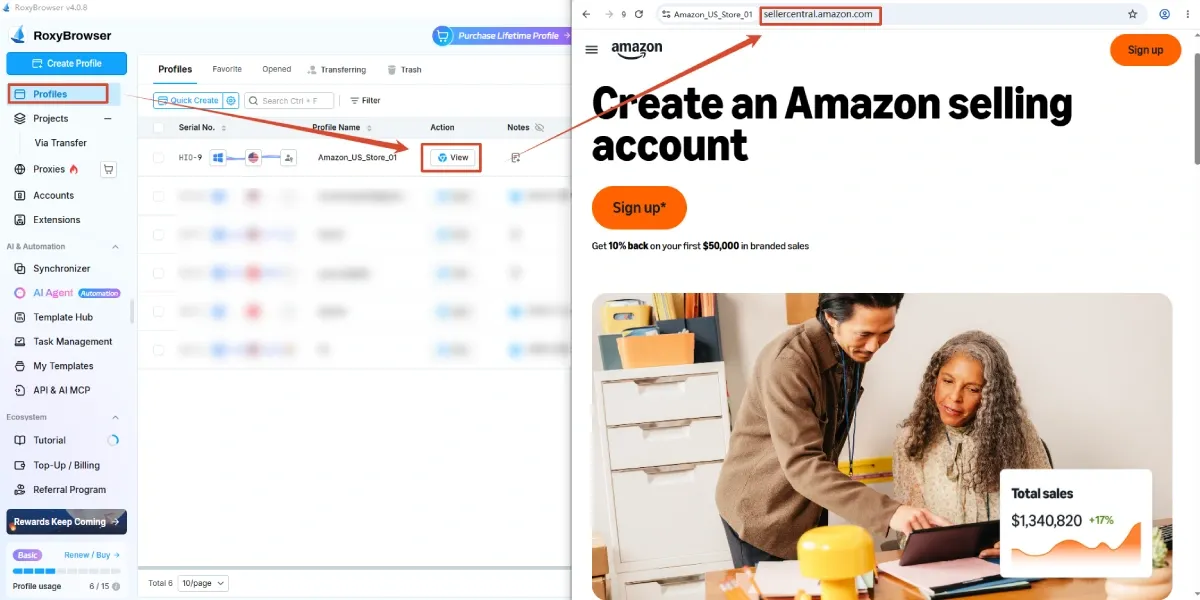
A VA switching between authorized client stores can open the wrong session when profiles have identical names. Clearly named browser profiles can help the operator identify the intended store; Section 7 shows that workflow with RoxyBrowser. This is an access-management measure, not evidence that session mixing caused the suspension. Browser or IP changes do not erase historical account relationships or resolve the existing case.
For the broader workflow of organizing authorized stores, see our guide to managing multiple Amazon accounts. An unresolved restriction still needs to be addressed through the response route in Amazon’s notice.
Step 3: Gather Supporting Documents
Match every attachment to the cited issue: supplier invoices, authorization records, identity or business documents, compliance records, ownership evidence, fulfillment logs, or payment verification. Check names, addresses, dates, product identifiers, legibility, and completeness. Keep the original records intact. Never fabricate evidence, change its factual content, or backdate a document; any permitted redaction must follow the specific submission instructions.
Evidence checklist:
- The document answers a specific question in the notice.
- Account and business details match registered information.
- Dates cover the relevant activity.
- Product identifiers and quantities reconcile with inventory.
- Sensitive fields follow Amazon’s instructions.
- Files open correctly and have clear names.
Step 4: Prepare Your Appeal or Verification
For verification, use the designated process and provide only requested documents. When a POA is requested, a practical way to organize the response is verified root cause, completed corrective actions, and preventive controls with an owner and review schedule. This is an editorial framework for organizing evidence; any questions or format specified in the account notice take priority.
Illustrative POA excerpt—not a universal template:
| Part | Example statement | Evidence supporting the statement |
|---|---|---|
| Verified root cause | Our receiving process did not reconcile the supplier’s variation codes with the cited ASINs. | Receiving procedure and invoice-to-ASIN discrepancy log |
| Completed correction | We paused affected inventory and reconciled each lot against genuine purchase records; unsupported units remain unavailable for sale. | Inventory hold report and completed lot reconciliation |
| Preventive control | The sourcing manager now approves invoice-to-ASIN matches before stock release and reviews the log monthly. | Revised procedure, named owner, and review calendar |
This hypothetical example shows how claims connect to records. It does not establish that Amazon will accept a particular invoice, correction, or appeal. An account restricted for identity verification requires a different response.
If the decision is incorrect, state the discrepancy and attach evidence. Remove emotional arguments, blame, long narratives, and irrelevant attachments.
Step 5: Submit Your Response
Use the route shown in Account Health or the relevant notice. Open the cited issue and select the available response, appeal, reactivation, or document-submission action; labels vary. Save the submitted text, attachments, date, case reference, and follow-up questions. Support guidance is not a reinstatement decision. Section 5 covers obligations during review; Section 6 covers rejection or delay.
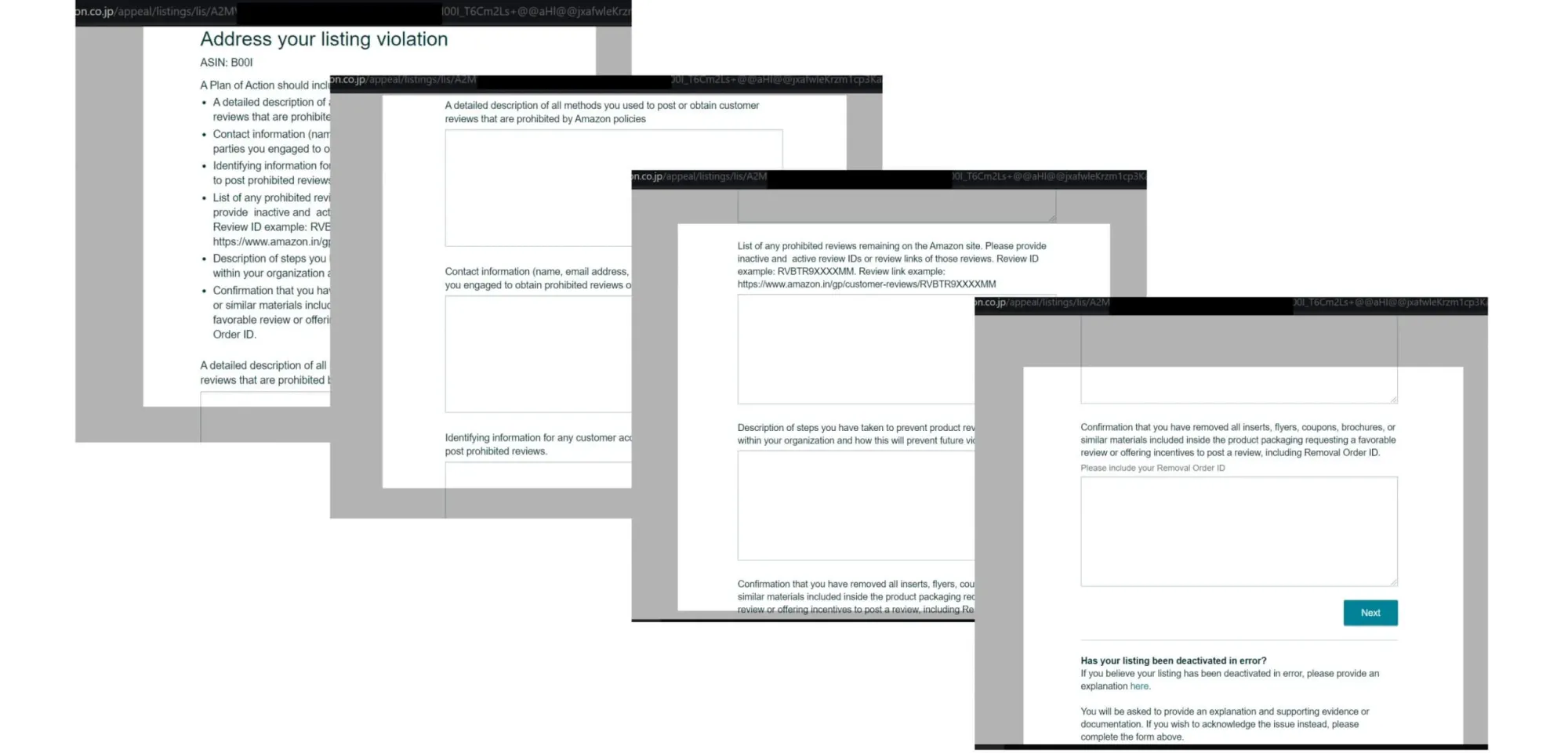
Public third-party example of an Amazon appeal form. Source: SellerEngine.
If submission fails: check the displayed file-size and format limits, confirm that each attachment opens, and save the error message. If the response option is absent, verify the marketplace and user permissions before contacting support. Explain which action is unavailable and include the notice reference.
4. Recover Your Amazon Buyer Account
Why Was My Amazon Buyer Account Suspended?
Buyer restrictions can involve payment verification, unusual activity, or account closure; the actual message determines the next step. For example, a billing-details request calls for payment verification rather than a seller POA. A closure notice may describe a different procedure or no further review option.
Complete Amazon’s Recovery Process
Follow official sign-in, verification, or customer-service instructions. Supply only requested information and follow document visibility or redaction requirements. Do not send a password, one-time sign-in code, or full payment details to someone claiming to handle appeals outside Amazon.
If the process is inaccessible, record the error and use the official Customer Service or sign-in assistance option displayed for the account and marketplace. For US accounts, Amazon Customer Service provides a starting point; available topics and contact options depend on login state. Explain the failed step—for example, “the billing-verification upload page will not open”—and retain the case reference and instructions. If the notice describes a final closure, ask about the applicable procedure without assuming another appeal is available.
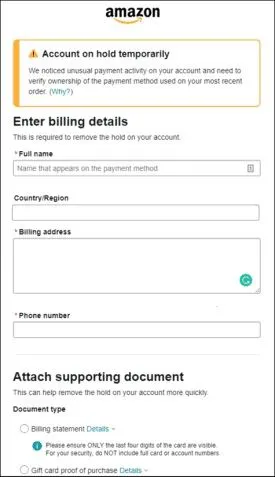
Public example of a buyer account hold and billing-document request. Source: Appuals.
Check Orders and Payments
Review each order individually. A restriction may affect purchasing, payment authorization, digital access, or refunds differently. Check pending charges, canceled orders, refunds, gift-card balances, and delivery obligations rather than assuming every transaction stopped. For example, a shipped order and a newly blocked purchase can have different outcomes even on the same account.
5. What to Expect During Review
How Long Does Recovery Take?
Use the response window stated in the case rather than a generic recovery estimate. Track requests for further documents, the latest submission date, and any promised update. An acknowledgment confirms receipt, while a reinstatement notice addresses the restriction; neither should be read as a statement about every separate order or payment obligation.
| Message or event | What it establishes | What to check next |
|---|---|---|
| Submission received | Amazon acknowledged the response | Save the receipt and follow the stated response window |
| Under review or more information requested | The case remains open or needs a further response | Answer the specific outstanding request |
| Selling privileges reinstated | The stated selling restriction has been lifted | Confirm listing status, order obligations, and any separate payment review |
These are descriptions of review events, not a fixed sequence of official account statuses.
Seller Funds and Open Orders
Keep two records: one for the selling restriction and another for payments and customer obligations. Check the account’s funds notice and payment view for the balance, pending refunds, reserves, requested verification, and any stated disbursement date. Record the status of each open order and follow the instructions for fulfillment or refunds. For example, a message restoring selling privileges should not be used to infer a payout date that the message does not state.
FBA Inventory and Fees
Amazon’s Fulfillment by Amazon overview describes inventory-storage costs and per-item charges for removal, disposal, or liquidation. Those general cost descriptions do not establish which actions are available during a particular account restriction.
For the affected account, check the inventory view, transaction records, and notice for storage charges, removal options, and deadlines. Reconcile a listed charge with the relevant inventory and billing period before deciding what to do. If an action is unavailable, ask support about that inventory’s status rather than assuming the general FBA options apply to the case.
6. If Your Appeal Is Rejected or Delayed
Address the Rejection Reason
Compare the rejection with the original request and submitted materials. Look for missing or unreadable documents, mismatched names or dates, corrections without evidence, unanswered questions, and preventive controls without an owner or schedule. Explain what changed before sending another response.
For example, if Amazon could not read the address on a submitted document, the next response should provide the requested legible record and identify the corrected attachment. Rewriting the same explanation does not fix the missing evidence. Keep one submission log with columns for date, request, response, attachments, and outstanding action.
Follow Up on Your Case
Follow the response window stated in the notice. Use Account Health or available support options for process guidance, and keep follow-up concise with the case reference, last submission date, and unanswered point.
When to Get Specialist Help
Consider qualified help for complex ownership disputes, intellectual property matters, repeated unexplained rejections, or substantial funds and inventory exposure. Prepare the notice history, submissions, invoices, ownership documents, access records, and dated action log.
An ownership dispute may need legal analysis of transfer documents, while a product complaint may need technical compliance expertise. No specialist can guarantee reinstatement. If a decision is described as final, further options depend on the notice and applicable procedures.
7. Reduce the Risk of Another Suspension
Maintain Your Corrective Measures
Confirm account and listing status before resuming normal operations. Assign responsibility for Account Health alerts, fulfillment and refund checks, supplier records, listing accuracy, restricted-product review, and policy updates. Maintain the controls described in the appeal. If the accepted corrective measure was invoice-to-ASIN reconciliation, the first inventory release after reinstatement should have a recorded reconciliation and approval.
Keep Store Access Organized With RoxyBrowser
Access organization can start during the investigation. The purpose is to identify the intended store and operator before work begins. It remains useful after Amazon has resolved the restriction.
A practical walkthrough for authorized stores:
- In the RoxyBrowser client, use Create Profile to establish a dedicated environment for the store. Choose the browser engine required for the workflow; an engine change is not a recovery step.
- Give the profile a recognizable name such as
BrandA-US-SellerCentral. Record the client, marketplace, responsible operator, and authorization in the team’s access register. - Check the profile’s proxy settings if your organization uses a managed connection. Our proxy configuration guide explains server addresses, ports, and authentication fields. Confirm the intended connection rather than rotating addresses to troubleshoot a suspension.
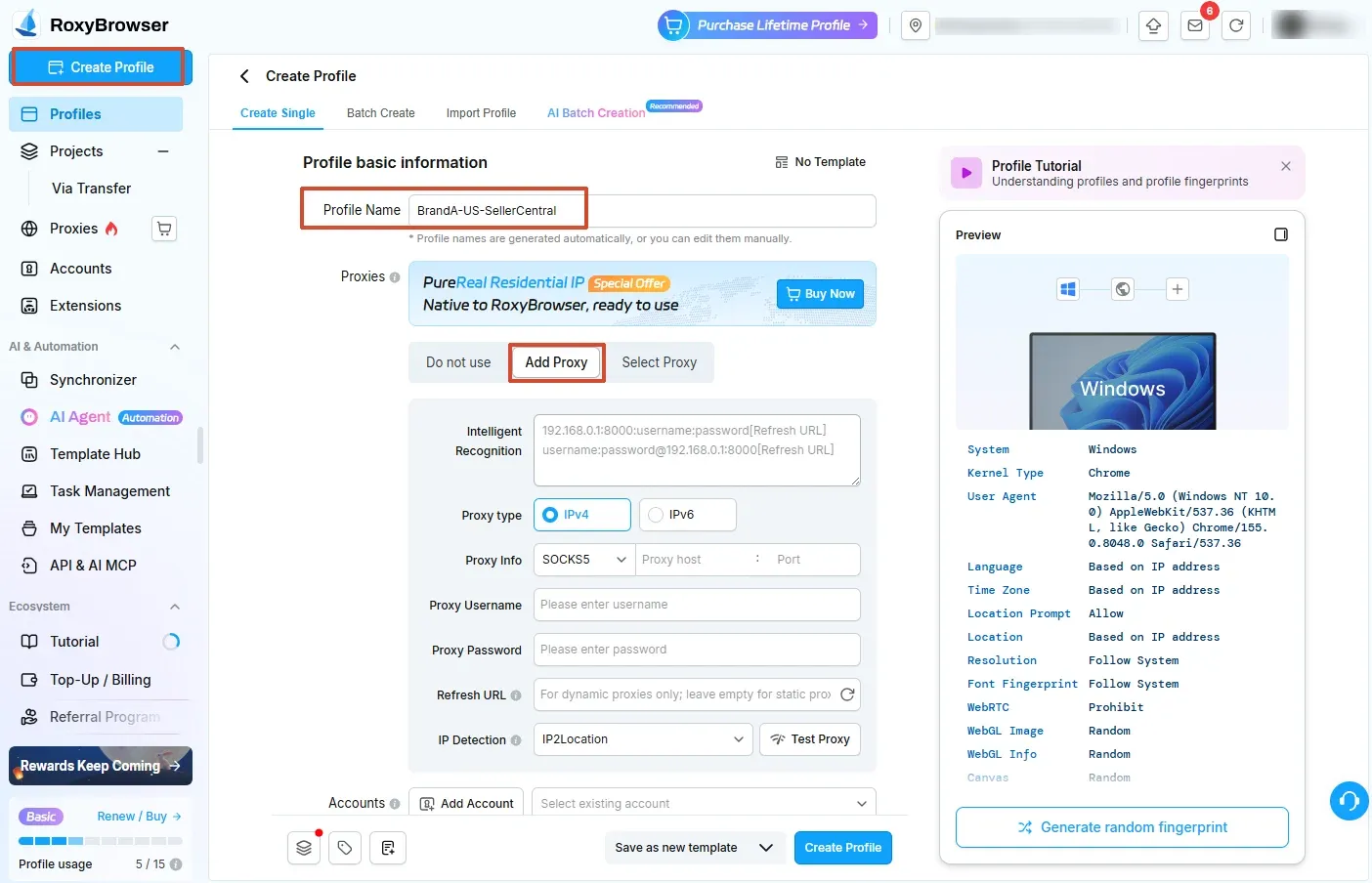
- Open the intended profile. On Amazon, confirm the store and marketplace before processing an order, editing a listing, or submitting evidence.
- In Seller Central, locate User Permissions through the navigation or settings available to the account owner. Give each authorized operator an individual login and only the access required for the work. Menu location and available roles vary; browser sharing does not replace Amazon authorization.
- When a relationship ends, revoke Amazon permissions and RoxyBrowser workspace access, review active sessions, and record completion.
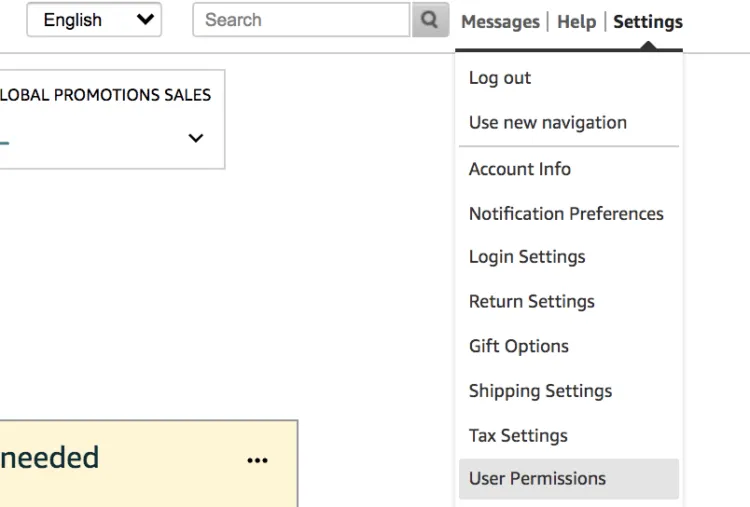
Public Seller Central navigation example showing the User Permissions destination. Source: Jungle Scout.
RoxyBrowser’s multi-account management features include separate profile cookies, cache, storage, and proxy settings, plus profile and workspace sharing. Those capabilities support the workflow above: operators can identify the intended browser environment and control who receives access to it.
What Does Profile Isolation Separate During an Amazon Account Review?
Profile isolation separates local browser session data and settings. Cookies preserve signed-in state, while storage mechanisms such as IndexedDB retain application data. Dedicated profiles keep those local contexts apart. For a small agency, BrandA-US-SellerCentral and BrandB-UK-SellerCentral make the intended environment recognizable before work begins. Amazon authorization and accurate business information remain separate requirements.
Managing multiple authorized Amazon stores? Visit RoxyBrowser.


