
TL;DR
Short answer: VMLogin still delivers basic multi-environment isolation in 2026, but its workflow feels manual enough that scaling, automation, and team coordination become noticeably slower over time.
| Item | Verdict |
|---|---|
| Best fit | Experienced users who understand manual setup, buy proxies separately, work mainly on Windows, and do not manage very large account pools |
| Less suitable | Teams that need macOS and Windows collaboration, rely on APIs and automation, or scale across many proxy regions |
| One-line judgment | VMLogin is still usable, but it exposes workflow friction sooner as the team grows |
Introduction
This review answers three questions: whether the VMLogin browser is still worth using in 2026, how VMLogin proxy configuration works in real operations, and how to evaluate a VMLogin alternative without relying on marketing claims. The focus is not only on whether the tool works, but also on where teams lose time, where configuration mistakes create risk, and when a replacement becomes easier to justify.
On the official VMLogin website, the product still emphasizes browser-environment isolation, fingerprint control, team collaboration, and Selenium-based automation.
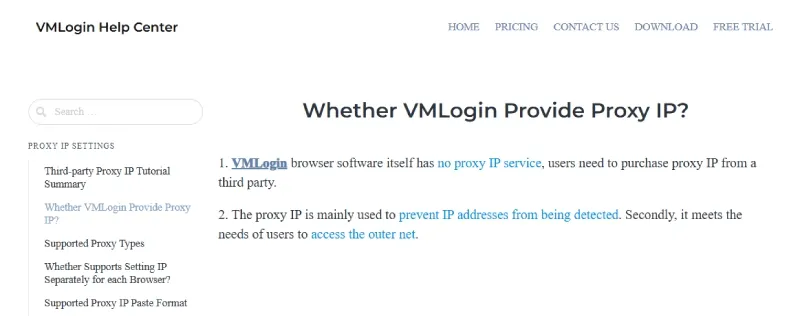
The public pricing section reviewed on June 26, 2026 listed a 3-day free trial with 5 saved browser profiles, followed by plans starting at $99 per month. In the help center, VMLogin states that it does not provide proxy IPs itself.
Users must buy third-party proxies and import them one by one or in bulk. That point matters because the real cost of VMLogin is not just the subscription. It also includes proxy procurement, binding, testing, and maintenance time.
The technical baseline in this article also reflects public browser standards. Modern risk systems do not rely on the User-Agent string alone. They also cross-check signals such as User-Agent Client Hints, timezone exposure, and WebRTC network behavior. That is why real-world multi-account stability depends on consistency across the whole browser environment, not on a single parameter change.
What Is VMLogin, and Who Is It For?
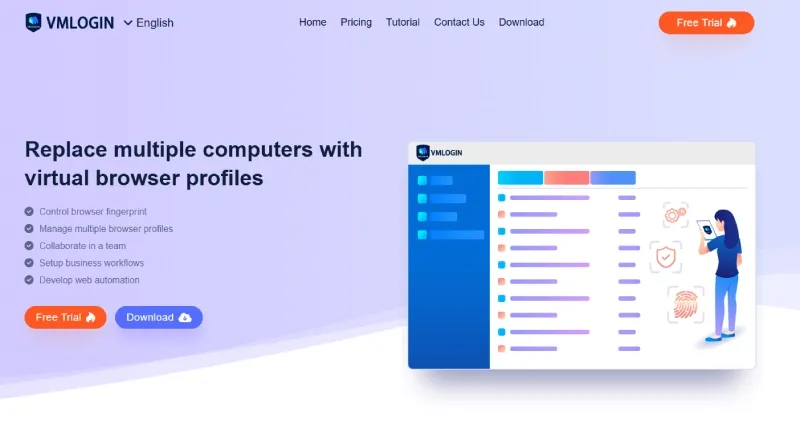
VMLogin is an anti-detect browser. Its core function is not to speed up browsing. Its job is to assign separate browser environments to different accounts, so cookies, LocalStorage, IndexedDB, cache, proxies, and fingerprint parameters operate in isolation. On its official site, VMLogin describes this as replacing multiple computers with virtual browser profiles.
That definition needs a boundary. VMLogin provides browser-environment isolation, not hardware-level isolation. It should not be treated as a guarantee of separation. If the proxy, timezone, language, cookie source, and behavior pattern still overlap, platforms can still connect accounts through multi-signal scoring.
In practice, the VMLogin browser is most relevant to affiliate, social media, e-commerce, and broader multi-account operations. Those use cases depend on Session Isolation, Profile Isolation, and IP Consistency.
When the same machine logs into several ad accounts, social profiles, or store backends, obvious overlap in browser profiles, proxy regions, timezones, languages, and behavior timing can trigger additional checks, temporary restrictions, or longer review windows.
Take a more concrete example. If a cross-border e-commerce team needs to maintain separate account groups for the United States, the United Kingdom, and Germany, scaling with physical devices alone becomes expensive and hard to hand off. An anti-detect browser reduces that hardware burden by splitting one machine into multiple isolated profiles, then binding each group to its own proxy region, timezone, and language setup.
The real question is not whether the tool can create multiple profiles. The real question is whether those profiles hold up under Browser Fingerprint Consistency checks.
A site can read User-Agent Client Hints through navigator.userAgentData, infer timezone from Intl.DateTimeFormat().resolvedOptions().timeZone, surface WebRTC signals during ICE collection, compare codec support through HTMLMediaElement.canPlayType(), and inspect a wider set of rendering and storage signals. Changing only the User-Agent, or adding a proxy without aligning timezone and locale, leaves obvious contradictions behind.
What Is Browser Fingerprint Consistency?
Browser Fingerprint Consistency means that all visible parameters inside one profile need to make sense together. If a profile claims to be Windows-based but exposes a mismatched timezone, language stack, font set, codec matrix, or network signal, those contradictions are often more suspicious than a smaller fingerprint surface.
One common example is a proxy exit in Germany while the timezone remains Asia/Shanghai, the browser language stays in Simplified Chinese, and the keyboard layout or regional preferences are never adjusted. A human operator may overlook that. A risk engine reads it as IP geolocation mismatch, locale mismatch, and timezone mismatch at the same time.
That consistency check now extends far beyond basic headers. Sites can compare Canvas Fingerprinting output, WebGL Metadata and Vendor values, AudioContext behavior, font enumeration, media-device listings, language preferences, hardware concurrency, and storage behavior.
Any one field can be spoofed. The problem appears when those fields no longer describe the same plausible device. A realistic profile is not the one with the most modifications. It is the one with the fewest contradictions.
VMLogin is a better fit for users who already understand proxy quality, ASN type, geolocation alignment, cookie import and export, and batch profile management. If you expect the tool to automate most environment creation, proxy binding, and collaboration rules for you, VMLogin feels more manual than newer products.
What to avoid:
- Generating a random profile and pushing it into production immediately, as if a profile were a one-click invisibility container.
What works better:
- Decide the country, language, timezone, proxy type, and account purpose first, then create profiles from that logic and verify region alignment before import or login.
VMLogin Review: Real Workflow and Feature Analysis
From a product-design perspective, VMLogin is not a lightweight browser. It is a desktop workspace built around profiles, proxies, sharing, and automation. The advantage is granular control. The downside is that many efficiency gains depend on how much operational detail the user is willing to manage by hand.
First-Time Installation and Interface Experience
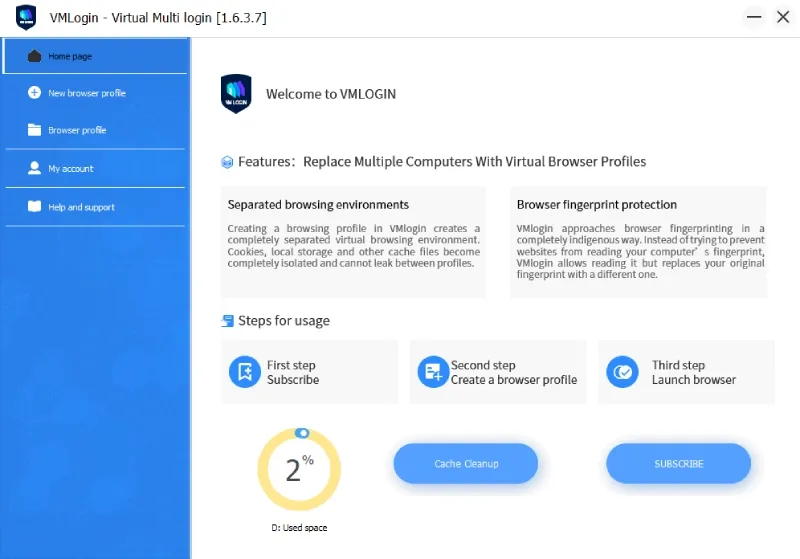
Installing the VMLogin browser is not difficult. Reaching a stable day-to-day workflow is a different matter. The public trial covers 3 days and up to 5 saved browser profiles on the official pricing section. That is enough to test core actions, but not enough to fully simulate a team process that includes profile creation, proxy binding, cookie import, grouping, and longer-term maintenance.
The interface feels closer to an older generation of desktop operations tools: function-heavy, form-driven, and explicit about steps. You can find where to create environments, edit proxies, test networking, import cookies, and run batch actions.
The tradeoff is that the UI is not especially light for new users. A solo operator can usually learn the main paths after some hands-on use, while a team often needs separate onboarding.
The learning curve is easy to underestimate. A newcomer is not just filling in fields. They are learning Profile Isolation, proxy protocols, IP reputation, geolocation alignment, and platform risk patterns at the same time. The subscription fee is the visible cost. Training time is the hidden cost.
What to avoid:
- Treating VMLogin as a simple multi-launch tool, then logging into accounts without testing the proxy, checking timezone, or reviewing locale and WebRTC behavior.
What works better:
- Bind the proxy first, then verify IP location, timezone, language, resolution, User-Agent Client Hints, and WebRTC behavior before importing cookies or logging in.
Profile Creation and Management
VMLogin’s profile management feature set is not weak. The public product page lists batch profile creation, batch cookie import and export, profile sharing, and transfer. That shows the basic management framework is already in place.
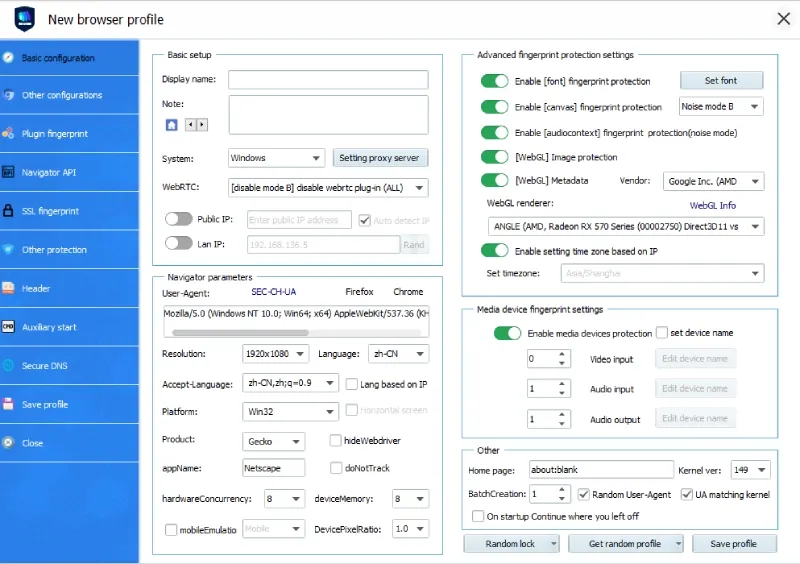
For single-profile setup, proxy settings, browser profile parameters, groups, and cookies can be configured separately. The help center also provides a clear path for one-by-one binding: VMLogin client -> New browser -> Set proxy server -> Enable proxy server -> Fill in proxy type, IP:port:username:password -> Test proxy -> Save. The path is straightforward. It also shows that VMLogin proxy management remains heavily form-based and test-based.
Once account volume increases beyond a small batch, that difference becomes more visible. Batch creation saves time, but only if the proxy source, region labels, and credential format are already clean. If not, the team has to normalize everything before import. A solo operator may keep a moderate number of profiles stable through experience. A team needs templates, ownership rules, and naming standards.
Social media teams see this quickly. If operators need parallel U.S., U.K., and Germany account groups, VMLogin can support the structure, but only if each group is bound to the right proxy pool, timezone, and language settings.
Otherwise the groups look separated in the dashboard while the actual browser environments remain inconsistent. The more the flow depends on handwork, the easier it becomes to misapply a language template or attach several accounts to the same residential IP.
Fingerprint Quality and Public Detection Performance
The quality of an anti-detect browser is not determined by its landing page language. It is determined by what public inspection tools and site-side risk scripts actually see. The usual baseline check includes Pixelscan, CreepJS, and BrowserLeaks.
The main questions are whether Canvas fingerprinting, WebGL rendering fingerprints, and AudioContext signals stay stable; whether the User-Agent matches User-Agent Client Hints; whether WebRTC exposes unexpected network data; and whether timezone, locale, screen data, and codec support remain internally consistent.
The platform’s public pages emphasize unique fingerprints and isolation, but that should not be read as proof of high-quality consistency. Anti-detect quality is not about changing more values. It is about making all values inside one profile look like they came from the same real device.
If the User-Agent says Windows 11 but navigator.platform behaves like an older setup, or the proxy says U.S. residential while the timezone and Accept-Language still point elsewhere, the full profile becomes easier to score as abnormal.
Public browser standards expose those details more clearly than they used to. navigator.userAgentData surfaces User-Agent Client Hints, RTCPeerConnection can reveal WebRTC-related network behavior, resolvedOptions().timeZone exposes timezone, and canPlayType() reflects codec support. That is why changing only the User-Agent or only the proxy is not enough in 2026.
There is another distinction that matters when evaluating any anti-detect browser: whether the environment is being adjusted mostly at the JavaScript layer or whether the browser engine itself has been modified more deeply. JavaScript-level hooks are easier to build, but they are also easier for a site to compare against native behavior.
A stronger implementation usually leaves fewer traces between the declared hardware profile and the rendered output. Public inspection tools cannot fully certify that quality, but they are still useful for spotting obvious mismatches before an account goes live.
What to avoid:
- Switching the VMLogin proxy to the United States while keeping the default language, default timezone, and unrelated cookies from another region.
What works better:
- Create the profile around one regional logic: proxy region, timezone, language, currency preference, keyboard layout, and template choice should point in the same direction.
Stability, Launch Speed, and Automation
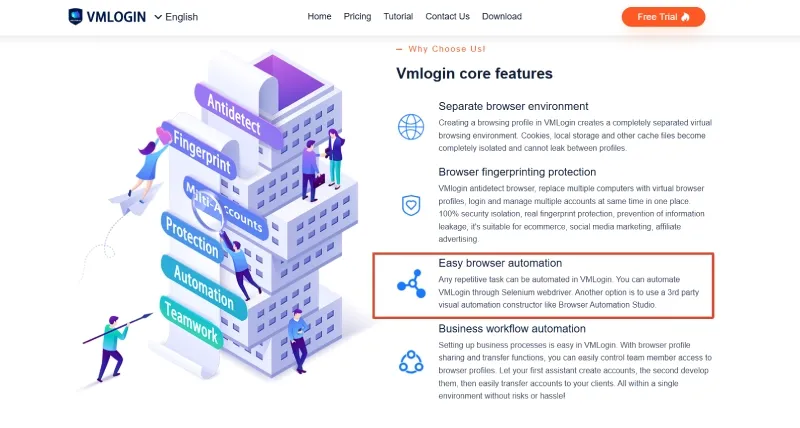
VMLogin supports Selenium and exposes REST API access on its public plans, so it is not a closed client. For teams that already have automation engineers or existing Selenium workflows, that is a meaningful advantage.
Still, API access does not mean low-friction automation. In products like VMLogin, the harder part usually appears in profile-state management, proxy retry handling, and exception recovery.
A script can launch a browser. That does not mean it can reliably handle dead proxies, inserted CAPTCHA flows, cookie expiry, profile-sharing conflicts, or risk changes after batch relogins. That is tolerable at small scale. At high profile counts, it becomes an operations cost question.
The public materials do not publish quantified launch-speed benchmarks, so there is no reason to invent them. A more practical standard is this: if your team repeats the same chain every day, such as create profile, bind proxy, test connectivity, import cookies, group accounts, and pass work to a teammate, even an extra 10 seconds per step compounds quickly. VMLogin often feels slower because too many steps must still be stitched together by the operator.
What to avoid:
- Applying the same screen size, font stack, and system preferences to a large group of accounts, then moving straight into automation.
What works better:
- Split templates by country and business line first, keep each group internally consistent, and avoid creating an overly concentrated cluster fingerprint across the same batch of accounts.
Where It Feels Outdated or Inefficient
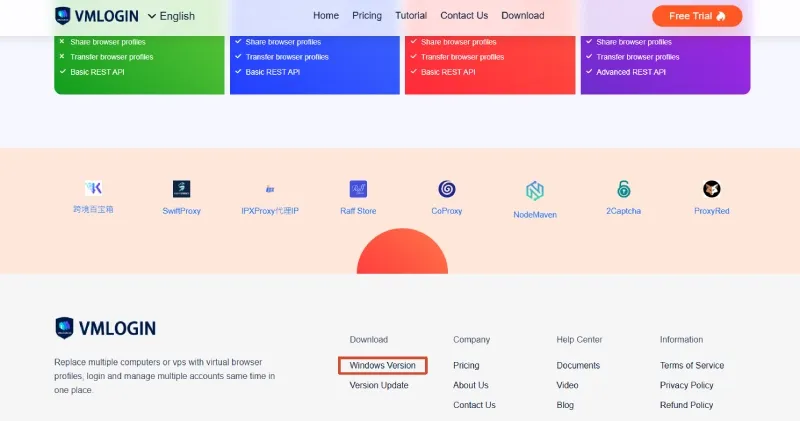
VMLogin’s strongest signs of aging come from three areas. First, the public download flow prominently surfaced Windows, rather than presenting a clearly balanced cross-platform download path in the same place.
That matters because many teams now split work across Windows, macOS, and Linux devices. Second, the interface still relies on a form-heavy interaction model. Third, many high-frequency tasks still depend on manual confirmation and manual troubleshooting, which means efficiency depends heavily on operator experience.
That is why teams often reach two different conclusions at the same time. VMLogin can still work. Whether it remains worth expanding around is another question. Manual control is not always a problem for an experienced solo operator. For teams that need repeatable handoff, training, and larger account pools, those same manual steps become recurring operating cost.
VMLogin Proxy Setup Guide and Common Problems
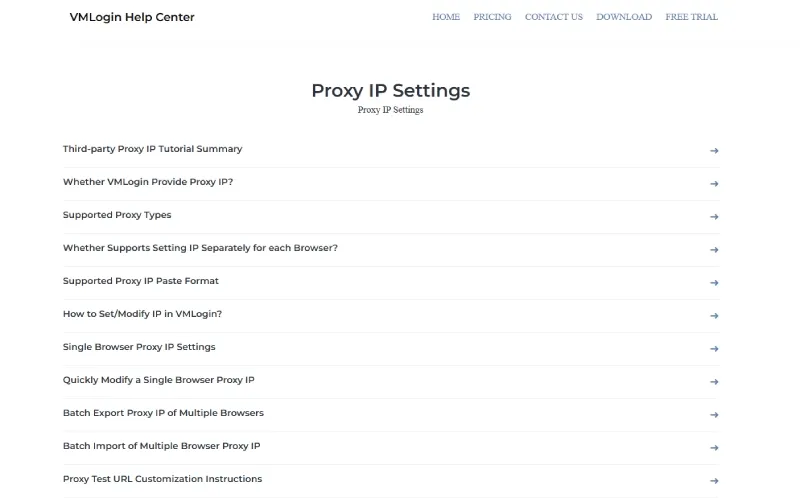
VMLogin proxy handling is the part most people misunderstand first. Many users confuse “the browser can use proxies” with “the product includes proxies.” The official help center is explicit: VMLogin does not provide proxy IPs. Users buy them elsewhere and import them manually. That means the product is a proxy-enabled browser workspace, not a fully bundled network environment.
Why Proxies Matter More Than a VPN Here
For multi-account environments, proxies matter more than a VPN because a proxy is easier to bind to one profile at a time. A VPN usually changes the network path for the whole machine. Multi-account risk systems care more about a stable, attributable network identity than about the simple fact that a connection comes from another country.
VMLogin’s help-center navigation lists support for HTTP, HTTPS, SOCKS4, SOCKS5, and IPv6-related proxy setup topics. In practice, SOCKS5 is usually the safer default for this kind of work because it handles a wider range of traffic patterns and is more commonly used where WebRTC-related traffic behavior matters. Proxy quality also matters.
Residential Proxy exits usually carry a more natural ASN profile than Datacenter Proxy exits, which are easier for platforms to flag as infrastructure traffic. Static residential proxies sit between those two categories: they tend to be more stable than rotating residential pools, but they still need region and reputation checks before being assigned to long-lived accounts.
What to avoid:
- Running every profile through one machine-wide VPN tunnel and assuming profile isolation will solve the rest.
What works better:
- Bind a dedicated proxy to each profile where the workflow requires it, and keep region, ASN type, and browser settings aligned with the intended business context.
How to Add a Single Proxy
According to the official single-proxy instructions, the standard process is to create or edit a profile, enable the proxy server, fill in proxy type + IP + port + username + password, test the proxy, and save after a successful test.
That design is not flawed by itself. The problem is that it places accuracy almost entirely on the operator. The protocol may be wrong. The port may be wrong. The provider may require IP whitelisting. The balance may be depleted. The connection quota may be exceeded. The username or password may be incorrect. In all of those cases, the browser can look broken when the real issue sits in the proxy layer.
Each field also serves a different purpose. The protocol defines the transport method. IP and port define the endpoint. Username and password define provider authentication. The test button checks current connectivity, not long-term stability. Passing a single test is not the same as proving that the proxy is suitable for long session work.
How to Batch Import Proxies
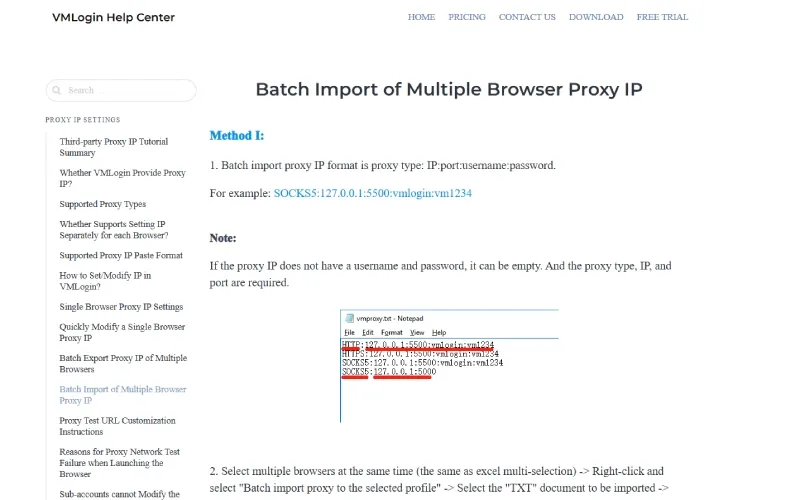
VMLogin’s batch import flow is much faster than entering proxies one by one, but it only works well if the source data is already clean. The official batch import guide uses the format proxy type:IP:port:username:password, with SOCKS5:127.0.0.1:5500:vmlogin:vm1234 as the example. The same guide also shows that you can right-click selected browsers to import a TXT file, or export an Excel template and import cookies together with proxy data.
That is useful for large migrations and account handoffs. It also means that bad source data gets scaled just as fast as good data. If dozens of profiles are attached to the wrong region, or a whole batch lands on the same low-reputation proxy pool, the repair cost can exceed the time you thought you saved.
A safer workflow is to clean proxies by country, ASN type, authentication format, and business line first, then map each cleaned set to the right profile template. U.S. residential proxies should go to U.S. templates. German proxies should go to German templates. Cookie region and profile region should not contradict each other by default.
Common Proxy Mistakes
The first common mistake is repeated use of the same IP across too many accounts. In short-term testing, that may only reduce success rates. In long-term account operations, it becomes an account-linkage signal. The second mistake is proxy-region mismatch. An IP in London with a Shanghai timezone and a conflicting language stack does not look international. It looks inconsistent.
The third mistake is using low-quality proxy pools. VMLogin’s own help-center troubleshooting pages point to familiar causes such as depleted traffic, insufficient balance, unstable proxy quality, missing whitelist authorization, region mismatch between the local network and proxy provider, or connection-count limits. The fourth mistake is treating a passed network test as final approval. A passing test only proves that the line worked at that moment.
The fifth mistake is failing to separate proxy policy by account type. Warmed accounts, newly created accounts, ad accounts, and store accounts do not always tolerate the same proxy behavior. A rotating endpoint that is acceptable for lightweight scraping or session checks can become a poor fit for long-lived social or commerce sessions that depend on IP consistency across repeated logins.
What to avoid:
- Importing dozens of cheap random proxies and cycling to the next batch as soon as timeouts appear.
What works better:
- Filter proxies by target region and proxy type first, run a small connectivity and stability sample, then assign them in batches to matching profiles.
- For long-lived operations, keep a proxy inventory with region, ASN type, auth method, and replacement date so later debugging does not depend on memory alone.
VMLogin Pricing: Is $99 Per Month Reasonable?
As of June 26, 2026, the public VMLogin pricing section listed four tiers: Free Trial, Solo, Team, and Scale. The trial was shown as $0 for 3 days with 5 saved browser profiles. Solo was listed at $99 per month with 200 profiles and 5 included sub-accounts. Team was listed at $209 per month with 500 profiles and 10 included sub-accounts. Scale was listed at $499 per month with 3,000 profiles and 20 included sub-accounts, and Advanced REST API appeared at that level.
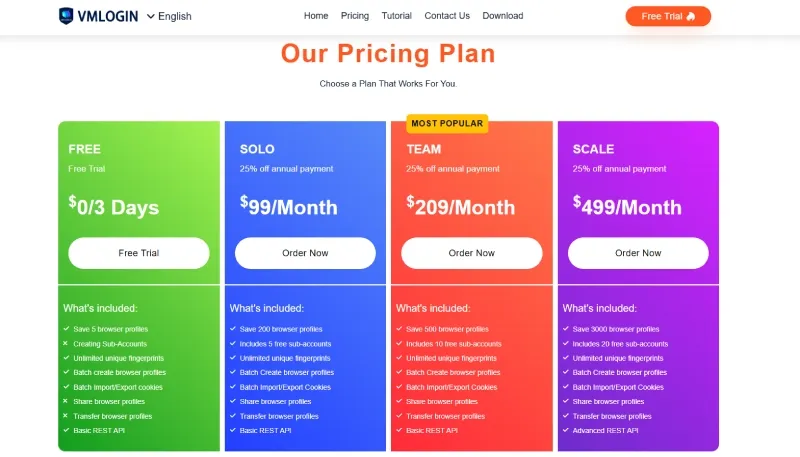
At the subscription level alone, $99 per month is not unreasonable, especially if you already have a stable proxy supply and only manage a few dozen to a couple hundred accounts. The problem is that the true cost of VMLogin is never just one invoice.
The first hidden layer is proxy spend, because VMLogin proxy capacity is external by design. The second hidden layer is labor time: single-proxy binding, batch-data cleanup, region checks, failure diagnosis, and account migration. The third hidden layer is training cost. If new team members need to understand proxy formatting, profile logic, and geolocation alignment before they can work safely, the team pays for that repeatedly.
There is another cost that often stays invisible until something breaks: operational loss from wrong setup. A simple example is enough. A team runs landing-page tests with 10 U.K. ad accounts, but 3 profiles are accidentally bound to the same U.S. proxy exit.
The accounts may not fail immediately. The problem tends to surface later in payments, login verification, or challenge flows. The loss is not one failed click. It is the chain of recovery work that follows.
From that angle, whether VMLogin is worth it depends less on the $99 figure itself and more on whether your team can use the profile capacity well and keep manual error rates low. If not, the entry price is less attractive than it first appears.
VMLogin Pros and Cons
Pros
VMLogin has four clear strengths.
First, its Profile Isolation structure is mature enough for everyday use. Cookies, storage, proxies, and basic browser profile settings are organized in a coherent way.
Second, essential functions such as proxy import, cookie import and export, sharing, and transfer are already built in.
Third, Selenium and REST API support make it usable for teams with existing automation capability. Fourth, the plan structure is straightforward enough for small to mid-sized teams that need a few hundred profiles rather than a highly customized enterprise stack.
If your workflow is still closer to “operator-led review plus careful hand setup” than to “template-driven orchestration,” those strengths are practical. A solo operator maintaining a moderate account set with fixed residential proxies can still use the VMLogin browser as a stable environment container.
Cons
The weaknesses are just as clear.
First, the public download path reviewed here prominently surfaced Windows, which may be a limitation for mixed-device teams if they need clearer cross-platform rollout support.
Second, the UI and onboarding path feel dated compared with newer products that use templates more aggressively.
Third, VMLogin proxy management depends on outside procurement and operator accuracy, so proxy mistakes move quickly into the account layer. Fourth, team collaboration exists, but it does not feel especially lightweight once projects, regions, and roles start multiplying.
The deeper issue is that many quality-critical decisions are still delegated to the operator. Experienced users read that as flexibility. Newer teams read it as a larger risk surface. That is where VMLogin feels less modern in 2026.
A VMLogin Alternative Worth Reviewing: RoxyBrowser
If you are comparing a VMLogin alternative seriously, three things matter most: environment creation speed, proxy workflow complexity, and collaboration overhead. From its public product structure, RoxyBrowser is worth shortlisting because its public pages place templates, collaboration, and workflow organization more visibly in the product narrative.
Faster Environment Startup
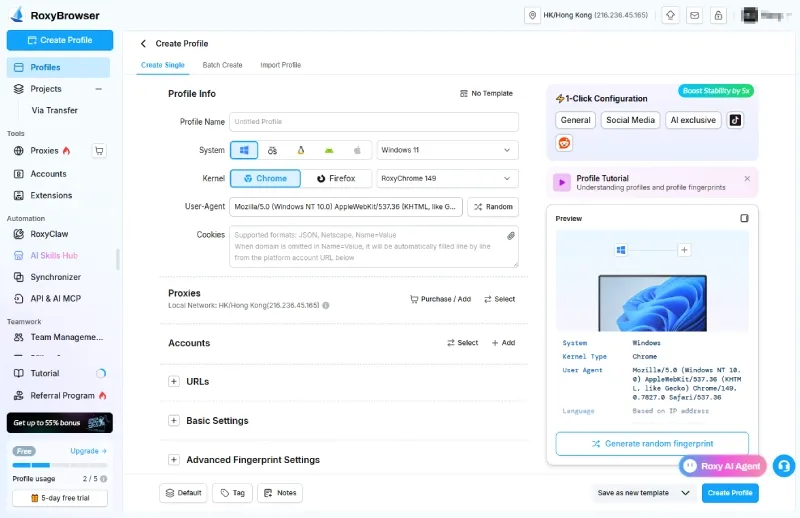
RoxyBrowser presents template-based creation more centrally in its public product messaging. Compared with VMLogin’s more manual sequence, that positioning suggests a workflow with less repeated profile-by-profile rebuilding of region, language, and fingerprint-related settings. The value is not just fewer clicks. It can also reduce parameter drift and lower the chance of new team members creating inconsistent environments by hand.
Better Template Sync for Scaled Operations
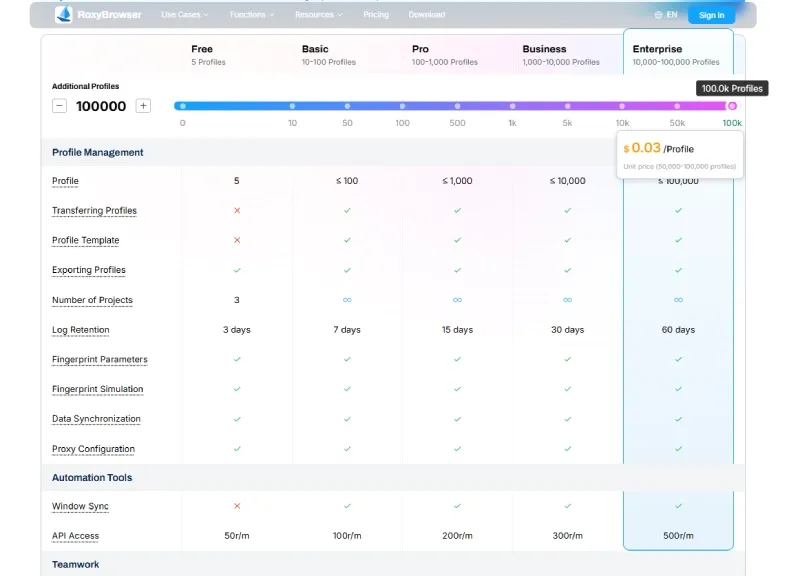
RoxyBrowser’s public pricing and product structure point more directly at scaled collaboration. The difference is not simply “more features.” The difference is that the public positioning appears to rely more on team rules and reusable templates than on operator memory. That becomes relevant if your team needs to manage multiple accounts across multiple regions without letting one template split into several inconsistent versions.
Lower Proxy-Setup Risk
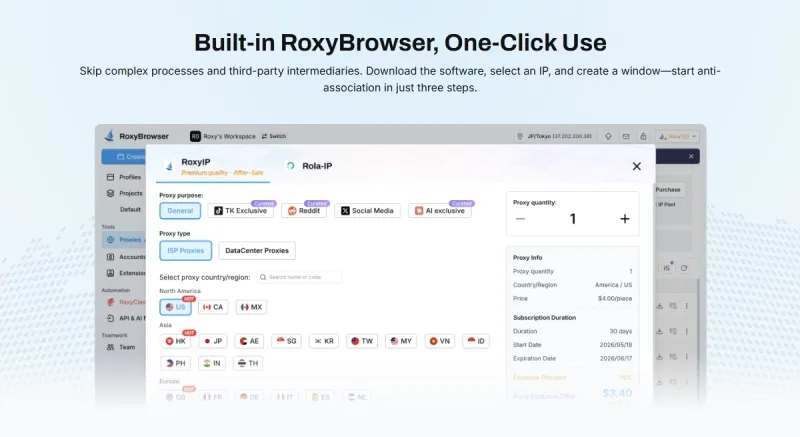
Compared with VMLogin’s external-proxy-first workflow, RoxyBrowser presents a more integrated proxy path on its public pages. In practical terms, that makes the relationship between the IP resource, the profile, and the team workflow easier to evaluate. For teams that lose time during proxy handoff and troubleshooting, an integrated path around RoxyIP is worth comparing against a workflow that depends on more manual import cleanup.
A Lighter Daily Workflow
RoxyBrowser also looks lighter in four day-to-day areas:
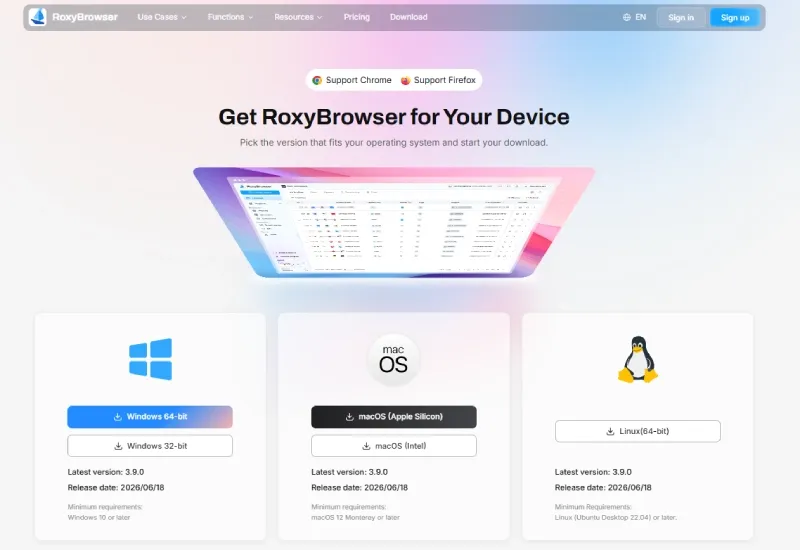
1.Cross-platform availability: the public download page lists Windows, macOS, and Linux, and also surfaces Chrome- and Firefox-based support.
2.Collaboration-first structure: the public product flow introduces workspaces and member controls early in the feature story.
3.Flexible pricing: the public pricing page shows a free tier and profile-based scaling instead of forcing every team into a higher fixed entry plan.
4.AI-facing automation path: the public MCP article describes direct MCP protocol support for AI-agent-driven browser actions.
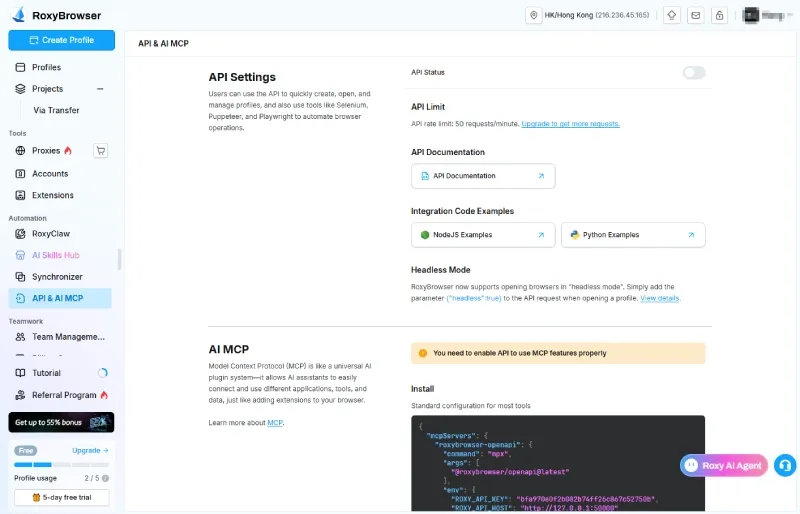
For teams trying to reduce script-heavy operations and move toward orchestrated workflows, that MCP path is worth reviewing. The practical next step is simple: compare the actual setup flow, not just the feature list, and see whether the structure fits your daily operations better than VMLogin does.
VMLogin vs RoxyBrowser
The simplest way to compare them is to focus on high-frequency operational scenarios rather than feature slogans.
| Evaluation Area | VMLogin | RoxyBrowser |
|---|---|---|
| Interaction and deployment | Form-heavy workflow with longer manual setup chains | More template-oriented public product flow |
| Proxy workflow | External proxy procurement and manual cleanup remain central | More integrated proxy path on public pages |
| System support | Public download flow reviewed here prominently surfaced Windows | Public download page lists Windows, macOS, and Linux |
| Scaled management | Error prevention depends heavily on operator discipline | More obviously structured around templates, projects, and team rules |
| Cost structure | Starts at $99 per month before proxy and labor costs | Public pricing starts with a free tier and profile-based scaling |
| Automation direction | Selenium and REST API support | API access plus a published MCP integration path |
Final Verdict
VMLogin remains a functional daily isolation container for solo, Windows-based operators who are comfortable managing proxy quality and fingerprint consistency manually. However, its workflow design shows its age. As operations scale, relying heavily on operator memory for routine troubleshooting and manual proxy binding becomes a liability.
When a team outgrows manual setups and requires cross-platform support or advanced API integration, testing a modern alternative is the safest decision. RoxyBrowser stands out as a logical next step. Rather than forcing users into repetitive manual configurations, its architecture is built around rapid window creation and environment template synchronization. For expanding teams, moving browser environments into reusable templates, strict permission rules, and automated proxy workflows provides immediate value over continuing to patch an aging process.


