
RoxyBrowser v4.0.8 is now available, bringing improvements to everyday browser environment checks, renewal management, and profile creation. This release adds proxy IP lookup and fingerprint checks to the dashboard, improves renewal management and expiration reminders, and makes creating browser profiles easier. It also refines time zone handling, system compatibility, and other details across the user experience.
For ecommerce sellers, social media teams, and performance marketers managing multiple accounts, these updates make it more convenient to check browser environments, plan renewals, and prepare new profiles. Here is what has changed.
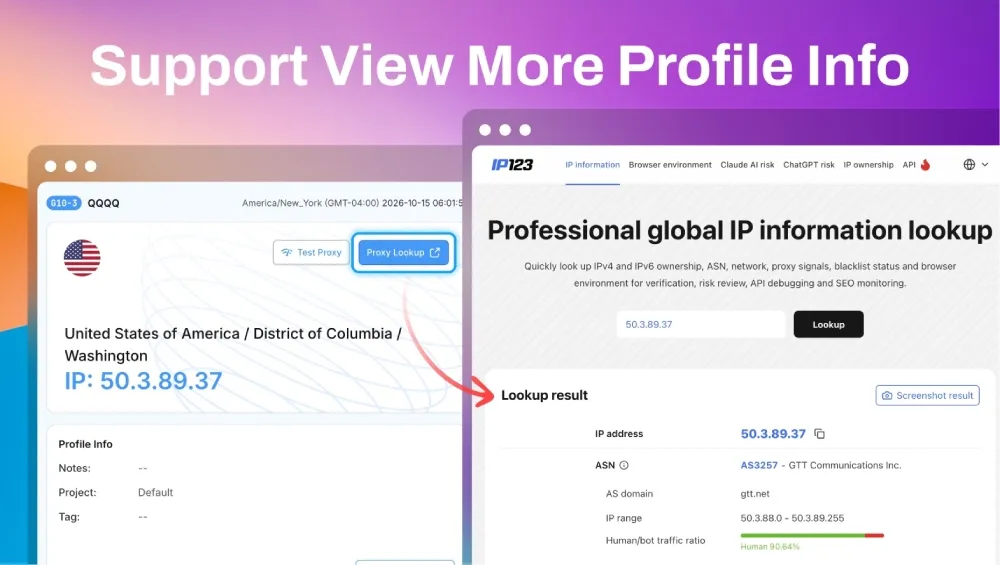
1. Proxy IP Lookup and Fingerprint Checks on the Dashboard
Checking proxy IP information and browser fingerprints is part of routine environment management. Whether you are preparing for a new task or reviewing a profile’s configuration, convenient access to these checks helps you understand the environment you are working with.
Version 4.0.8 brings both functions to the dashboard:
-
Look up proxy IP information:
Access proxy IP details from the dashboard to support routine network environment checks. -
Check browser fingerprints:
Review browser fingerprint information to help assess your environment’s configuration. -
Keep routine checks in one place:
Use the dashboard to access both functions before starting your daily workflows.
With these checks available in a central location, reviewing browser environments becomes a more convenient part of everyday multi-account management.
2. Improved Renewal Management and Expiration Reminders
Ongoing account operations depend on continued access to the services behind them. Missing an expiration date can interrupt work and delay scheduled activities.
RoxyBrowser v4.0.8 improves renewal management and expiration reminders to help users plan ahead:
-
Manage renewals more easily:
An improved renewal management experience makes routine service renewals more convenient. -
Stay aware of upcoming expirations:
Refined reminders help users keep track of expiration dates and arrange renewals in advance. -
Reduce avoidable interruptions:
Timely renewals help lower the risk of service expiration disrupting ongoing work.
For teams managing ecommerce stores, social channels, or advertising projects, these improvements support better renewal planning and business continuity.
3. Streamlined Browser Profile Creation
Creating a browser profile is often the first step when adding an account or starting a new project. A smoother setup process helps teams move through that preparation more efficiently.
Version 4.0.8 streamlines the browser profile creation workflow, making setup easier and improving efficiency. Whether you are creating your first profile or adding new environments to an existing operation, the updated flow helps you spend less time on setup and move on to the work ahead.
4. Refined Time Zone Handling and System Compatibility
This release also improves time zone handling, system compatibility, and other usability details.
These refinements focus on the foundations of everyday browser use, improving the overall experience across system environments and making routine configuration and operation smoother.
Update RoxyBrowser
RoxyBrowser continues to evolve around the practical needs of multi-account operators. From checking browser environments on the dashboard to managing renewals and creating profiles, v4.0.8 makes everyday workflows more convenient.
Open your desktop client to check for updates and upgrade to v4.0.8. If you are new to RoxyBrowser, visit the RoxyBrowser website to download the client and get started.


