
TL;DR
Choose Requests for conventional synchronous API calls and HTTPX when async I/O or HTTP/2 is part of the requirement. Choose a real browser such as RoxyBrowser when the workflow needs JavaScript rendering, cookies, profile isolation, or page interaction.
Neither library is universally faster. Throughput depends on connection reuse, payload size, server behavior, concurrency limits, and whether your application is synchronous or async. Start with the execution model, then compare features and operational constraints.
For most new synchronous code, Requests is the shorter path. For an async application, HTTPX is usually the more natural fit. A browser environment is a separate layer: HTTPX and Requests send HTTP messages, while RoxyBrowser runs pages with a persistent, configurable browser profile. aiohttp remains another option for async-first services.
Quick tool-selection guide
| Requirement | Recommended layer |
|---|---|
| Documented API or static HTML | Requests |
| Async HTTP calls or HTTP/2 | HTTPX |
| JavaScript-rendered page or interactive controls | RoxyBrowser |
| Persistent cookies and isolated browser profiles | RoxyBrowser |
| API requests plus browser-only steps | Hybrid: Python with RoxyBrowser |
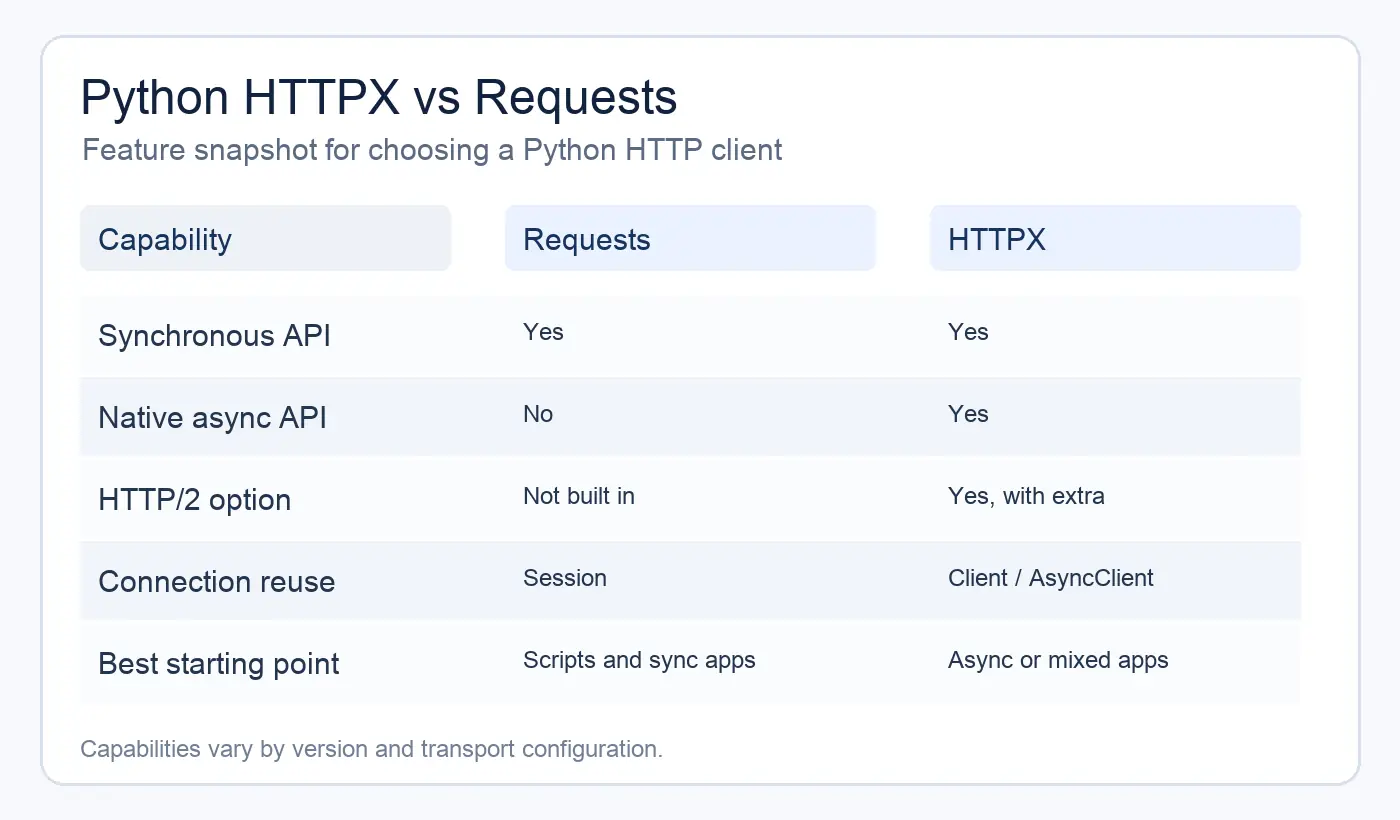
HTTPX vs Requests at a glance
| Capability | Requests | HTTPX |
|---|---|---|
| Synchronous requests | Yes | Yes |
| Native async API | No | Yes, through AsyncClient |
| HTTP/1.1 | Yes | Yes |
| HTTP/2 | Not built in | Available with the HTTP/2 extra and http2=True |
| Default timeout | No timeout by default | 5-second network inactivity timeout by default |
| Redirects | GET requests follow redirects by default | Not followed by default; enable follow_redirects=True |
| Connection pooling | Session |
Client and AsyncClient |
| Streaming | Yes | Yes |
| Proxy configuration | proxies= mapping |
proxy= for one proxy; mounts= for routing |
| Custom transport | Adapters | Transport classes and mounts |
| Familiarity and installed base | Very high | High and growing |
| Migration effort | Baseline for existing projects | Low for simple calls, higher for edge cases |
The table describes library capabilities, not a promise about every release or transport configuration. Check the version-specific documentation when TLS, proxies, authentication, or HTTP/2 behavior matters.
The main difference: execution model
Requests exposes a synchronous API. A call such as requests.get() blocks the current thread until the response arrives or the request times out. That is straightforward for scripts, command-line tools, background jobs, and web applications that already run synchronous handlers.
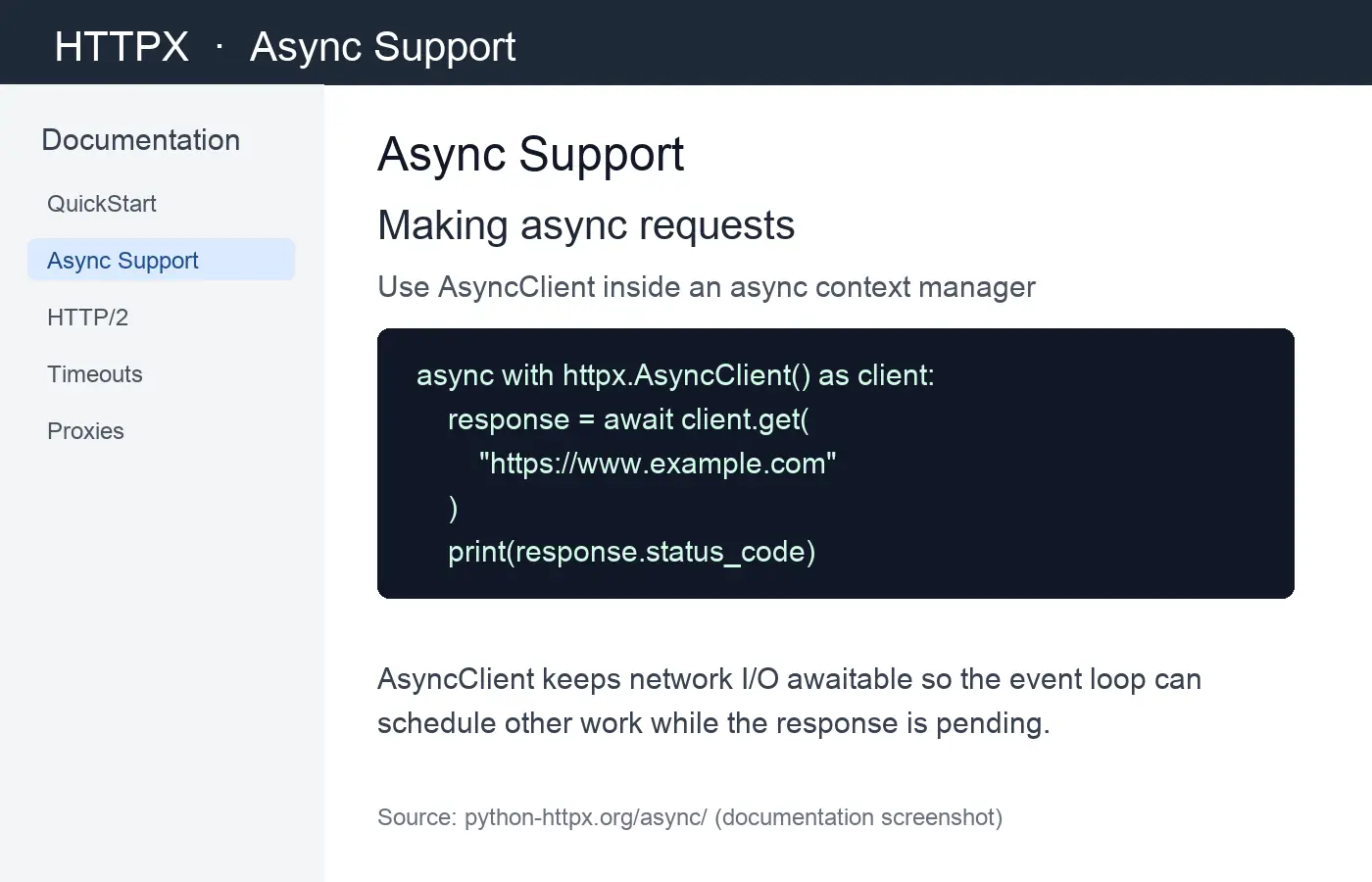
HTTPX exposes both Client and AsyncClient. The synchronous interface feels familiar to a Requests user, while AsyncClient lets an asyncio application await network I/O without blocking the event loop. The async API does not make your whole program concurrent by itself. You still need task scheduling, bounded concurrency, cancellation, and error handling.
Use a client object for repeated requests. It keeps connection-pooling state and makes shared headers, authentication, limits, and timeouts explicit. In async code, create one AsyncClient for a unit of work rather than opening a new client inside a hot loop; repeated construction prevents effective connection pooling.
HTTP/2: useful capability, not an automatic speed boost
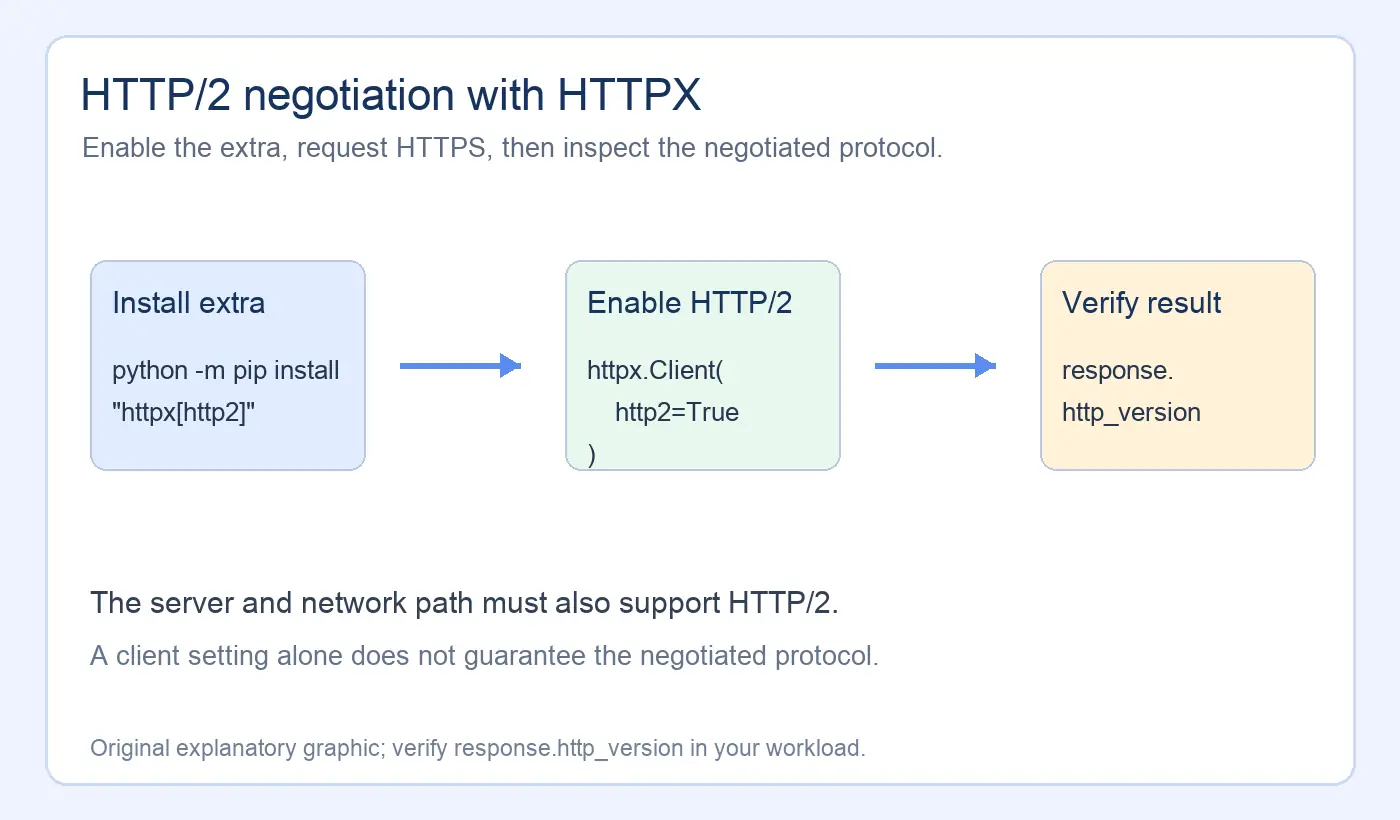
HTTPX can negotiate HTTP/2 when you install the HTTP/2 extra and enable it on the client. The server must also support HTTP/2, and TLS or proxy behavior can affect negotiation.
HTTP/2 multiplexes streams over a connection and can reduce connection overhead in suitable workloads. It does not guarantee lower latency. A server may continue with HTTP/1.1, a proxy may terminate HTTP/2, or the workload may contain one small request where the difference is irrelevant.
Requests is documented around HTTP/1.1, while HTTPX provides optional HTTP/2 support. If your application specifically needs HTTP/2 semantics, HTTPX gives you a direct client-level option. Verify the negotiated protocol rather than inferring it from the library name. HTTP/2 is most interesting when you make multiple concurrent requests to the same origin.
Connection pooling, clients, and resource cleanup
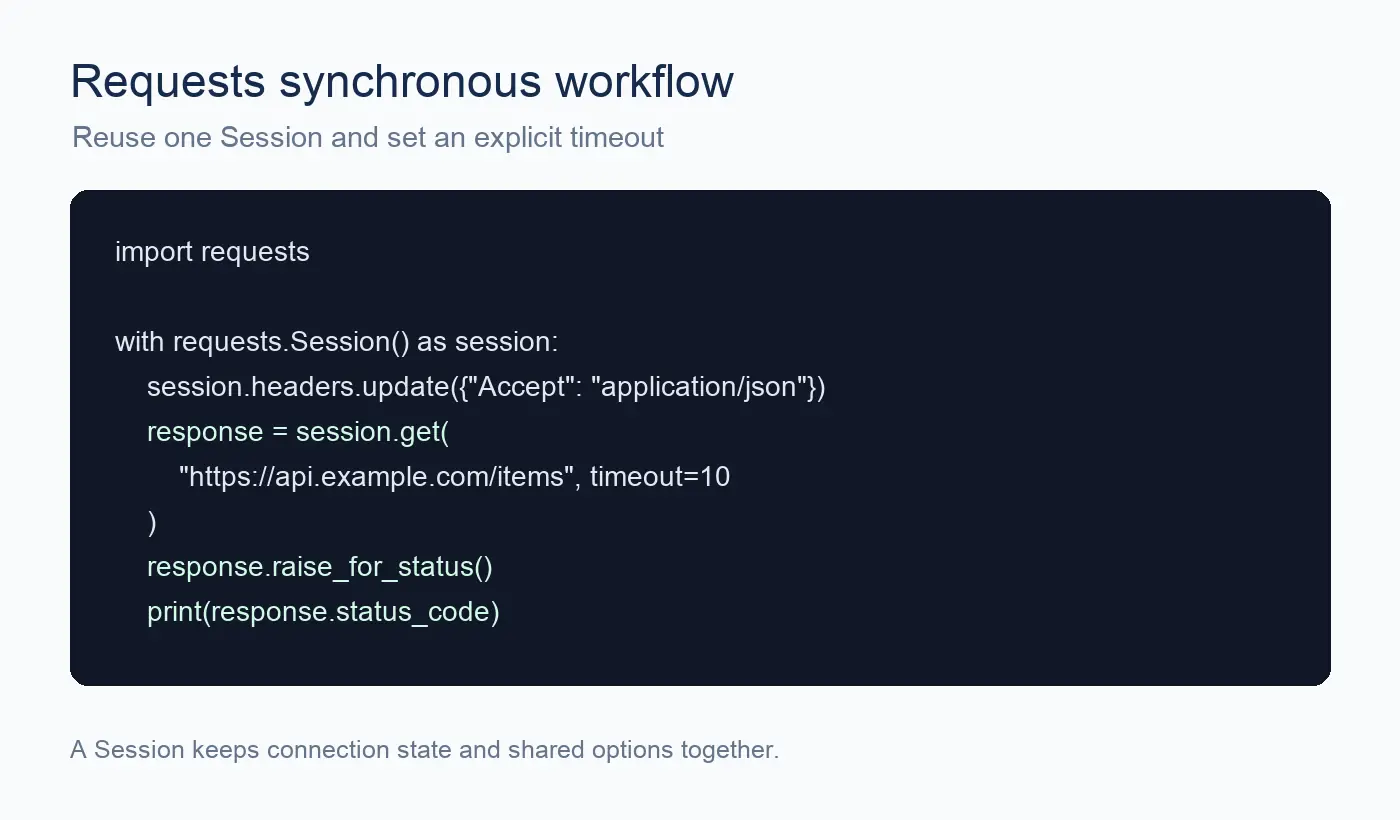
Both libraries support persistent sessions or clients. Reusing one for a group of requests avoids rebuilding connection state for every call and lets you set common options once.
Requests:
HTTPX:
Close a client when its work is done. In async code, use async with or call aclose(). Leaking clients can leave sockets open and create confusing connection-limit failures under load.
Timeouts and error handling
Do not treat a successful TCP connection as a successful application request. Check the HTTP status, response body, and any API-specific error field.
Requests requires an explicit timeout if you do not want a request to wait indefinitely:
HTTPX also supports separate connect, read, write, and pool timeout values:
The exception trees differ, so do not copy a Requests except block into HTTPX unchanged. Keep network errors separate from status errors and JSON decoding errors.
The pool timeout matters in concurrent applications: a request can be delayed while waiting for an available connection in the local pool, even when the remote server is responsive.
Redirects and compatibility
Redirect handling is an easy migration detail to miss. Requests follows redirects for common GET calls by default. HTTPX does not follow redirects unless you opt in:
Choose the behavior deliberately when translating a client. An API may require you to inspect the Location header, preserve the original URL for signing, or avoid following redirects across hosts.
Proxies, headers, and TLS
Both clients can send custom headers, cookies, authentication, and proxy-routed traffic. The configuration APIs are not interchangeable, especially across major versions. Pin and test the library version used by your application before deploying a proxy or TLS change.
For Requests projects, inspect the exact headers and timeout phases before changing the network path. In a browser workflow, headers are only one signal: sites can also observe cookies, JavaScript state, WebGL metadata, Canvas Fingerprinting, AudioContext Fingerprinting, fonts, screen properties, timezone, and WebRTC behavior.
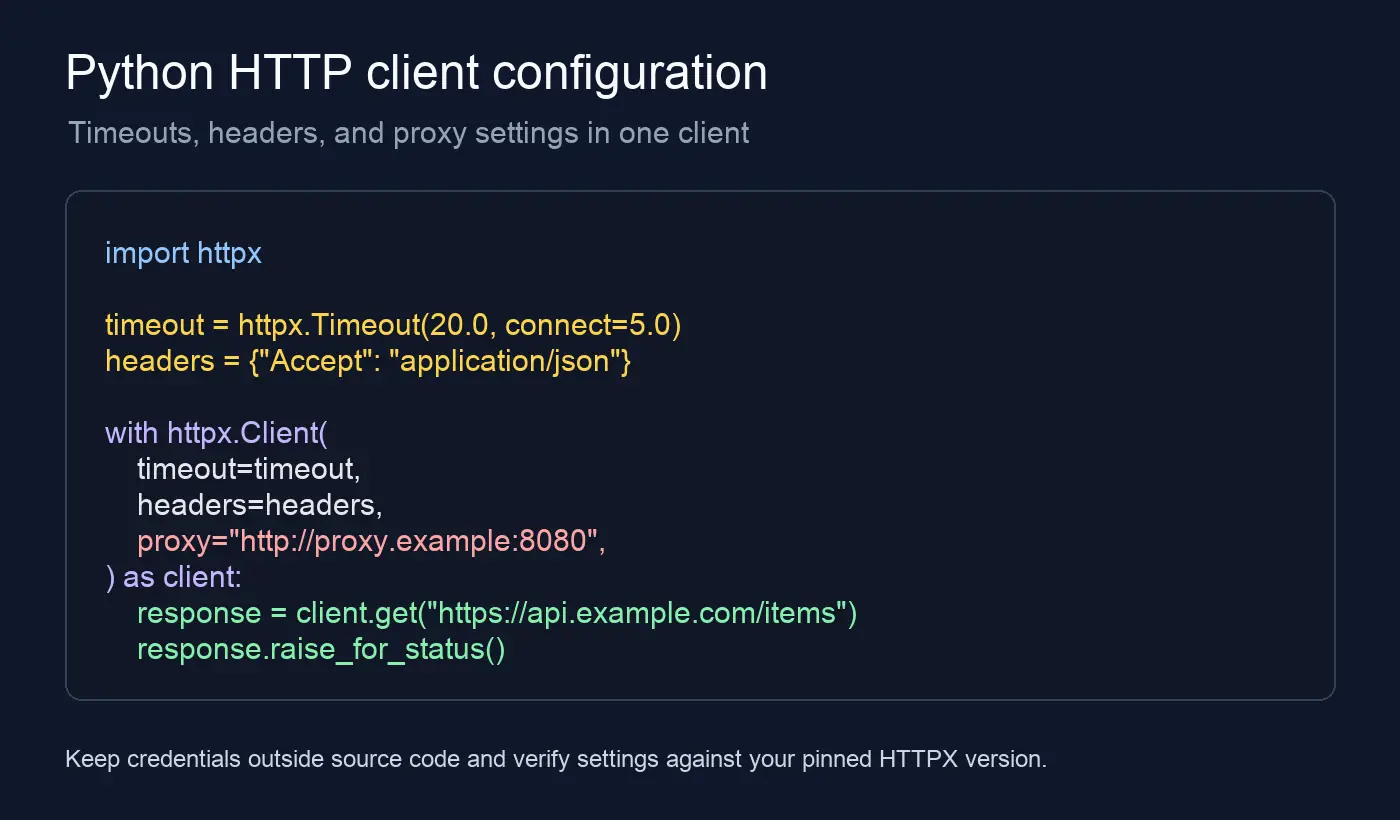
For Requests, proxy routing commonly uses a proxies= mapping. Current HTTPX uses proxy= for a single proxy and mounts= when different schemes or hosts need different routes:
Keep proxy credentials, cookies, and API tokens outside source code, using environment variables or your application’s secret-management system. When a task needs a browser rather than a raw HTTP client, RoxyBrowser provides isolated profiles and browser-level network settings. Its built-in proxy option should be evaluated per authorized workflow; it does not grant access to restricted content.
Testing and observability
Requests and HTTPX both support request customization and response inspection, but their mocking ecosystems and transport abstractions differ. Choose a test strategy that matches the library instead of replacing the transport in production code just to make a test pass.
At minimum, test:
- a normal 2xx response and the exact parsed payload
- a 4xx or 5xx response after
raise_for_status() - a connect or read timeout
- malformed JSON or an unexpected content type
- redirects, authentication, and proxy behavior when your application uses them
Log a request ID, method, host, elapsed time, status code, and exception class. Redact authorization headers, cookies, proxy credentials, and response bodies that may contain personal data.
Which library should you choose?
HTTP clients and browser profiles solve different problems
HTTPX and Requests do not reproduce a browser environment. They do not execute page JavaScript, maintain a visible browser profile, or provide the complete set of navigator and rendering signals that a modern site can inspect. A RoxyBrowser profile is appropriate when the task requires page interaction, persistent cookies, separate sessions, or browser fingerprint consistency. For a technical overview of this boundary, see browser fingerprint protection.
Choose Requests when
- your code is synchronous and does not need HTTP/2
- you want the smallest learning curve for a simple API integration
- the project already has Requests sessions, adapters, mocks, and operational knowledge
- your team values compatibility with a large body of existing examples
Choose HTTPX when
- the application already uses asyncio
- you want one library with sync and async interfaces
- HTTP/2 negotiation is a real requirement
- you are building a client layer that may need bounded concurrent requests
- you want explicit timeout categories and a modern transport interface
Choose RoxyBrowser when
- the target page requires JavaScript, a rendered DOM, or interactive controls
- each client or account needs a separate cookie jar and profile-isolated storage
- the workflow depends on consistent User-Agent, UA-CH, Navigator, Screen, WebGL, and timezone values
- you need to inspect a page in a controlled browser context before handing data to Python
RoxyBrowser’s browser profiles are designed to keep browser settings and rendering signals consistent within an authorized workflow. Depending on the configured engine and profile, this may include controls for Canvas, WebGL, AudioContext, User-Agent Client Hints, Navigator properties, fonts, screen values, timezone, and WebRTC-related behavior. Consistency controls do not guarantee access, anonymity, or immunity from detection, and they cannot override a website’s rules.
RoxyBrowser also combines profile configuration with native IP resources. Its network layer offers more than 90 million residential proxy nodes across 200+ countries and regions, allowing an operator to bind an approved location to a browser environment from one workspace. Treat those figures and availability as product claims that require current account-level confirmation. A network choice cannot compensate for weak authentication, inconsistent profile settings, or a lack of permission from the target service.
For teams coordinating approved browser tasks, RoxyBrowser may provide workflow automation features such as AI-agent control, MCP protocol connections, custom Skills, subaccount permissions, or environment templates, depending on the product configuration. These features should be evaluated against documented access controls, quotas, cancellation behavior, audit logs, and human approval requirements. Profile isolation supports separation of browser state; it does not make an operation compliant or remove the need to follow each platform’s terms.
Use a hybrid workflow when
- HTTPX or Requests can handle documented APIs and static resources efficiently
- a browser is needed only for login, JavaScript rendering, or a small number of interactive steps
- Python should process results while RoxyBrowser keeps browser state and profile isolation
Consider aiohttp when
aiohttp is an async-first alternative with its own client session, connector, timeout, and middleware patterns. It can be a good fit for an asyncio-heavy service that already uses the aiohttp ecosystem. Do not choose it solely because a benchmark ranks one event loop library above another. Compare the APIs, deployment model, test tools, and team experience against your actual workload.
Migration notes: Requests to HTTPX
Simple GET and POST calls are usually easy to translate, but a production migration deserves a checklist:
| Requests | HTTPX |
|---|---|
requests.get() |
httpx.get() |
requests.Session() |
httpx.Client() |
| No native async client | httpx.AsyncClient() |
requests.exceptions.Timeout |
httpx.TimeoutException |
requests.exceptions.HTTPError |
httpx.HTTPStatusError |
proxies= |
proxy= or mounts= |
verify= |
verify= |
Use this mapping as a starting point, then complete the migration checklist:
- Replace
requests.Sessionwithhttpx.Clientorhttpx.AsyncClient. - Review timeout values and exception handling instead of copying names mechanically.
- Recheck proxy syntax, TLS verification, certificates, redirects, and authentication.
- Confirm streaming and upload behavior with realistic payloads.
- Run integration tests against the real service or a faithful test server.
- Measure connection reuse and concurrency after the change.
Do not switch to async only by changing def to async def. The call sites must await the client, and the surrounding framework must run an event loop correctly.
Final recommendation
The practical answer to “Python HTTPX vs Requests” is architectural. Requests remains a strong default for conventional synchronous Python applications, while HTTPX fits async support and HTTP/2 requirements. RoxyBrowser belongs in a different decision: use it when JavaScript, persistent sessions, profile isolation, or browser fingerprint consistency is part of the workflow. A hybrid design can keep API work in Python and reserve browser automation for the pages that require it.
Pick the smallest layer that satisfies the task. Reuse each HTTP client or browser profile correctly, set explicit timeouts, verify status codes and page state, and test failure paths. Do not use profile isolation, proxies, or fingerprint controls to bypass authentication, CAPTCHAs, paywalls, or platform restrictions.


