
If you are evaluating the Kameleo browser for multi-account work, scraping, mobile emulation, or automation, the decision is rarely about whether it can open many windows. The real question is whether its browser isolation model, concurrency limits, proxy binding, and automation stack fit the way your team actually operates. This Kameleo review focuses on three points: whether Kameleo pricing is reasonable in practice, whether its fingerprint and mobile capabilities justify the operational cost, and which teams can use it efficiently at scale.
TL;DR
- Best for: Tech teams needing advanced mobile emulation and custom local automation.
- Less suited for: Non-technical users wanting built-in proxies and plug-and-play setup.
- Verdict: Kameleo is a high-control developer environment, not a turnkey browser.
What Kameleo Is and What Changed in 2026
Kameleo is an anti-detect browser built around isolated browser profiles rather than simple User-Agent editing. Its practical goal is to give each account a separate runtime environment with its own fingerprint profile, storage, proxy, and automation entry point. In operational terms, that means profile isolation, cookie isolation, local API access, browser kernel control, and mobile browser emulation matter more than surface-level UI features.
Based on the public product pages, Kameleo currently ships two custom browser kernels: Chroma, which is Chromium-based, and Junglefox, which is Firefox-based. The product is positioned for multi-account management, web scraping, QA testing, and automated browser workflows rather than ordinary private browsing.
Based on Kameleo’s public pages, the current product structure affects the buying logic in five visible ways.
1. Concurrent browsers are now the primary capacity unit
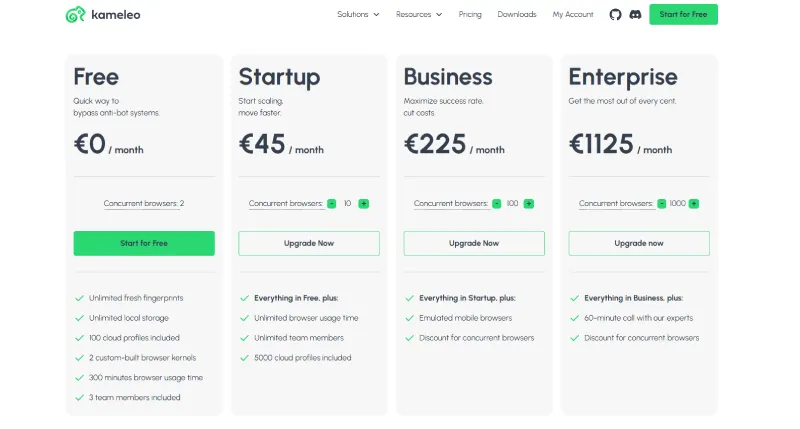
The public pricing page makes this explicit. You are not buying a limit on how many profiles you can save. You are buying how many browser instances can run at the same time. That distinction matters because one operator managing five accounts during the day and five automated jobs at night can consume a 10-browser plan much faster than expected.
2. The free plan is now a real evaluation layer
The public pricing page lists a Free plan with:
- 2 concurrent browsers
- 100 cloud profiles
- 300 minutes of browser usage time
- 60 API requests per minute
That makes the free tier useful for workflow validation and fingerprint sanity checks. It is not a production plan.
3. Mobile browser emulation is tier-gated
Kameleo now separates emulated mobile access from standard desktop-style use. The pricing page states that Free and Startup users can use only one emulated mobile profile at a time for testing, while Business and Enterprise fully unlock emulated mobile browsers. If your workflow depends on TikTok, Instagram, mobile ad verification, or mobile-first QA, this is not a minor detail. It changes which tier is even viable.
4. API throughput is clearly segmented
The current public limits are 60 RPM, 120 RPM, 600 RPM, and 1200 RPM across Free, Startup, Business, and Enterprise. Kameleo also states that calls such as SearchFingerprints, CreateProfile, and StartProfile count toward that limit. For teams orchestrating large profile pools, this affects queue design, retry logic, and burst capacity.
5. Deployment boundaries are clearer than before
The current downloads page lists support for Windows 10+, Windows Server 2016+, macOS 12+, and Docker environments. That matters because the Kameleo browser is still fundamentally a local-first or self-hosted runtime model, even when team features and cloud profiles are available.
The current structure makes Kameleo easier to evaluate accurately. It does not make the product inherently cheaper. It makes the limits more transparent.
Kameleo Pricing in 2026
Kameleo’s official pricing page displays euro-denominated plans rather than U.S. dollar pricing. That matters because older blog posts and screenshots often still circulate with dollar figures.
Here is the current public structure:
| Plan | Monthly Price | Annual Equivalent | Concurrent Browsers | API Limit | Key Limitation |
|---|---|---|---|---|---|
| Free | EUR0 | EUR0 | 2 | 60 RPM | 300 minutes per month; 1 emulated mobile profile at a time |
| Startup | EUR59 | EUR45 | 10 | 120 RPM | 1 emulated mobile profile at a time |
| Business | EUR299 | EUR225 | 100 | 600 RPM | Full mobile emulation unlocked |
| Enterprise | EUR1499 | EUR1125 | 1000 | 1200 RPM | Expert support; large-team orientation |
The most common mistake is treating concurrency as if it were an account count. It is not. Concurrent browsers are live runtime slots. If you maintain 200 account profiles but can run only 10 instances at once, your throughput ceiling is defined by those 10 live slots, not by your stored profiles.
That changes procurement logic in concrete ways:
- A solo operator doing manual work on a handful of accounts may survive on Startup.
- A scraping team spinning multiple browser profiles per job can hit the 10-browser ceiling quickly.
- A mobile-heavy media-buying workflow usually starts making sense only at Business because mobile emulation is fully unlocked there.
The practical problem with Kameleo pricing is not the sticker price. The practical problem is that software pricing, proxy pricing, and infrastructure pricing compound together. If you ignore that, Startup can look cheap on paper and expensive in operation.
Incorrect vs correct package selection
Incorrect pattern
Estimate from a single-user scenario, assume the Startup plan is enough, and then share the same concurrency pool across manual operations, scraping jobs, and mobile testing.
Correct pattern
Break down the business load first, then reverse-map the plan. Separate manual logins, automated runs, mobile testing, and overnight collection into independent concurrency pools. Calculate how many live profiles need to run simultaneously during peak periods, then decide whether Startup is sufficient or whether Business is the cheaper long-term choice.
If the goal is a long-running multi-account operation rather than a one-time test, annual billing usually makes more sense. The gap between monthly and annual-equivalent pricing is large enough to offset a meaningful amount of switching cost and trial-and-error overhead for small teams.
Why Concurrent Browsers Matter More Than Profile Count

Concurrent browsers change total cost because they define how many tasks can be active at the same time across human work and automated workloads.
A simple example:
- 4 live sessions for manual account handling
- 3 live sessions for overnight scraping
- 2 live sessions for QA checks
- 2 spare sessions for retries, relaunches, or CAPTCHA recovery
That is already 11 runtime slots. A nominal 10-browser plan is now undersized even though the stored profile count might be modest.
This is where Kameleo pricing can look deceptively low. If a team interprets Startup as “enough for 10 accounts,” the estimate is structurally wrong. The better model is to treat each concurrent browser as a working seat in a runtime queue.
The Hidden Cost of Kameleo
The biggest budgeting error with Kameleo is assuming the subscription is the total cost. It is only the first layer.
The full operating cost usually has four components:
- Software subscription: concurrency, API throughput, and mobile access tier
- Proxy procurement: residential, mobile, static residential, or datacenter supply
- Automation maintenance: script updates, selector drift, anti-bot changes, retry logic, and orchestration
- Infrastructure overhead: CPU, memory, disk I/O, Docker capacity, and local machine stability
For many teams, the Kameleo browser becomes expensive after deployment rather than at checkout.
Another way to state the same issue is simple: Kameleo may not be expensive to buy, but it can become expensive to keep running.
Proxy cost is usually the largest external line item
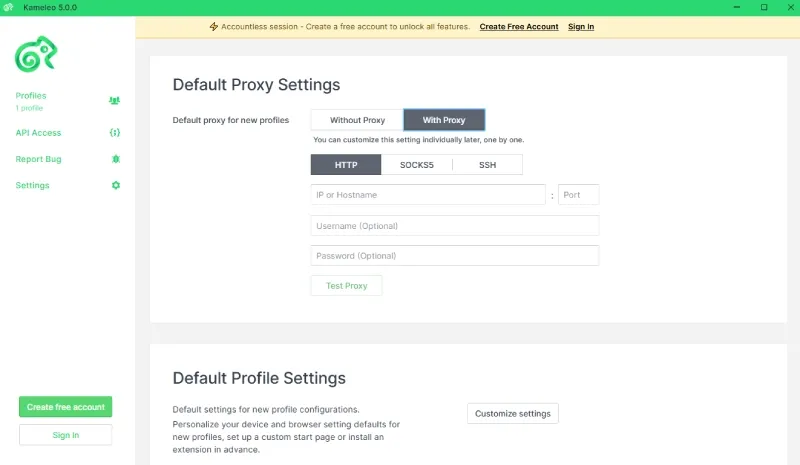
Kameleo publicly documents built-in proxy management and support for HTTP, HTTPS, SOCKS5, and SSH proxies, but its public pricing materials do not present bundled proxy traffic as a standard plan feature. Based on those public materials, most teams should evaluate proxy acquisition as a separate cost center.
That matters because proxy quality defines the ceiling on what Kameleo can achieve. A technically clean browser profile attached to a weak network identity is still weak.
The proxy decision usually looks like this:
- Residential proxy: higher trust, better ASN/ISP alignment, higher cost
- Mobile proxy: strongest trust profile in many social and mobile scenarios, highest operational cost
- Datacenter proxy: lower cost, weaker reputation on strict platforms
If your team is comparing network strategy, a practical starting point is understanding how a residential proxy differs from datacenter or rotating supply before you estimate the browser budget.
Automation maintenance is not optional
Kameleo supports Selenium, Playwright, Puppeteer, Docker, and a local API. For technical teams, that is useful. For non-technical teams, that is overhead.
Once you connect Kameleo to a scraping or RPA workflow, you inherit recurring maintenance:
- browser version drift
- selector breakage
- CAPTCHA policy changes
- anti-bot response changes
- API rate limit management
- queue and relaunch logic
Even the public RPM caps can become restrictive faster than expected if your orchestration pattern is noisy. A system that frequently creates profiles, launches profiles, polls state, rotates jobs, and retries failed sessions can push 60 or 120 RPM harder than a buyer expects from the table alone.
Infrastructure becomes part of the browser budget
Kameleo is still local-first in architecture. That gives you more control, but it also means your own machines or containers carry the load.
If you plan to run dozens or hundreds of live profiles, cost is no longer just software plus proxies. It becomes:
- CPU headroom
- memory allocation
- storage I/O
- container scheduling
- failure monitoring
- proxy exit quality
For small teams, local-first control can be a feature. For distributed teams, it can become a coordination tax.
Core Capabilities of the Kameleo Browser

Kameleo’s practical value is concentrated in four areas:
- mobile browser emulation
- fingerprint consistency control
- automation integration
- local-to-cloud profile management
The Kameleo browser is strongest when you need more than account tabs and cookie separation. It is designed for teams that care about how the entire environment looks to the target site.
Mobile emulation is a meaningful differentiator
Mobile workflows are more sensitive to fingerprint coherence than desktop-only workflows. A site can compare:
- User-Agent and User-Agent Client Hints
- timezone and IP location
- screen geometry and touch capability
- WebGL metadata
- AudioContext behavior
- sensor signals
If your workflow only edits the UA string and ignores UA-CH, navigator.maxTouchPoints, timezone, and GPU metadata, the mismatch itself becomes a detection signal.
What is browser fingerprint consistency?
Browser fingerprint consistency means the values inside a single profile do not contradict one another.
In practice, that includes alignment across:
- User-Agent string
- User-Agent Client Hints
- operating system claims
- screen resolution and device pixel ratio
- language and locale
- timezone
- WebGL renderer metadata
- Canvas behavior
- IP geolocation
- persistent storage state
Modern anti-bot systems do not score one field in isolation. They score groups of signals together. A profile that claims to be an iPhone but still exposes a desktop-style platform footprint, Windows-style locale patterns, and mismatched rendering metadata can look less credible than an unmodified desktop browser.
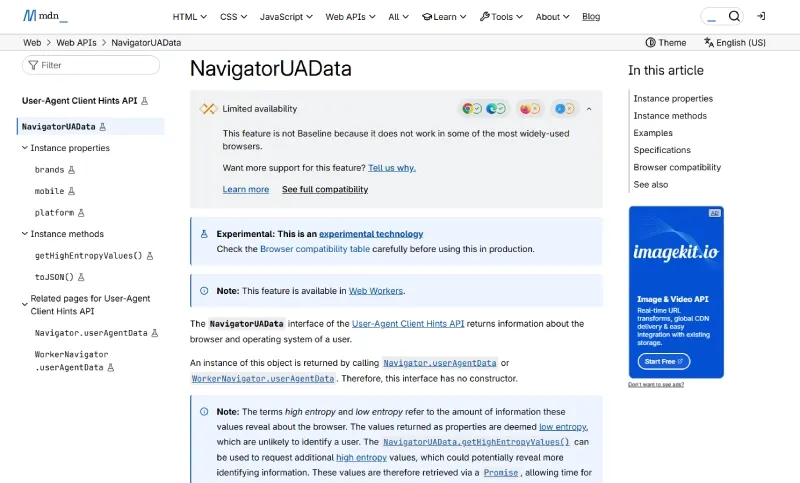
For readers who want the browser-side technical definitions, MDN’s UA-CH reference and MDN’s WebRTC documentation are useful baselines when you evaluate what a profile has to align.
Public masking tests exist, but they are not your final benchmark
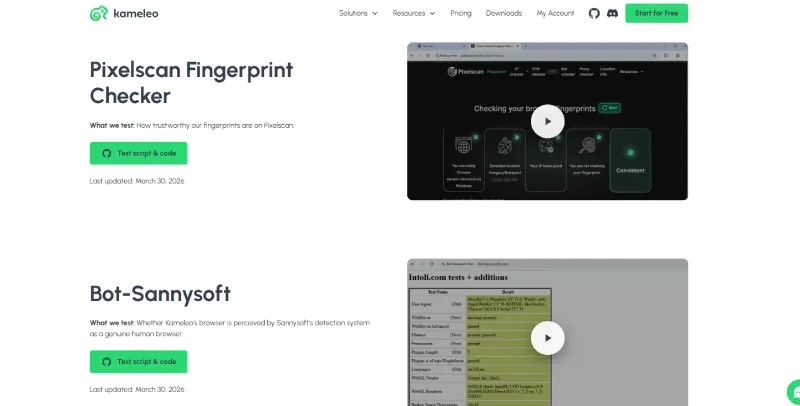
Kameleo maintains a public Masking Status Report. That page showed test entries for Pixelscan, Bot-Sannysoft, CreepJS, Browserscan, Cloudflare Turnstile, and other checks, with visible test-card dates from March 2026.
That is useful transparency. It is not a substitute for your own validation.
The correct procurement workflow is:
- test with your own proxy type
- test against your own target platform
- test the exact profile creation pattern you plan to use
- test at the same concurrency level you expect in production
Vendor test pages measure one part of the problem. Your own traffic shape, proxy reputation, login cadence, and automation pattern determine the rest.
Automation Support and Where the Cost Appears
Kameleo publicly supports Selenium, Playwright, Puppeteer, headless sessions, Docker, and SDKs for Python, JavaScript, and C#. That is a strong technical surface.
It also changes the kind of team that can extract value from the platform.
If your team already maintains:
- profile lifecycle code
- queueing logic
- proxy binding rules
- error handling
- browser restarts
- anti-bot regression checks
then Kameleo can fit cleanly into the stack.
If your team does not maintain that layer, Kameleo can feel like an unfinished environment rather than a finished operating product.
Incorrect vs correct implementation pattern
Incorrect pattern
Use Kameleo as a GUI wrapper for “change IP plus change UA,” ignore WebRTC leak control, skip timezone alignment, and reuse the same proxy across multiple accounts.
Correct pattern
Bind one stable proxy to one account-level browser profile, keep geolocation alignment intact, isolate cookies and local storage fully, and constrain automation scripts to that profile boundary so sessions do not bleed across accounts.
This is also where manage multiple accounts becomes the more relevant operating question than “how many profiles can I save?” The technical problem is session hygiene and environment discipline, not raw profile count.
First Run Experience, Performance, and Operational Boundaries
Kameleo is not especially beginner-friendly. The interface is not the hard part. The hard part is understanding which settings affect risk.
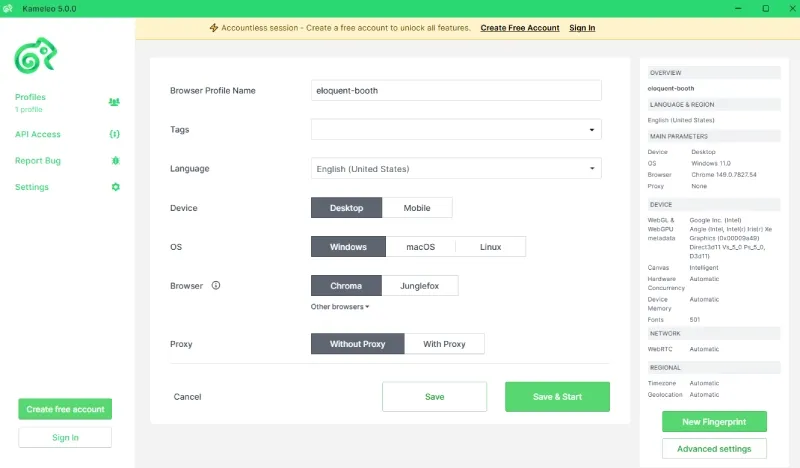
A technically correct first-run checklist usually includes:
- choose the kernel path
- create the browser profile
- bind the proxy
- align timezone and locale
- validate WebRTC behavior
- validate DNS behavior
- decide whether automation attaches immediately or after manual warm-up
That workflow is normal for an engineering team. It is heavy for a buyer who wants a low-friction multi-login product.
Local-first performance is both the advantage and the constraint
The advantage is control. You are not forced to hand all session data, cookies, and automation logic to a remote browser SaaS.
The constraint is resource ownership. Your machine or Docker environment takes the hit when concurrency rises.
That becomes visible when:
- browser launches pile up
- profile storage grows
- memory fragmentation appears
- proxy quality slows page completion
- retries increase after site friction
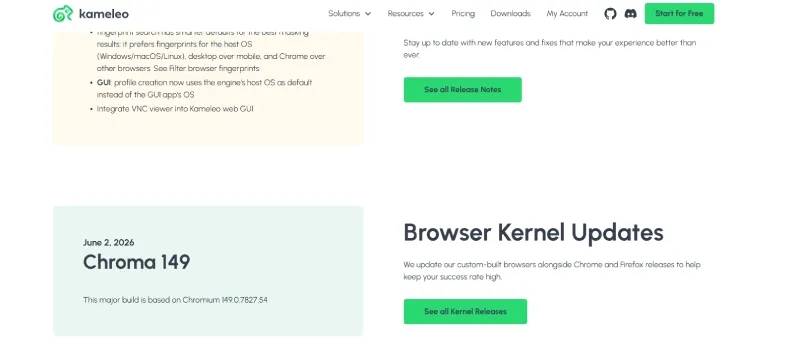
The current downloads page confirms support for Windows 10+, Windows Server 2016+, macOS 12+, and Docker, and the same page listed Kameleo 5.0.0 and Chroma 149 as June 2026 downloads. Kameleo also states publicly that new Chroma versions ship within five days of official Chrome releases. That update cadence is operationally relevant if your automation scripts are sensitive to browser-version movement.
Who Kameleo Fits Best
Kameleo is a better fit for teams willing to trade simplicity for control.
Strong fit
Data collection and automation teams
These teams can absorb the local API, Playwright, Puppeteer, Docker, and proxy orchestration requirements. They are also the most likely to benefit from concurrency-based scaling and low-level profile control.
Mobile-first operators
If your workflow centers on TikTok, Instagram, mobile ad validation, or mobile QA, Kameleo’s emulated mobile browser layer is more relevant than it would be in a desktop-only account workflow.
Teams that want local control of account state
If you do not want all cookies, sessions, and execution logic delegated to a remote browser provider, Kameleo’s local-first model can be structurally attractive.
Weak fit
Small teams with tight budgets
If you only need a few low-intensity sessions and want fast setup, Kameleo can be heavier than necessary once proxies and maintenance are included.
Teams that rely on frictionless real-time collaboration
Kameleo does support cloud profiles and team functions, but its product logic still leans toward controlled environments rather than instant browser-based handoff across many users.
Buyers who expect the browser itself to solve platform risk
No anti-detect browser can erase weak proxy reputation, aggressive automation cadence, unstable account histories, or payment-side signals. Browser isolation is one control layer, not the entire risk model.
Incorrect vs correct social workflow
Incorrect pattern
Run many social accounts through cheap datacenter exits, rotate geography aggressively, and assume the browser alone will compensate.
Correct pattern
Keep each higher-value account on a stable proxy, align timezone, language, and device claims with that network identity, and preserve an account-warming window before high-frequency automation begins.
If your buying process already includes AdsPower, Multilogin, or other anti-detect tools, the useful comparison is not “which one has the longest feature list.” The useful comparison is which one maps more directly to your profile lifecycle, proxy workflow, and team operating model.
The Best Kameleo Alternative for Teams
If your priority is not local-first control but lower deployment friction, faster proxy binding, shorter collaboration loops, and less custom orchestration work, the strongest alternative path is usually closer to RoxyBrowser.
The difference is product philosophy.
Kameleo behaves more like an environment-control tool for technical teams.
RoxyBrowser is closer to an integrated operating layer for teams that want the browser, proxy, orchestration, and collaboration path to be shorter.
The comparison is clearer if you look at the operating model side by side.
| Dimension | Kameleo | RoxyBrowser |
|---|---|---|
| Core model | Local-first environment control | More integrated browser-plus-workflow model |
| Capacity logic | Concurrent browser slots are the primary scaling unit | Positioned around easier batch control and lower operational friction |
| Proxy path | Proxy integration is supported, but proxy sourcing is still a separate workflow | Product positioning emphasizes a shorter browser-plus-IP workflow |
| Mobile and fingerprint focus | Strong fit for teams that need mobile emulation and deeper environment control | Stronger fit for teams that want built-in workflow simplification around fingerprint and IP management |
| Collaboration style | Better for controlled technical setups | Better for teams that want faster handoff and simpler coordination |
| Best fit | Technical teams with scripts, proxy discipline, and local infrastructure | Teams that want quicker rollout with less assembly work |
There are four reasons that distinction matters.
1. Scheduling is lighter
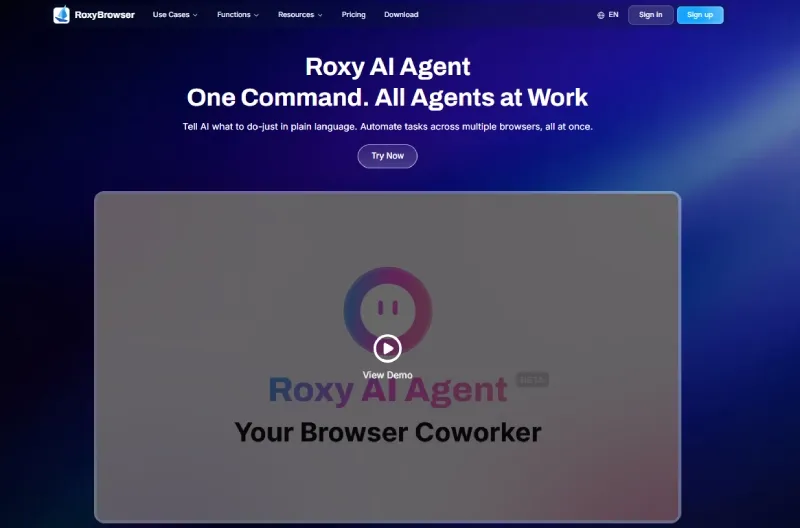
RoxyBrowser positions AI-driven concurrency control and no-code batch window handling more directly in the product layer. That is more attractive for teams that do not want to maintain large amounts of glue code around browser actions.
2. Fingerprint engineering is more integrated
Its public positioning emphasizes lower-level fingerprint masking across Canvas, AudioContext, and mobile-side signals instead of treating profile spoofing as mostly a UI-layer configuration task.
3. Proxy and environment binding is operationally simpler
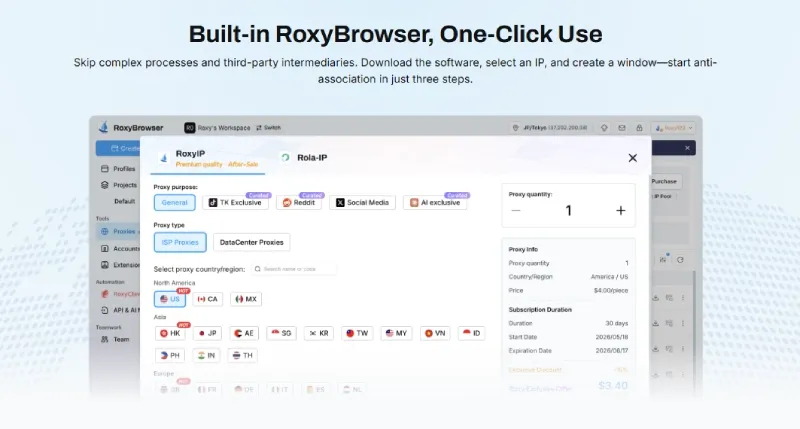
For many teams, browser-plus-IP binding inside one system is easier to govern than buying the browser separately, buying proxies separately, and stitching the workflow together afterward. If that is your main concern, RoxyIP is the more relevant product lens than raw browser feature count.
4. Team coordination is shorter
For distributed teams that need environment templates, handoff, and permissions discipline, a more integrated team product often scales faster than a local-first setup.
If your team is mainly solving social media management, those workflow differences matter more than kernel marketing language alone.
Whichever stack you choose, browser isolation does not override platform rules, proxy reputation limits, or account behavior signals. Teams should still validate workflows against the target platform’s policies and their own compliance requirements.
Verdict
This Kameleo review comes down to operating model, not monthly price.
Kameleo is worth evaluating if you genuinely need:
- mobile browser emulation
- local-first control
- deep browser profile isolation
- automation framework access
- concurrency at the runtime level rather than simple profile storage
Kameleo is less attractive if you mainly need:
- low setup friction
- built-in network supply
- faster team collaboration
- reduced scripting overhead
- a shorter path from purchase to production
The simplest way to read the product is this: Kameleo sells control, not convenience.
If your team needs that control and can support the surrounding proxy, infrastructure, and automation stack, the value proposition is coherent. If your team mainly wants lower operating overhead, the better answer is often a more integrated alternative rather than a deeper anti-detect stack.


