How to Get YouTube Unblocked (2026): Guide for Creators & Agencies
Facing YouTube IP bans or geo-restrictions? Learn how creators, MCN agencies, and marketers can get YouTube unblocked and manage multiple channels safely using antidetect browsers.
A blocked YouTube connection or a suspended channel network is a nightmare for content creators, MCN agencies, and digital marketers. While many guides focus on helping people bypass school or workplace Wi-Fi, the real stakes are much higher for professionals running YouTube ad campaigns, managing international channels, or operating YouTube automation networks.
In this guide, we'll cover how to bypass YouTube blocks, avoid IP bans, and securely manage multiple YouTube accounts without triggering Google's strict anti-fraud algorithms.
Why Is YouTube Blocked?
Before we dive into solutions, it's helpful to understand the common reasons behind YouTube blocking. Knowing the "why" can often inform the "how" when it comes to finding effective workarounds.
- IP Bans for Marketers: Schools often block YouTube to keep students focused on their academic work and prevent off-topic browsing during class. This policy aims to create a productive learning environment and manage network bandwidth.
- Geo-Restricted Ad Campaigns: Companies restrict access to YouTube to ensure employees are focused on their tasks and not consuming non-work-related entertainment. This measure helps maintain network security and ensures resources are used efficiently.
Both schools and some nations block YouTube to prevent exposure to content that is inappropriate, potentially violent, or goes against local laws and cultural norms. This is a key reason many search for youtube unblocked sites to bypass these filters.
- Governments: Some governments block YouTube to control information and prevent citizens from accessing content deemed politically or culturally sensitive. Finding a reliable YouTube unblocker becomes a tool for accessing diverse perspectives and exercising freedom of information.
- Internet Service Providers: In some cases, an ISP might block or throttle access to certain sites to manage network traffic or comply with government regulations.
In each case, restrictions vary. Some block the main domain, while others use advanced filters to detect unblocked YouTube sites. Knowing the type of restriction helps you choose the right solution.
How to Unblock YouTube: 5 Practical Methods
Now, let's get to the core of the matter: how to bypass these restrictions and gain access to YouTube unblocked at school and other common places. There are many methods available, ranging from simple browser-based tricks to more robust security solutions. Here're the top 5 way to unblock Youtube.
1. Using a Virtual Private Network (VPN)
A VPN is arguably the most reliable and secure method to unblock YouTube and bypass virtually any internet restriction. It works by encrypting your internet connection and routing it through a server in a different location. This makes it appear as if you are browsing from that server's location, effectively masking your real IP address and circumventing local blocks.
How to Use a VPN:
- Choose a reputable VPN provider: Look for services with strong encryption, a no-logs policy, and a good selection of servers.
- Download and install the VPN app: Most providers offer apps for various devices (Windows, macOS, Android, iOS).
- Connect to a server: Select a server in a country where YouTube is not blocked (e.g., the United States or Canada).
- Open YouTube: You should now have full access to YouTube unblocked.
| ✅Pros | ⚠️Cons |
|---|---|
| Strong encryption | Can slow down connection speed |
| Bypasses geo-restrictions | Paid services can be costly |
| Masks IP address | Some websites can still detect VPN usage due to your browser fingerprint. |
| Works for most blocked sites |
2. Web Proxies and Proxy Sites
Proxy sites act as intermediaries between your device and YouTube. When you use a proxy, your request goes to the proxy server first, which then fetches the YouTube content for you and sends it back. This effectively hides your IP address from YouTube and the blocking entity. Many youtube sites that are unblocked are actually proxy servers.
How to Use a Proxy:
- Search for "free web proxy" or "proxy sites to unblock youtube": You'll find numerous options online.
- Enter the YouTube URL: Type YouTube URL into the proxy site's search bar.
- Browse YouTube: The content will be loaded through the proxy server.
| ✅Pros | ⚠️Cons |
|---|---|
| Often free | Slower speeds |
| Easy to use | Less secure than VPNs |
| No software installation needed | Unreliable performance |
| Many free proxies are short-lived | |
| Basic ones are easily detected and blocked |
Be cautious about which unblocked YouTube sites you trust.
3. Using RoxyBrowser (3 Steps)
Manage your YouTube channel matrix securely. Prevent account bans and scale your video marketing with RoxyBrowser's enterprise-grade antidetect technology.
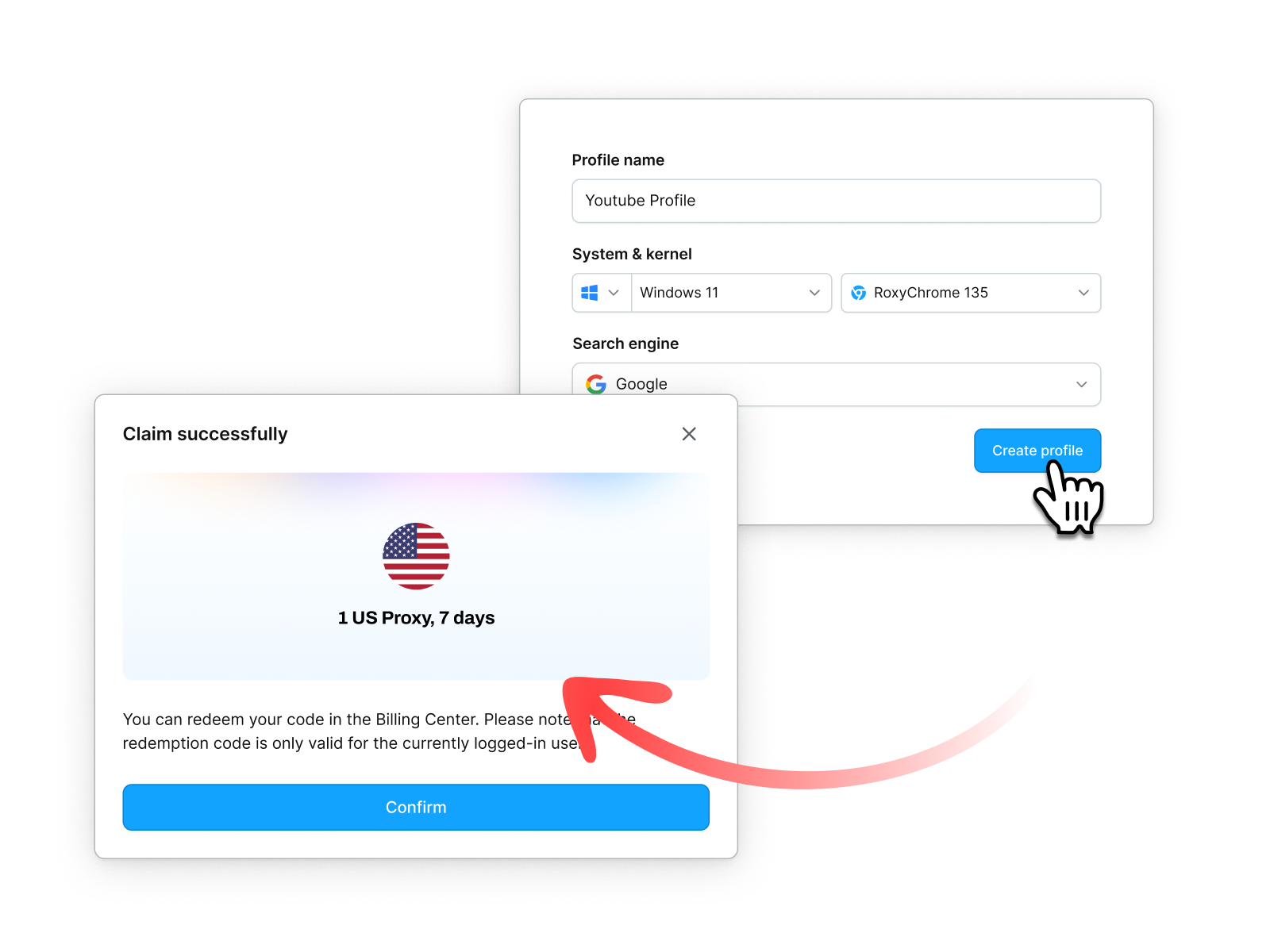
Step1: Create a profile and claim your free proxy
Download and install RoxyBrowser. Create a profile, and the option to claim a free proxy will appear — it’s fast and straightforward.
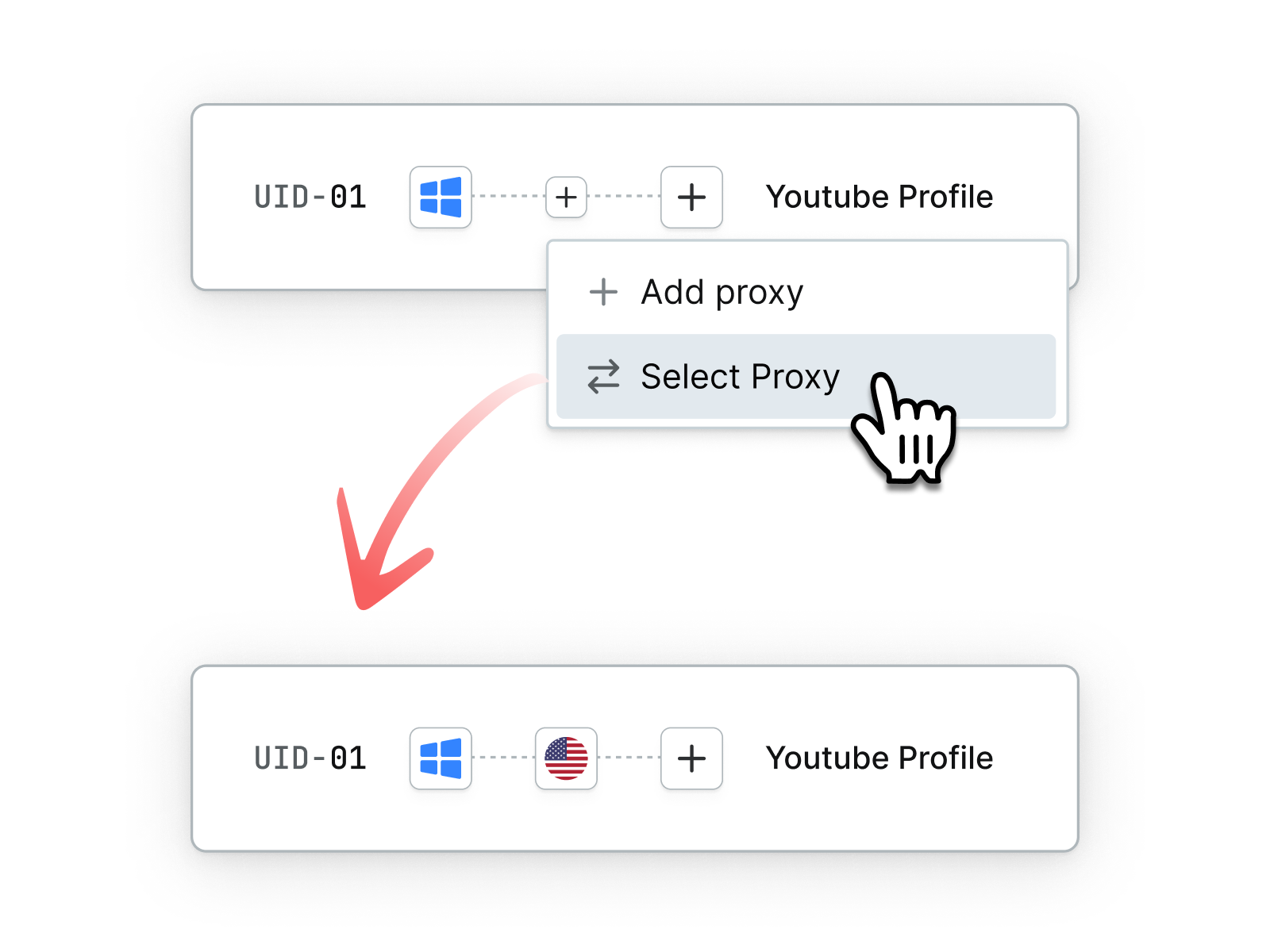
Step 2: Add the proxy to your profile
Attach the free proxy to your profile. An authentic browser fingerprint is automatically generated based on your proxy, so YouTube won’t detect any tools. No complicated setup needed.
Step 3: Open the browser window and watch YouTube
Open your configured window and visit YouTube. You can now stream any show or movie without limits. To access content in another region, just create a new profile with a different proxy IP. New users can create 5 profiles for free!
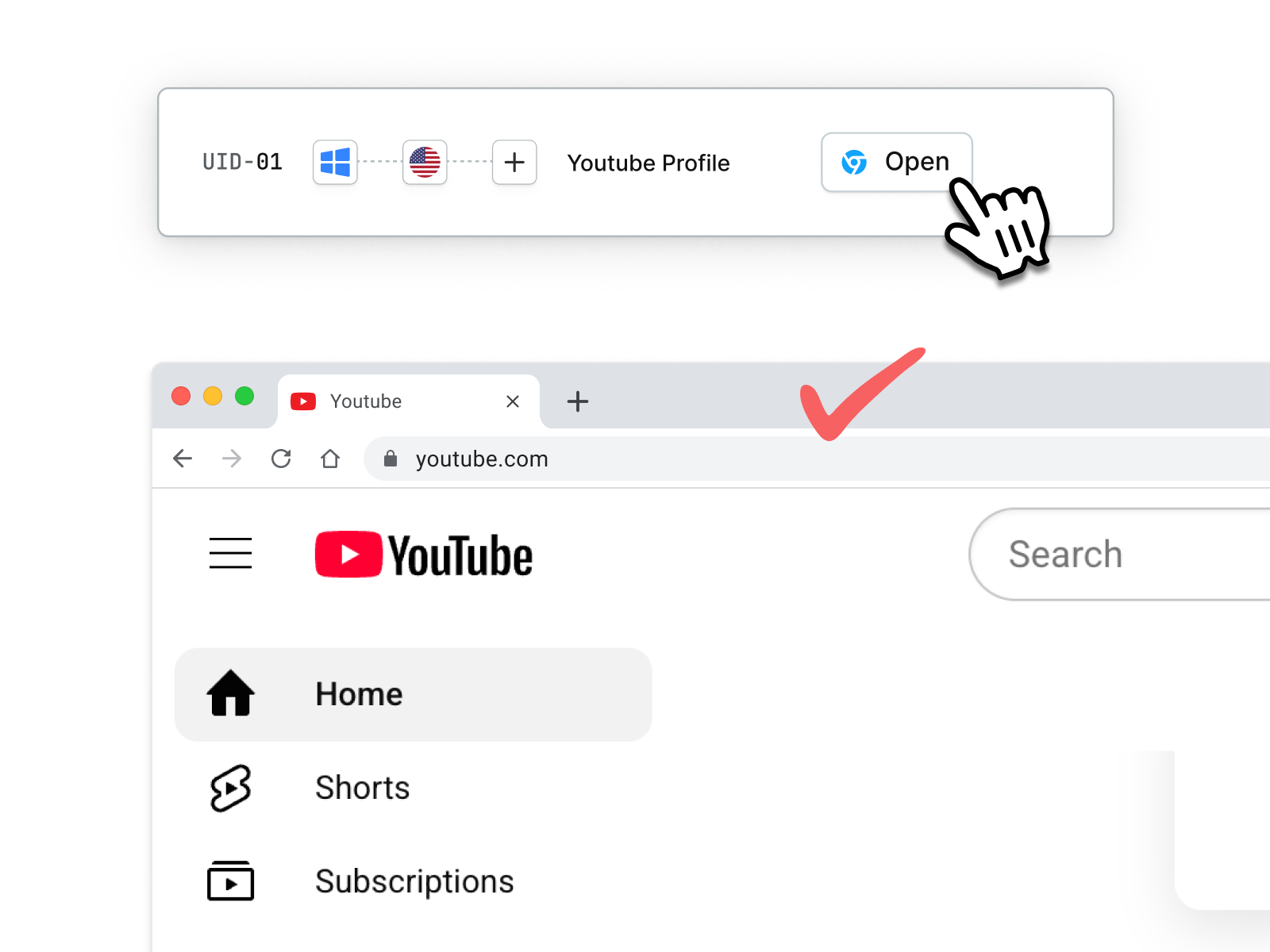
By using a browser like this, you can access a YouTube unblocked website with a high degree of anonymity.
{% cta title="Unblock Your YouTube with RoxyBrowser" desc="Access YouTube Anytime, Anywhere." style="2" btnText="Download Now" btnLink="/download" %}
| ✅Pros | ⚠️Cons |
|---|---|
| Secure and highly reliable for unblocking sites like YouTube | Some features might require a subscription |
| Provides strong digital fingerprint spoofing | |
| Allows for managing multiple browser profiles simultaneously | |
| Offers stable and consistent IP and fingerprint information |
4. Using TOR Browser
TOR (The Onion Router) is a free and open-source software that enables anonymous communication. It routes your internet traffic through a worldwide volunteer overlay network, consisting of thousands of relays, to conceal your location and usage from network surveillance.
How to Use TOR:
- Download the TOR Browser: Get it from the official TOR Project website.
- Install and launch: The browser is pre-configured for anonymity.
- Navigate to YouTube: You can now access YouTube unblocked.
| ✅Pros | ⚠️Cons |
|---|---|
| High anonymity | Not foolproof |
| Difficult for basic network filters to block | Very slow speeds due to multiple relays |
| Not ideal for streaming high-quality video | |
| Can be flagged by network administrators due to its association with anonymity |
5. URL Shorteners and Different URLs
Sometimes, network filters are very basic and only block the exact youtube domain. Using URL shorteners or slightly different URLs can sometimes bypass these rudimentary blocks.
How to Use This Method:
- Use a URL shortener: Copy the YouTube video link and paste it into a service like Bitly{target="_blank" rel="nofollow"} or TinyURL{target="_blank" rel="nofollow"}. Then try accessing the shortened link.
- Try alternative YouTube domains: Occasionally, accessing YouTube via its secure HTTPS version (if the block is only on HTTP) or trying international YouTube domains might work, but this is less common for comprehensive blocks.
| ✅Pros | ⚠️Cons |
|---|---|
| Simple and quick | Highly unreliable |
| No additional software required. | Only works for very basic network filters |
Tips for Managing Multiple YouTube Channels Safely
Students often face unique challenges when trying to access YouTube unblocked at school. School networks are usually tightly controlled. Here are some tailored tips:
When scaling your YouTube operations, running multiple channels from the same device or network is a massive risk. Google's anti-fraud algorithms can easily detect linked accounts through your digital footprint. If one channel gets suspended for a policy violation, your entire network could face a cascading ban (shadowban or permanent termination).
Here are the golden rules for safe multi-channel management:
- Strict IP Isolation: Never log into multiple YouTube creator accounts using the same public IP address. Always assign a dedicated, high-quality residential proxy to each specific channel.
- Browser Fingerprint Spoofing: Incognito mode or clearing cookies does NOT hide your hardware fingerprints (such as Canvas, WebRTC, and fonts). You must use an enterprise-grade antidetect browser like RoxyBrowser to create a unique, physically isolated browser profile for every channel.
- Avoid Cross-Contamination: Keep your cookies, cache, and browsing histories strictly separated. RoxyBrowser automates this environment isolation, ensuring Google’s tracking scripts see each of your channels as completely unrelated users operating from different clean devices.
Exploring Unblocked YouTube Sites and Alternatives
While the focus is on YouTube itself, it's also worth noting that a few platforms are designed to host mirrored content or offer similar video experiences. Some users search for "sites to unblock YouTube" hoping for alternative platforms, but often these are just proxy services. However, there are legitimate alternative video platforms if your goal is just to watch videos and YouTube isn't critical. These aren't "youtube unblocked websites" per se, but alternatives:
- Vimeo: Known for high-quality, often creative and professional content.
- Dailymotion: A French video-sharing platform with a vast library.
- Bitchute / Rumble: Platforms popular with creators looking for alternatives to YouTube's content policies.
- Educational Platforms: For academic content, consider platforms like Khan Academy, Coursera, or edX, which are often not blocked.
These platforms can serve as excellent resources if you're looking for content that isn't exclusively on YouTube or if all methods to access YouTube unblocked fail.
Final Thoughts
Accessing YouTube unblocked can significantly enhance your educational experience, productivity, and access to global information and entertainment. The methods outlined above provide viable pathways to bypass common internet restrictions. With the right tools and knowledge, the vast world of YouTube can be at your fingertips, no matter where you are. So go ahead, unblock YouTube and start exploring!
FAQ
Is it legal to unblock Youtube?
Yes, unblocking youtube by bypassing a network filter is generally legal, If you have any worries, you can check your school or workplace’s Acceptable Use Policy to avoid risks.
Why would I need a different browser just for Youtube?
An anti-detect browser like RoxyBrowser alows you to use a separate, isolated browser profile, which ensures your Youtube watching doesn’t leave any traces on your main browser, including cookies or cache. You can also use it to enhance your privacy on other video platforms.
What makes RoxyBrowser different from regular VPNs?
RoxyBrowser creates isolated browsing environments with unique digital fingerprints for each profile, making it harder for network filters to detect compared to standard VPNs so that you can watch Youtube more safely.
Is RoxyBrowser more expensive than other unblocking methods?
RoxyBrowser is actually more cost-effective than most premium VPN subscriptions. New users get a permanent free plan with 5 profiles. If you join RoxyBrowser now, you also get to claim one of three welcome bonuses, including free high-quality IP resources.