How to Change TikTok Location: Account Region, Feed, and IP
Change TikTok location through account settings, feed preferences, or a proxy. Learn how to change location on TikTok with a clear RoxyBrowser guide.

To change TikTok location, first decide what needs to change. Your account region, For You recommendations, connection IP, and a video's location tag are separate things. Each has a different method and a different way to check the result.
Quick answer: To change TikTok location, choose the setting that matches your goal. Use account settings for an eligible region change, content preferences for different recommendations, or a VPN or proxy for a different connection IP. RoxyBrowser assigns proxies to desktop browser profiles; it does not change a phone's GPS or automatically qualify an account for regional features.
Choose What You Want to Change on TikTok
The right method depends on your intended result. Checking a new IP address will not tell you whether your account region changed, just as seeing a British video does not prove your account is registered in the UK.
| Your goal | Start with | How to check it |
|---|---|---|
| Update your account after moving countries | Account region settings, where available | Reopen the saved account-region field |
| See more content from another country | Searches, relevant creators, and content preferences | Review recommendations across normal browsing sessions |
| Use a regional IP on desktop | A proxy assigned to a browser profile | Check the exit IP inside that profile |
| Change the mobile app's network IP | A device VPN that includes TikTok traffic | Check routing and the VPN connection |
| Add a place to a video | Add location on the posting screen | Review the post's location label |
| Reach a country through paid campaigns | Ad-group location targeting | Review campaign targeting and delivery reports |
TikTok's location-related information can include network information, SIM region, and device location where available and permitted. Recommendations also reflect your interactions and content preferences. These inputs should not be treated as a set of switches with publicly established, fixed weights.
For example, someone studying Japanese cooking can search for Japanese creators without migrating their account. An agency managing a UK client's existing account has a different requirement: keeping that account's desktop session, browser settings, and network configuration organized.
How to Change Your Region on TikTok Through Account Settings
For an account-level change, start with the account-region option if TikTok makes it available. A different IP address alone does not update this saved setting or satisfy the requirements shown by TikTok.
Check the Region Option on iPhone or Android
The account-settings route to look for is:
- Open TikTok and go to Profile.
- Open Menu > Settings and privacy.
- Look under Account > User information > Account region.
- If the option is available, review your current region and the destinations offered.
- Read the requirements and confirmation notices before selecting a new region.
- Return to account information to check the saved result.
This is the first place to look when deciding how to change your region on TikTok after a move. Requirements can concern your presence or activity in the destination, age eligibility, or unresolved account balances or rewards. The actual prompt on your account determines what you need to resolve; there is no universal waiting period assumed in this guide.
On TikTok's website, check account-management settings for the equivalent option. If the web interface does not expose it, use the mobile app rather than assuming that changing a browser setting will update the account.
If the Option Is Missing or the Request Fails
A missing menu and a rejected change are different problems. For a missing menu, check the app version and account settings. For a rejected request, record the exact message and address that requirement through TikTok's account or support flow.
For example, if a prompt asks you to resolve a balance, switching proxy endpoints will not resolve it. Likewise, creating a second account does not transfer your followers, history, or program eligibility. Keep the existing account unless a separate business need justifies another one.
How to Change Location on TikTok for a More Relevant Feed
If you want different videos, start with what you search for, watch, and follow. These actions can influence recommendations without requiring a country change, a new account, or a paid network tool.
Adjust Your Content Preferences and Interactions
- Search for specific places, topics, and creators in the language relevant to your interests.
- Follow useful accounts and watch videos you genuinely want to see more of.
- Use Not interested on unwanted recommendations instead of repeatedly watching them.
- Review the language and content preferences available in your settings.
- For a broader recommendation refresh, look for Settings and privacy > Content preferences > Refresh your For You feed. Read the confirmation before proceeding; the refresh cannot be undone.
App language and content preferences serve different purposes. Changing the interface to Spanish does not specify whether you want content from Spain, Mexico, or another Spanish-speaking market. Searches such as a city name plus a topic provide a more specific starting point.
A feed refresh concerns For You recommendations. It does not rewrite your account region, change your connection, or guarantee a country-specific feed. Your later viewing activity will continue to shape recommendations.
Review Location Permissions on Your Phone
You can review device location access separately from content preferences:
| Device | Settings route | What to review |
|---|---|---|
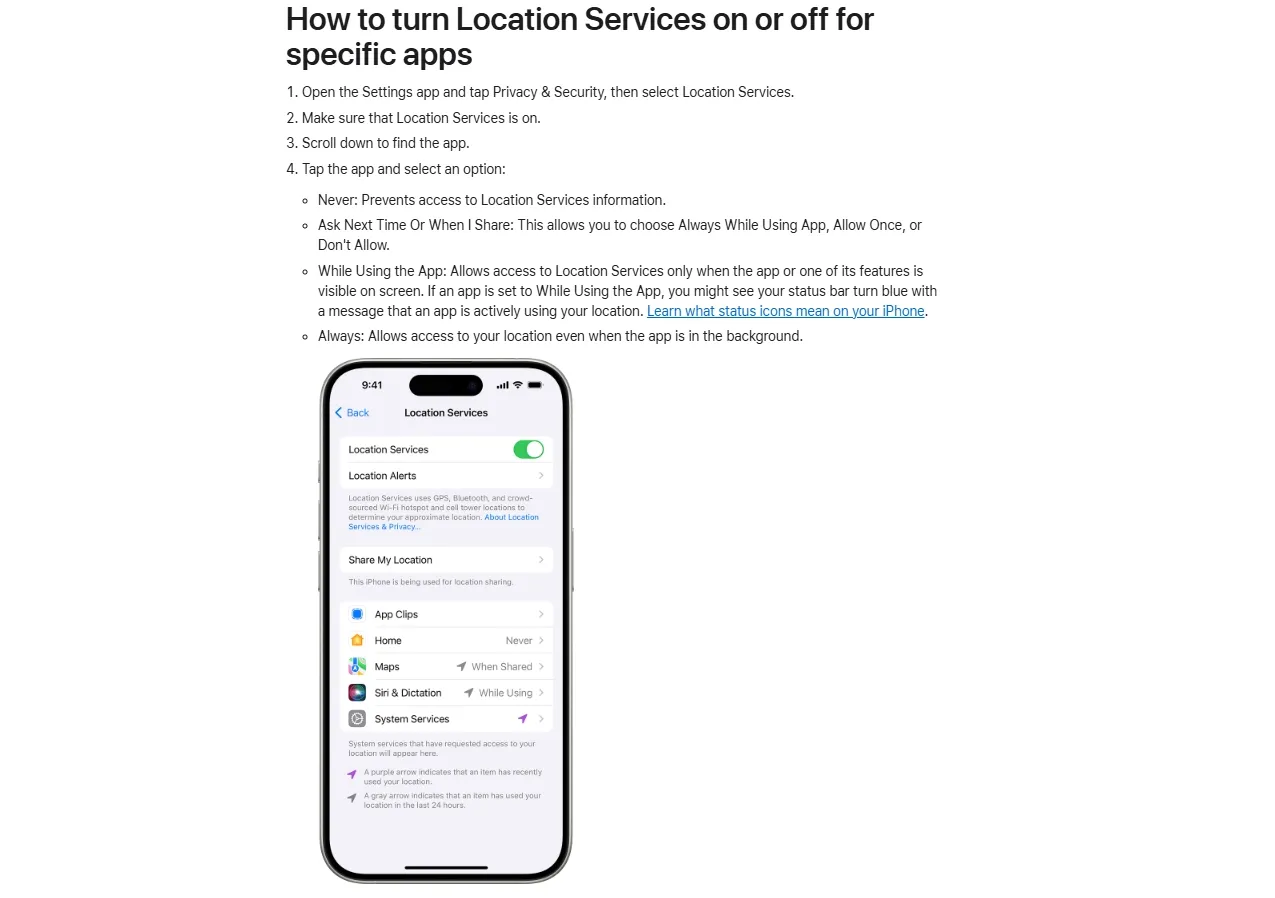
| iPhone | Settings > Privacy & Security > Location Services > TikTok, if listed | Access permission and Precise Location, where available |
| Android | Settings > Apps > TikTok > Permissions > Location, where available | Access level and precise or approximate location; labels vary by manufacturer |
Apple's Location Services instructions explain how to manage access per app. Disabling precise location can limit the detail an app receives through that permission, but it does not hide your IP address or erase existing account data.
After a genuine move, a local SIM changes part of your mobile-network context. It does not independently migrate your TikTok account. Your phone's language and region settings are also separate from your Apple or Google store account country; changing one does not automatically change the other.
When a Mobile VPN Helps
A VPN is relevant when you need to change the network IP used by the mobile app. Connect to the intended endpoint, check that TikTok is included in any split-tunneling configuration, and reopen the app after the connection is established.
A browser-based IP check can confirm that browser's route. If the VPN excludes TikTok, the same check does not establish the app's route. The VPN also does not replace your SIM, remove account history, or necessarily change device location. Review those layers separately if the result differs from what you expected.
The proxy vs VPN comparison explains the differences in routing scope and encryption. For this workflow, check which application or browser profile actually uses the configured connection.
Change the IP Location Used by TikTok on Desktop with RoxyBrowser
RoxyBrowser combines browser profiles with per-profile proxy configuration. This gives you a practical way to keep an authorized account's session and regional network settings together, without repeatedly changing the connection used by every browser window.
Step 1: Prepare a Dedicated Profile
In RoxyBrowser, a profile holds a separate browsing environment. Profile isolation keeps cookies and site storage separate between profiles, while browser fingerprint protection includes controls for browser characteristics exposed to websites. A proxy controls the configured connection's exit IP. These functions address different parts of account management.
For an illustrative agency workflow, name two profiles Client-A-UK-TikTok and Client-B-US-TikTok. Assign each the appropriate authorized account and network configuration. For an established account, reuse its existing profile rather than creating a fresh environment for every session.
For teams managing multiple TikTok accounts, keep the profile name, account owner, and assigned proxy recorded together so colleagues can reopen the correct environment.
Before setup, have the proxy's protocol, host, port, authentication details, and intended exit country ready. A suitable existing endpoint is sufficient; a new purchase is not a prerequisite.
Step 2: Create the Profile and Add a Proxy
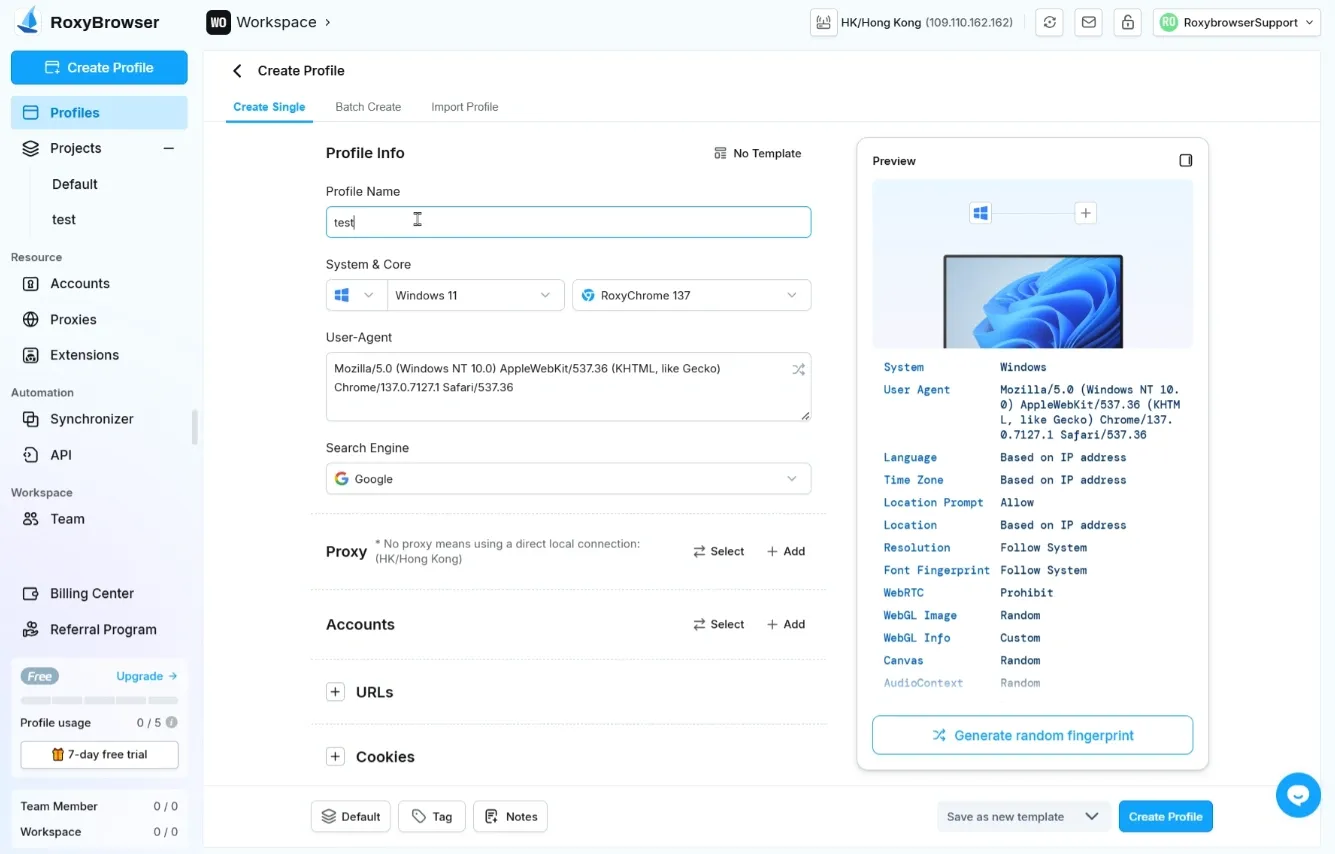
The RoxyBrowser profile creation guide documents the following workflow:
- Select Create Profile and enter a descriptive profile name.
- Choose a suitable browser configuration. Retain defaults unless your workflow requires a specific change.
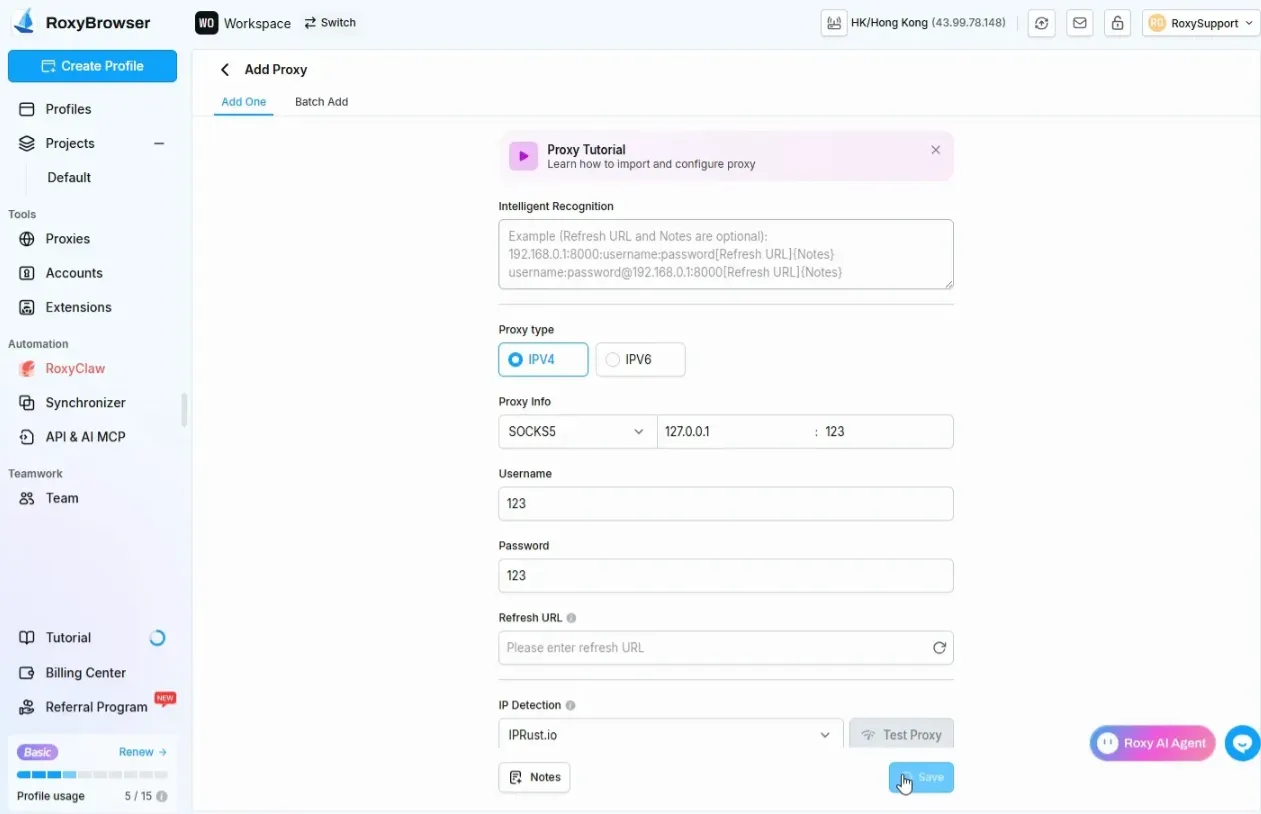
- Under Proxy, select Add, or choose an existing saved proxy.
- Enter the connection details supplied by your provider.
| Field | What belongs here | Common mistake |
|---|---|---|
| Protocol | The endpoint's supported protocol, such as HTTP, HTTPS, or SOCKS5 | Selecting a protocol the endpoint does not support |
| Proxy host | The provider's hostname or IP address | Pasting a full website URL |
| Port | The provider's port number | Using a port from a different endpoint |
| Username and password | Credentials required by the endpoint | Omitting a country or session parameter embedded in the username |
| Country/session configuration | Provider-specific settings or endpoint options | Assuming the gateway hostname identifies the exit country |
For protocol selection, the HTTP vs SOCKS5 proxy guide provides a useful comparison. Choose the protocol your endpoint and client support; selecting SOCKS5 alone does not establish encryption or guarantee that every traffic type follows the proxy.
Choose proxy resources by exit-country accuracy, stability, authentication support, cost, and suitability for the task. Residential proxies, ISP proxies, mobile proxies, and datacenter proxies describe different network offerings; none guarantees that TikTok will accept a connection.
A static IP and a sticky session are also different. A sticky session can retain an exit for a provider-defined period, but expiration or network availability can change it. For recurring account work, understand that behavior before relying on the endpoint for session continuity.
Step 3: Test Connectivity and Exit Location
After adding the proxy, select Test Proxy. Roxy's proxy documentation describes the test and the available IP Detection channels.
Check connectivity first, then the detected exit IP and country. If the connection fails, review protocol, credentials, endpoint status, and any provider-side authentication requirements. If location information seems incorrect, compare another detection channel and check the provider's country configuration.
A successful test establishes connectivity to the test destination. It does not prove that TikTok will accept the IP, update your account region, or deliver videos to a particular audience.
Step 4: Review Regional Browser Settings
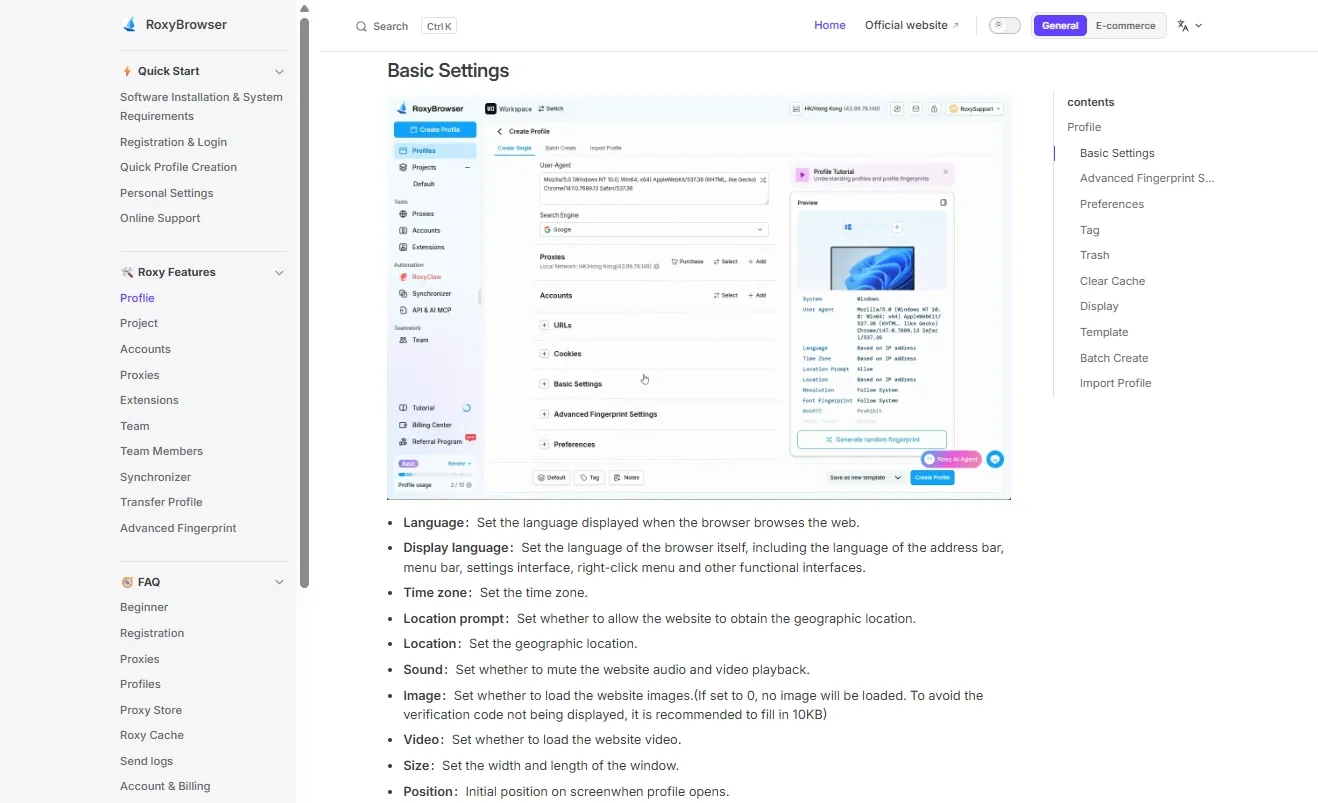
Roxy exposes Language, Display language, Time zone, Location prompt, and Location in the profile's basic settings. Its documentation recommends Auto-match based on IP for relevant regional settings unless you have a specific reason to customize them.
Review what each control does:
- Language affects language preferences used when browsing websites. Display language controls the browser interface.
- Time zone controls the zone exposed by the browser environment. For a UK workflow,
Europe/Londonaccounts for seasonal clock changes; a fixed UTC offset does not describe the whole year. - Location prompt controls access to browser geolocation. Location concerns the coordinates supplied by that browser environment when access is permitted.
The web's Geolocation API is a permission-controlled mechanism separate from IP geolocation. Changing browser coordinates does not change a phone's GPS. Denying a location request also does not prevent a website from seeing the IP used to connect.
Browser fingerprint consistency means that exposed characteristics make sense together. It does not mean every person in a country must use the same language. Rendering characteristics used in canvas fingerprinting are a separate technical layer from an IP's location. Retain reasonable defaults for Canvas, WebGL, and other advanced settings rather than changing unrelated parameters to solve a location problem.
Step 5: Open the Profile and Verify from Inside It
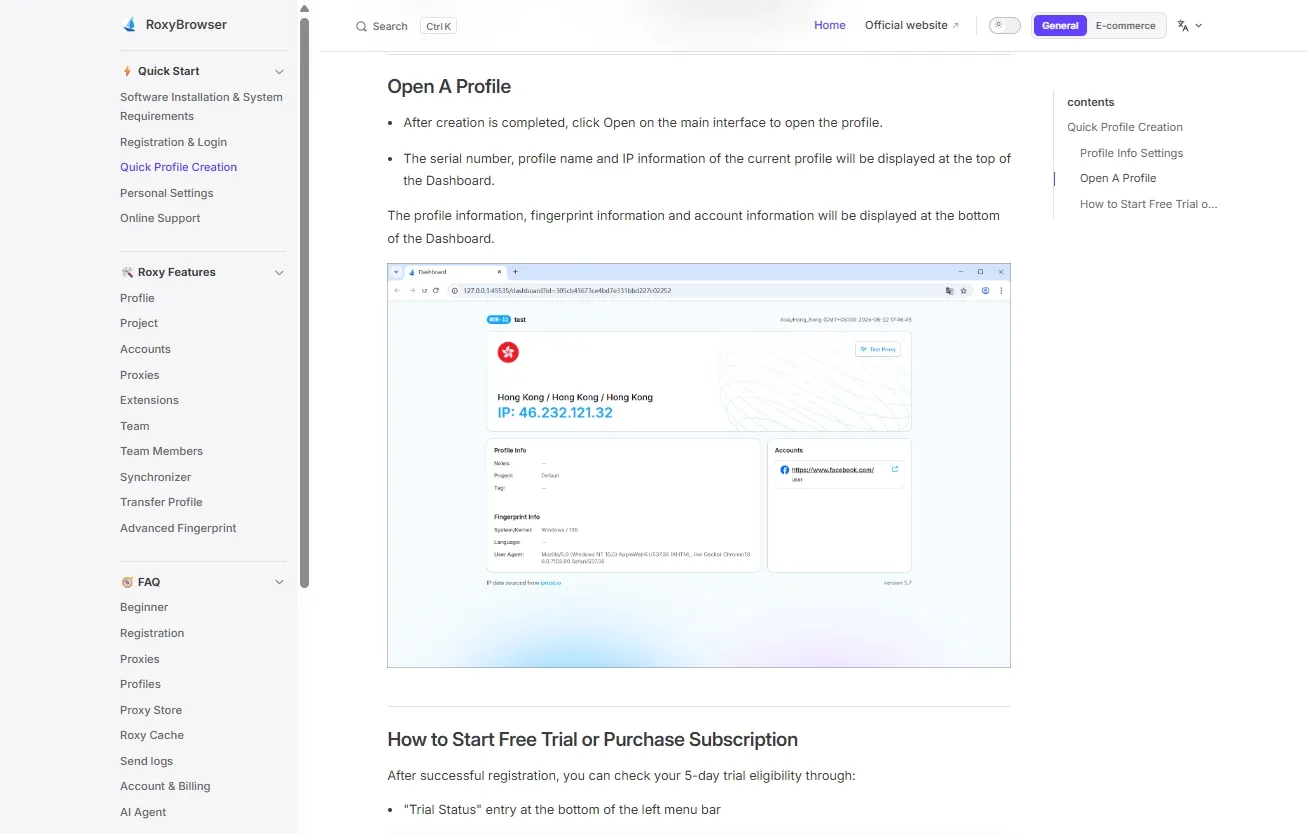
Select Create profile, then Open. The Dashboard displays the profile name and IP information. Before signing in to TikTok, open an IP-location checker inside that same profile and compare the result with the intended country.
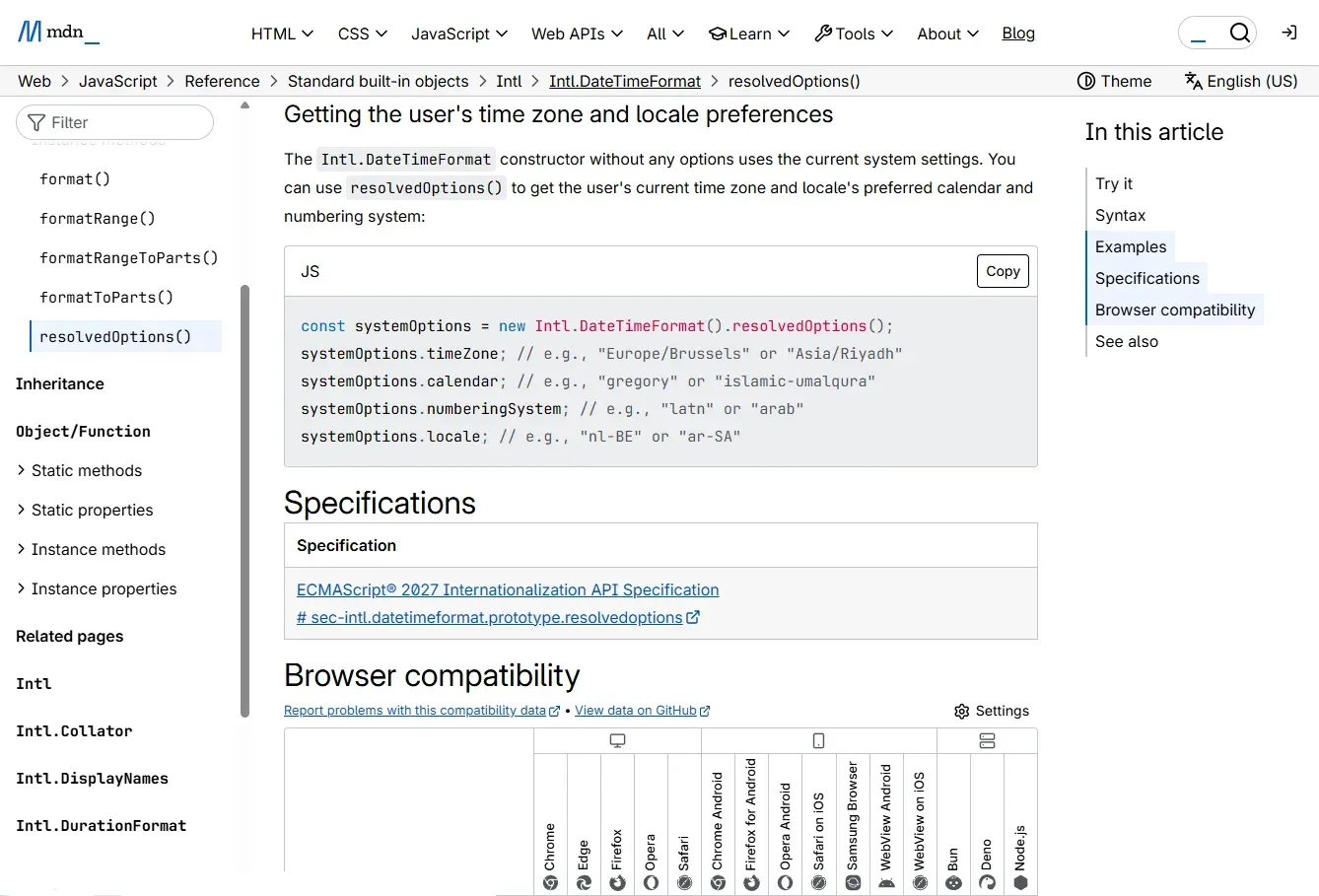
For a technical check of the browser's time zone, Intl.DateTimeFormat().resolvedOptions().timeZone returns the runtime's time-zone identifier. MDN documents this property. It can help confirm a setting, but it does not reveal how TikTok classifies the account.
If you investigate a possible WebRTC IP leak, review whether a diagnostic actually exposes an unexpected public address. A local address or an mDNS hostname is not, by itself, proof that your public IP leaked. An ordinary IP lookup also does not test every WebRTC or DNS route.
Once the profile's connection and settings are correct, open TikTok and complete its normal sign-in flow. An IP test in your regular browser would verify that other browser, not the Roxy profile.
Step 6: Preserve the Working Environment
Reuse the profile for subsequent work and retain the session data you need. Repeatedly clearing cookies, switching endpoints, or randomizing settings makes troubleshooting harder because several variables change at once.
Roxy's profile settings documentation describes synchronization, cache controls, and IP/Network Change Settings. The latter can prevent a profile from opening after a detected network, IP, or region change. That documented startup behavior should not be treated as a continuous VPN kill switch.
Editing a saved proxy can affect every profile bound to it. Before changing an endpoint for one client, check whether other profiles use the same proxy record.
Profile isolation helps keep account sessions organized. It cannot prevent a platform from associating accounts through information you provide or other signals, and it does not guarantee immunity from restrictions.
Check Whether the Intended Change Worked
Verify each result at the layer where you made the change. This avoids mistaking a working proxy for an account migration or treating a personalized feed as a country-wide trend report.
| Layer | Evidence to inspect | What the result does not prove |
|---|---|---|
| Network | Exit IP and country checked inside the profile | TikTok account region or program eligibility |
| Browser | Time zone, language, and location-permission settings | A real phone's GPS, SIM, or native-app environment |
| Account | Saved account-region field, where available | Immediate changes to every recommendation |
| Recommendations | Content across ordinary viewing sessions | A permanent region change or representative national sample |
| Audience | Available video or account analytics over a stated period | That an IP change caused the audience distribution |
For example, a London exit IP alongside an unchanged account-region field means the network check succeeded while the account setting stayed the same. That is not necessarily a proxy failure.
Keep a short record of the profile, date, intended change, and observed result. Change one variable at a time during diagnosis. IP databases can disagree, particularly about cities, so a city-level difference deserves investigation rather than an immediate conclusion that the connection is wrong.
Change a Video's Location Tag or Reach a Regional Audience
A location tag labels a post; audience targeting determines who you try to reach. Neither is an automatic consequence of a regional IP address.
Add a Place to a Video
When creating or uploading a video, look for Add location on the posting screen. If available, choose a relevant place and review the label before publishing. A restaurant video tagged with its London location provides useful context, but the label does not guarantee distribution only to London viewers.
Editing options for an existing post may differ from those offered before publishing. A missing location field can also reflect feature availability rather than a network problem.
Separate Organic Reach from Paid Targeting
For organic content, focus on language, topics, audience context, and performance data. A UK recipe account still needs relevant recipes and presentation; a UK IP cannot substitute for those choices.
For paid campaigns, review location targeting at the ad-group level in TikTok Ads Manager. Available destinations depend on the advertising account and campaign. Browser profiles can organize access to authorized accounts, but they do not change an advertiser's eligibility or unlock a destination that the campaign does not offer.
Why Your TikTok Location Is Not Changing
The most useful next step is to identify which result failed. Repeating every method can disrupt a working session without addressing the actual problem.
| Symptom | Likely area to investigate | Next action |
|---|---|---|
| Account region is missing | App version or feature availability | Review account settings and the supported account-help flow |
| TikTok rejects a region change | The requirement stated in its message | Resolve that requirement rather than changing IPs repeatedly |
| Test Proxy fails | Protocol, host, port, authentication, expiration | Correct connection details and retest |
| The checker shows another country | Selected endpoint, active profile, or IP database | Check from the same profile and compare a second detection channel |
| The IP changed but account region did not | Only the network layer changed | Use the eligible account-region process |
| The IP changed but the feed looks familiar | Recommendation history and preferences | Work through content preferences and relevant viewing activity |
| Desktop changes have no effect on the phone app | Separate devices and routing | Check the phone's own connection if that is the intended target |
| New login challenges appear | Recent changes to network or session context | Complete normal verification and avoid additional unrelated changes |
Clearing cache is an application troubleshooting step, not an account-region reset. It can help with loading problems, but it does not erase all server-side recommendation history. Temporary cache, cookies, app storage, and local drafts are different data categories.
Before clearing data or reinstalling, check what the action removes and preserve any drafts you need. In RoxyBrowser, the documented Clear all cache option includes cookies and invalidates related login sessions; it is different from options that only clear local cache.
Conclusion
To change TikTok location effectively, match the method to the result you need. Use account settings for an eligible region change, content preferences for more relevant recommendations, and a VPN or proxy for the connection's IP location. Verify each result separately before making further changes.
For recurring desktop work, RoxyBrowser keeps an authorized account's browser profile, proxy configuration, and session together. Start with one profile, test the endpoint, review regional browser settings, and preserve the working environment. This creates a repeatable account-management workflow while leaving account eligibility and audience distribution to TikTok's own systems.