Can I Have Two Instagram Accounts? How to Set Up and Manage Multiple Accounts
Can I have two Instagram accounts? Yes. Learn how to create a second account, switch profiles on one phone, and manage recovery and privacy settings.

TL;DR: Yes, you can use two Instagram accounts on one phone. Open the account menu to create a new account or add an existing one, then switch by username. Each profile has its own posts, followers, and inbox. Review recovery details, Accounts Center connections, and privacy settings separately. Instagram's native tools handle ordinary personal use; separate browser profiles help organize authorized client work.
Yes, you can have two Instagram accounts and use both on the same phone. A second account gives you a separate username, profile, inbox, and audience, whether you are keeping family photos apart from business updates or building a page for a different interest.
The setup is straightforward. The decisions that deserve more attention are how the accounts log in, which recovery details they use, and whether you want connected experiences through Meta's Accounts Center. Separate profiles do not necessarily mean separate recommendations or complete privacy from people you know.
This guide covers account creation, switching, contact details, discoverability, and the point where a dedicated browser workspace becomes useful for client or team accounts.
Quick Answer: Can You Have Two Instagram Accounts?
Yes. Instagram supports creating and switching between multiple accounts. You do not need another phone or a business account to keep two profiles.
A common example is a personal profile alongside a public page for a bakery. The bakery can have its own bio, messages, and content without changing the personal profile into a business presence.
App-switching capacity, account ownership, and recovery details are separate questions. An app's limit on signed-in accounts does not establish a lifetime cap on account ownership or determine whether an email address can be reused. For two accounts, the practical setup is to add both usernames to the account list and confirm that you can switch between them.
What to Know Before Creating a Second Account
Your second account will have its own public identity. It can use a different username, profile picture, bio, and privacy setting. For example, a photographer might keep a private family account and a public portfolio under a studio name.
Before signup, it helps to decide how independently each account should operate:
| Decision | What it affects | Practical example |
|---|---|---|
| Username and profile details | Public identity and recognition | A studio username separates portfolio posts from family updates. |
| Recovery email and phone | Password resets and account verification | A business-controlled inbox keeps recovery accessible when staff change. |
| Login connections | Whether one account can help access another | Independent credentials simplify a future client handoff. |
| Accounts Center settings | Available connected experiences | Cross-posting can be enabled or left off where supported. |
| Contacts and suggestions | How easily people may discover the profile | Contact syncing deserves attention when audiences should stay distinct. |
Accounts Center is a settings hub, not an account merger. Connecting accounts does not combine their usernames, followers, or inboxes. It can enable connected experiences, including cross-posting, profile-information syncing, or login features, depending on the accounts and options available.
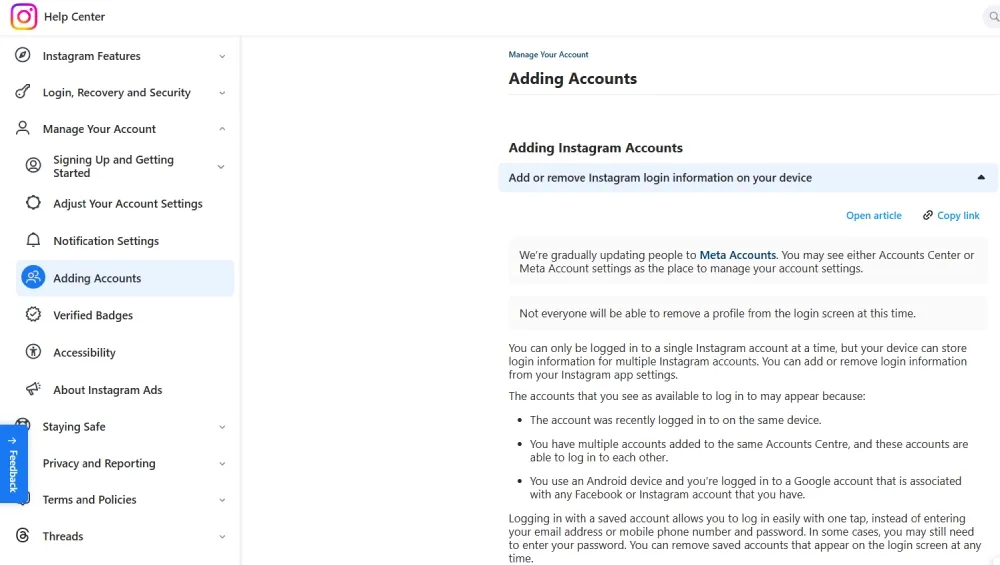
You can review those choices under Profile > Menu > Accounts Center. An account appearing in the app switcher is not, by itself, proof that every connected experience is enabled. For instance, having both profiles available does not mean a post should automatically publish to both.
For a broader team-oriented view of Instagram profile organization, the Instagram account management guide covers multi-profile workflows beyond basic phone switching.
How to Create a Second Instagram Account
You can create a new account, add an existing one, or register through a computer. Before starting, make sure you can access the email address or phone number used for verification. Adding an existing account may also require its password and two-factor authentication method.
Menu labels can vary by app version, device, and region. The account list is the starting point on both iPhone and Android.
Create a New Account in the Instagram App
- Open your current profile and tap the username at the top to open the account list. On some versions, pressing and holding the profile icon also opens it.
- Select Add account to display the sign-in and creation options.
- Choose Create new account and enter an available username.
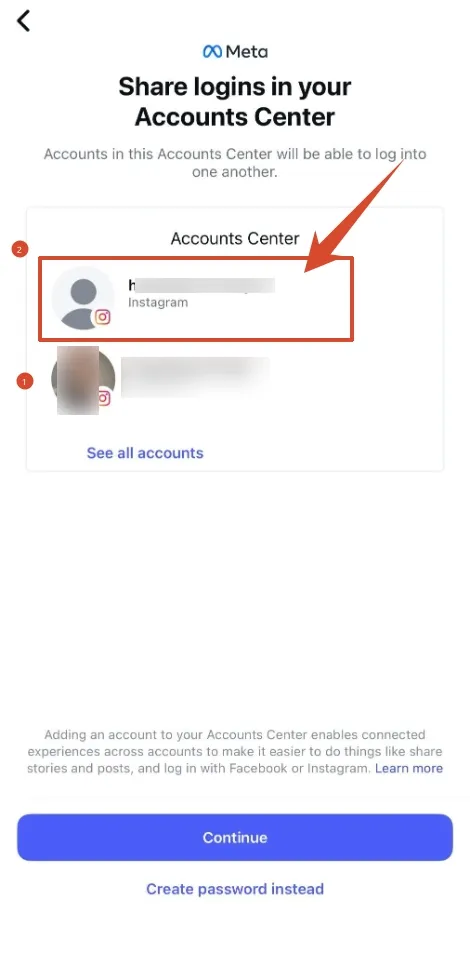
- Review any offered Accounts Center connection or shared-login option. Use independent credentials when a client or business needs separate access.
- Complete the requested registration details and any email or phone verification.
- Return to the account list, select the new username, and confirm that you have opened the intended profile. Review its privacy and recovery settings.
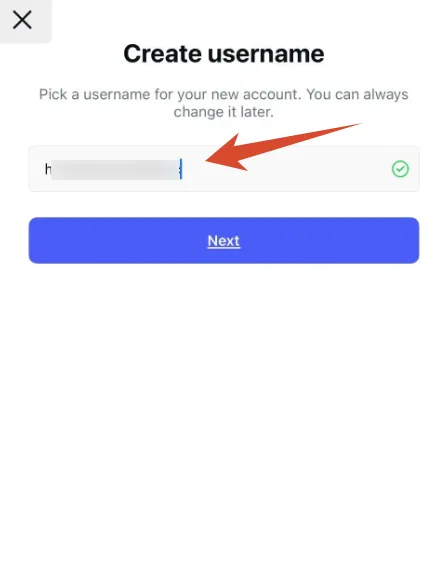
For a personal hobby account, a connected login may be convenient. For a client account that another organization owns, separate recovery access is usually easier to maintain through a staffing change.
Add an Existing Instagram Account
An existing profile does not need to be registered again. From the account list, Add account > Log into existing account opens the sign-in flow. The account's username and password identify the profile you want to add.
Instagram may request two-factor authentication, an email code, or confirmation from another signed-in device. Completing the prompt is part of authentication; creating a duplicate account will not resolve access to the original one.
Once both usernames appear, you can switch between them. A shop owner adding an established store account, for example, should see the store's existing posts and followers after login. An empty profile with a similar name suggests the wrong account was selected.
Create an Account on a Computer
Instagram's website offers a Sign up option when you are signed out. Registration asks for the details shown on the signup screen, including a unique username and an accepted contact method.
If your browser is already logged in, you can use the website's account-switching or add-account option when available. Otherwise, another browser profile provides a separate place to complete signup without disturbing your existing session.
After registration, the new credentials can be used in the mobile app. Creating the account on a computer does not make it a different account type or require you to manage it only from that computer.
Can You Have Two Instagram Accounts on the Same Phone?
Yes. The Instagram app can keep multiple accounts available on one device. A second phone is unnecessary for ordinary personal and business use.
Open the native account list, select the other username, and continue in that profile. Adding an existing account preserves its posts and followers; it does not create a duplicate profile.
Some Android devices also offer app-cloning features. These create another app instance and may have different notification, storage, and backup behavior. They are separate from Instagram's own account switcher, and they are not required to use two profiles.
The more immediate risk is a publishing mistake. A distinct profile image helps, but the username is the better final check. For example, before replying to a customer, you can verify the shop's handle in the inbox; before publishing a Story, you can confirm the account and any enabled cross-posting destination.
Can Two Instagram Accounts Use the Same Email or Phone Number?
Contact details support signup, verification, and recovery. They do not replace the unique username that identifies each account.
Email Address
Using two accounts on one phone does not require them to share an email address. If you want to reuse an address, the signup flow must accept it. Each profile still needs a unique username, which also helps identify the intended account at login.
If registration rejects an address as already in use, use another email address you control. For a business account, a business-controlled inbox keeps recovery access available when employees or contractors change.
Phone Number
A phone number already used for one account may be rejected when registering another. Using two accounts on one phone does not require sharing the same recovery number.
If that happens, you can use an accessible email address or another phone number you control, where the signup flow permits it. A temporary number creates a recovery problem: the next person assigned that number may receive a code intended for you.
Login and Recovery Details
Separate passwords make sense when accounts need independent access. A client account and an employee's personal account, for example, should not depend on the employee remaining available to approve every login.
Under Accounts Center > Password and security, you can review password, login, and two-factor authentication settings for the relevant account. Contact information is generally available under Accounts Center > Personal details > Contact info. The account selected on each screen matters, especially when several profiles share the same settings hub.
How to Switch Between Instagram Accounts
You can open the profile account list and select the username you want to use. Both accounts remain separate profiles even when switching takes only a tap.
Before posting, commenting, or replying, a brief check of the active handle helps prevent mistakes. This is particularly useful when two clients use similar logos or when a personal account was the last profile opened.
If switching does not work as expected, these checks address common causes:
| Problem | What you can check |
|---|---|
| An account is missing from the list | It may need to be added again through Add account > Log into existing account. |
| Instagram requests a password repeatedly | Login activity, security prompts, and recent password changes may explain why the session is no longer accepted. |
| A verification code does not arrive | The destination shown on the screen can reveal an outdated email address or phone number. |
| Notifications are difficult to distinguish | Per-account notification settings and the username shown in an alert can help identify the destination. |
| A particular option is absent | App updates and differences between mobile and web interfaces may account for the missing menu. |
Notification preferences deserve attention on each profile. You might want customer-message alerts for a store while reducing live-video notifications on a hobby account. A notification can also open a different profile from the one you last used, so checking the destination is useful before replying.
Are Two Instagram Accounts Linked or Shown to the Same People?
A shared login connection and public discoverability are different things. Accounts Center controls connected experiences; recommendations determine whether Instagram suggests a profile to other people.
Instagram does not display a public list of every account you own simply because you switch between them. However, a second profile can still become recognizable through its name, photo, bio, shared contacts, linked profiles, or interactions.
For example, an otherwise separate hobby account can become easy to identify if it uses your personal portrait, follows your coworkers, and links to your main profile. Those visible connections matter even before considering recommendation systems.
Privacy controls can reduce some discovery routes:
- Contact syncing: Accounts Center commonly places this under Your information and permissions > Upload contacts. Disabling future syncing and deleting previously uploaded contacts are separate actions.
- Device permissions: Your phone's settings can restrict Instagram's access to contacts.
- Account suggestions: On the website, Edit profile may include Show account suggestions on profiles. This controls a particular suggestion feature, rather than every recommendation surface.
- Profile visibility: A private account limits who can see posts after approval, while parts of the profile remain visible.
- Connected experiences: Cross-posting and profile-information syncing deserve a review if your audiences should remain distinct.
Instagram's profile-suggestion instructions explain the relevant web setting. These controls reduce specific discovery routes; a second account can still appear in recommendations.
Risks and Misconceptions About Multiple Instagram Accounts
Having more than one account is not, by itself, evidence of a policy violation. Neither is ordinary switching through Instagram's account menu.
The distinction is what the accounts do. A designer maintaining a personal page and a studio portfolio is different from a set of profiles sending identical unsolicited messages or manufacturing engagement for one another.
Account switching is not a safety threshold. The number of daily switches alone cannot establish whether an account complies with Instagram's rules. Likewise, a reach decline does not establish that normal switching caused a "shadowban." Content performance, recommendation eligibility, and enforcement are different issues.
Instagram's Account Status can show certain removed content, feature restrictions, and recommendation-eligibility information, depending on the account. That is a more useful starting point than assuming every change in reach has the same cause.
Device fingerprinting refers to identifying a browser or device through combinations of observable characteristics, such as browser properties, display settings, and rendering behavior. MDN's fingerprinting definition explains this general browser mechanism.
A shared home or office IP address also does not prove that every account has the same owner. Enforcement is case-specific. A restriction affecting one profile should not be described as automatically suspending every account on the same device or network.
Managing Multiple Instagram Accounts at Scale
Two personal accounts and a roster of client accounts create different operational needs. For teams handling social media management, the practical questions are who needs access, which workspace each person should open, and how mistakes are prevented during handoffs.
When Instagram's Native Tools Are Enough
For a personal account and a small business page, Instagram's app is often sufficient. Both profiles can remain accessible without a separate browser product or proxy subscription.
Meta business tools may also suit eligible professional accounts that need assigned access, publishing, or inbox management. A small retail team, for example, may find that its main need is permission to answer customer messages rather than another way to store account passwords.
App-switching capacity remains an interface limit. It is not a reason to assume that every additional business identity requires another phone.
When a Dedicated Multi-Account Browser Workflow Helps
Profile isolation gives each account a separate browser workspace with its own session and storage. A dedicated workflow to manage multiple accounts becomes useful when different clients, brands, or staff assignments need clearly named environments and controlled access.
Two ordinary tabs in one browser profile normally share the site's cookies and persistent storage, including localStorage and IndexedDB. The cookie logging and social-account guide explains why these stored session details matter when several profiles use the same browser environment. Separate browser profiles keep these stores in distinct workspaces, helping preserve each account's login session and site preferences. For example, opening Client A's workspace should bring you to Client A's saved session rather than whichever client last used the shared browser.
A proxy serves a different purpose: it routes traffic through another network endpoint. It does not separate cookies or grant permission to access an account. Residential proxies are optional network services, not a requirement for keeping two Instagram accounts.
Browser characteristics are another layer: changing a User-Agent string alone does not separate sessions or account identities. Canvas fingerprinting uses differences in rendered images or text as browser signals; WebGL metadata can expose graphics renderer information. Browser fingerprint protection addresses these observable characteristics beyond cookies.
How RoxyBrowser Supports Instagram Account Management
RoxyBrowser organizes account work in saved browser profiles. For an agency, the practical benefit is having a named environment for each client, with its own saved session and configuration.
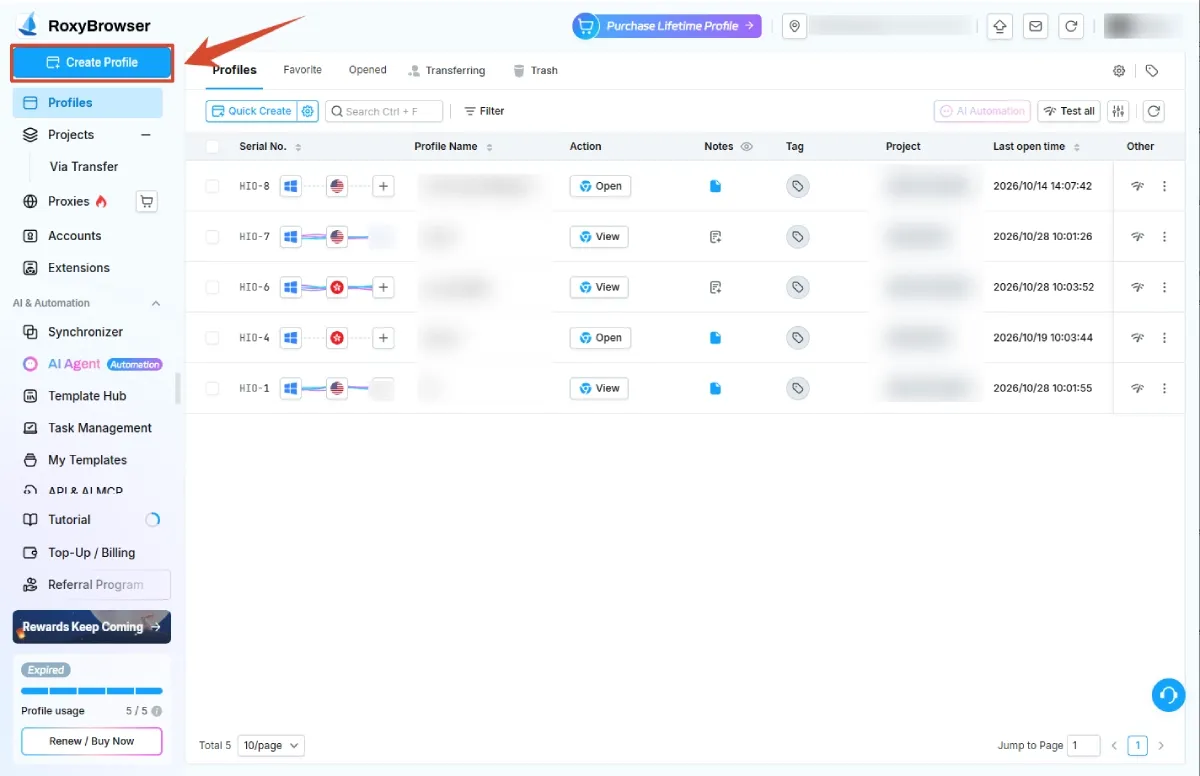
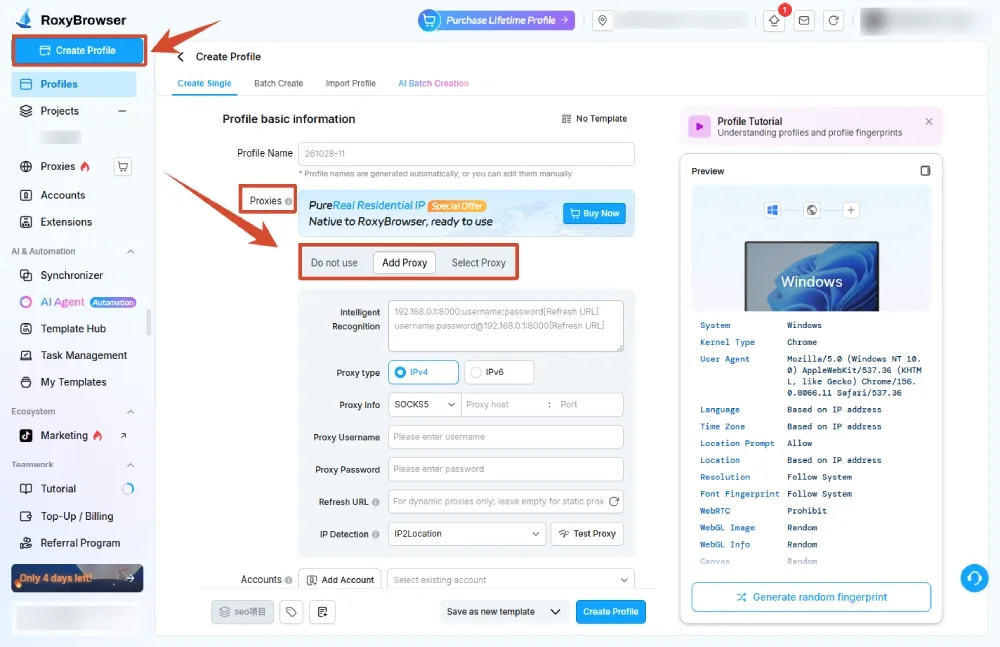
A typical setup follows the product's profile-creation workflow:
- Create Profile opens the configuration screen. A name such as
Client-A-Instagrammakes the destination recognizable. - Choose the operating system and browser engine under System & Core, shown as System and Kernel in the help text. Keep the default configuration unless the workflow requires a specific setting.
- Proxy > Add accepts the proxy type, host, port, and credentials when a proxy is needed. No proxy remains an available choice.
- Accounts > Add identifies the platform; the URLs section, called Custom URLs in the help text, sets starting pages. Optional stored account details should follow the organization's access policy.
- The profile's project, tags, and notes help keep client work organized. After Create profile, Open launches the saved workspace.
The product also provides project-based team access. Under Team Members > Invite, an administrator can enter a teammate's email, select a project, and assign an available role. The documented roles include Owner, Manager, Editor, and Viewer, with different permissions. A Viewer can open assigned profiles, while an Editor can modify profile content within the permitted project.
For a client handoff, assign a role that matches the teammate's tasks: opening a workspace and editing its configuration require different permissions.
RoxyBrowser's Chrome-based and Firefox-based environments provide browser fingerprint configuration alongside separate profile storage.
If client handoffs and session mix-ups are recurring problems, evaluate the browser workflow against those requirements. For two personal profiles, Instagram's native switcher is usually the more direct starting point.
Best Practices for Running Two or More Accounts
Good account management begins with clear ownership and secure access. The same principles apply whether you use Instagram's app or separate browser profiles.
- A distinct purpose for each account: A studio portfolio and a personal photography page can have different content plans, even when one person owns both.
- Unique passwords and two-factor authentication: A password manager and securely stored backup codes help keep a lost phone from becoming a complete recovery failure.
- Accessible recovery details: Business-controlled contact information makes staffing changes easier to handle.
- Limited access: Trusted staff should have the permissions needed for their work. Connected apps and login sessions deserve review when a contractor leaves.
- Policy-compliant activity: Unsolicited mass messages, deceptive identities, and artificial engagement create problems that additional profiles cannot resolve.
- An account check before publishing: The username, intended audience, and any cross-posting settings help confirm the destination.
Using one account to manufacture likes or comments for another adds little to a content strategy and can violate platform rules. A second profile works better when it serves a real audience with a clear reason to follow it.
Conclusion
The answer to "Can I have two Instagram accounts?" is yes. The simplest path is the app's account menu: a new profile can be created there, or an existing account can be added without rebuilding its content or audience.
Two profiles become easier to manage when each has a clear purpose, reliable recovery details, and an identifiable workspace. Instagram's native switcher handles ordinary personal use; dedicated browser profiles become relevant when client ownership, staff access, and repeated handoffs need more structure. A check of the active username remains useful in either workflow.